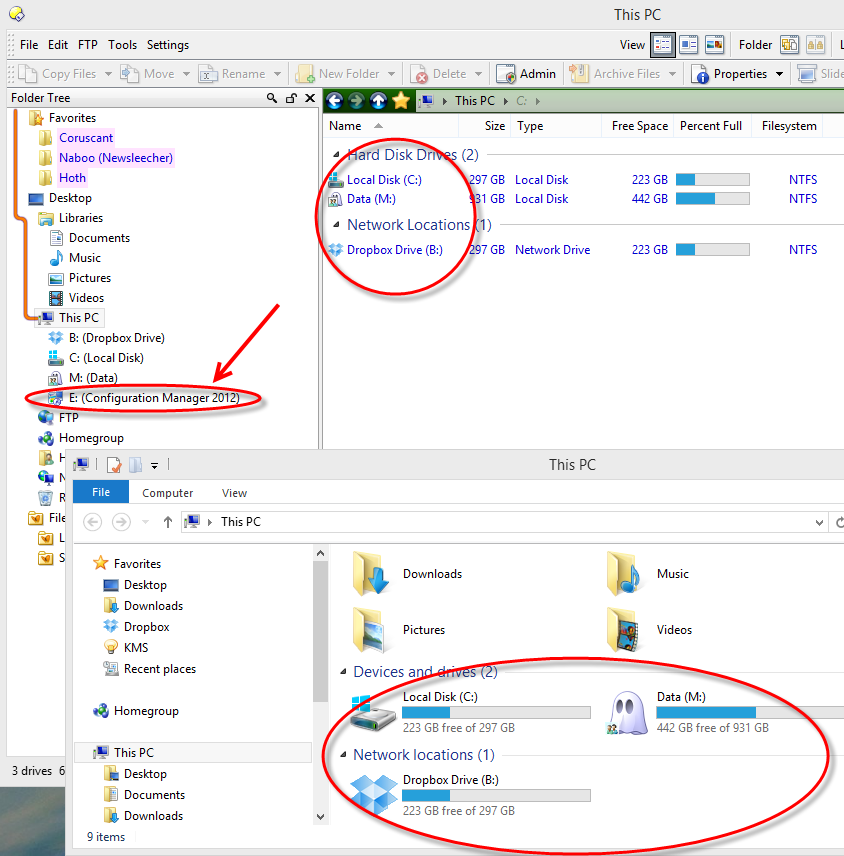
I inserted an 8GB flash drive for the first time since installing Directory Opus -- it read the files okay, but when I was done, I right-clicked and selected 'eject' like I would do in Windows, I got the standard 'safe to remove' message on my taskbar but the drive icon in Directory Opus doesn't disappear. Worse, if I select it, I get an error windows asking me to 'Rety' or 'Abort'.
Is this normal behavior? Maybe there's something I'm supposed to configure to get the drive icon to disappear once ejected?
Ok, I realize now that the folder tree just doesn't seem to automatically refresh. I can force it with F5 but that does get a bit annoying. is there a way to get folder tree to refresh the way it would in windows explorer?
It's not normal behaviour, but does happen with some devices which don't send media insert/eject events correctly (which is sadly a reasonably large minority of devices).
I have a very similar problem. If I remove the USB drive the folder tree in Dopus does not get refreshed in many cases. It happens with a lot of USB devices. F5 does not help. Closing all DOpus listers and re-open a new lister helps.
Clicking on the Computer folder and pushing F5 in Opus will force it to re-check if drives are empty or not, in case the media change notification wasn't received.
Sometimes just visiting the Computer folder in Explorer will also make Windows itself detect the change and send the missing notification, updating Opus as well. But that depends on the cause of the problem. (I've seen that with my DVD drive, which is known to have issues with not sending insert/eject notifications.)
I have downgraded to version 10.5.2.0 and find that opus handles removable drives much better. Now they disappear promptly when removed, no need to click computer and hit F5 or close and reopen listers. I think they broke it when they changed the way empty drives are detected in later versions.