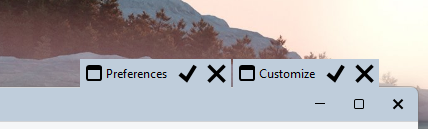
There is a small visual glitch when both the "Customize" and "Preferences" mini-toolbars are shown while the option "Move top-row toolbars into window title bar" is enabled. The four phases of this glitch are demonstrated in order in the GIF below.
Initial State (No Space): When Customize mode is triggered first and then Preferences is opened (for example, via the Prefs command), there is initially no vertical space between the two mini-toolbars when the lister is unfocused.
Focus/Unfocus Behavior: Clicking the lister to bring it into focus causes a faint border to appear between the toolbars. Clicking another window to take the lister out of focus makes this border disappear.
Desktop Toggle (White Border): Toggling the desktop (by pressing Windows Key + D or clicking the "Show Desktop" line at the far-right edge of the taskbar next to the clock) turns this border white.
Maximize/Restore Toggle (Black Border): Maximizing and then restoring the window turns the border black.
Alternative Trigger Order: When Preferences is opened first and then Customize, a different border appears between them regardless of whether the window is in focus or not. However, points 3 and 4 mentioned above still behave exactly the same way.
Yes, it happens only when Move top-row toolbars into the window title bar is turned on.
When that option is turned off (i.e., the Title Bar is enabled), there is consistently a white space in Light mode (or a black space in Dark mode) between the mini-toolbars. This happens in all scenarios, regardless of which mini-toolbar was activated first. Additionally, they sit in the title bar when the lister window is restored (not maximized).
Sorry, I previously over-cropped the GIFs to provide a close-up of the glitch, as it's otherwise hard to notice.