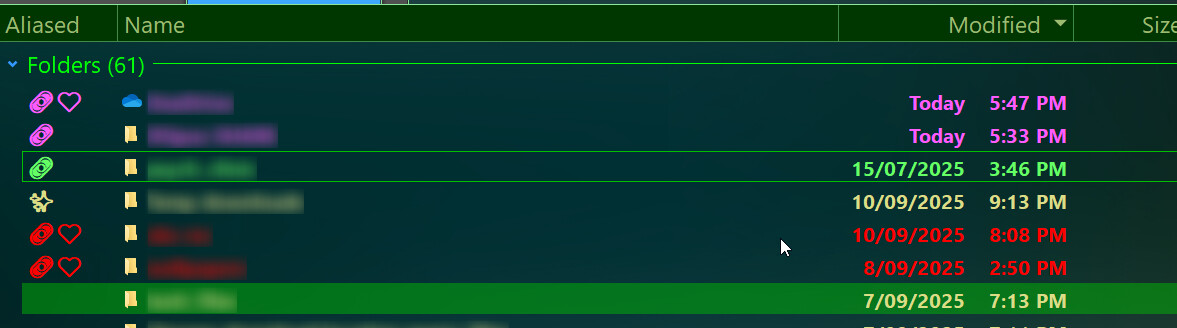
I wanted a quick way to see which files and folders have been aliased, favorited, or smart-favorited, to improve organization. For example, knowing which folders are aliased makes it easy to return to them using GoScripts.
To achieve this, I settled on a script column with a button that toggles the column on and off.
<?xml version="1.0"?>
<button backcol="none" display="label" hotkey="shift+A" separate="yes" textcol="none">
<label>Toggle Alias</label>
<icon1>#newcommand</icon1>
<function type="normal">
<instruction>Set COLUMNSTOGGLE="scp:AliasHighlighter/Aliased(0)"</instruction>
</function>
</button>
Version History
V1.0 – 21/09/25
- Initial release:
- Alias_Highlighter.opusscriptinstall (1.9 KB)
V1.1 – 06/11/25
- Updated script to allow toggling any of the three options on/off (e.g., smart favorites can be hidden if desired).
- Alias_Highlighter.opusscriptinstall (2.0 KB)
V1.3 – Latest Update
- Upgraded based on advice from @PassThePeas: the script now reads DOpus.aliases, DOpus.favorites, and DOpus.smartfavorites directly from the API.
Added new commands:
- Alias.AddSelected – Add alias for selected folder(s)
- Alias.RemoveSelected – Remove alias(es) pointing to selection
- Favorite.AddSelected – Add selected file/folder as favorite
- Favorite.RemoveSelected – Remove selected favorite(s)
- Alias_Highlighter.opusscriptinstall (2.5 KB)

