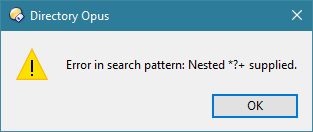
What is wrong with this regex? (Nested *?+ supplied)

The rename script preview shows 'no errors' and in preview files are renamed correctly.
At [Apply] I get the above 'Nested' error.

Part of the script (example)

Dim re9
        Set re9 = new RegExp
        re9.IgnoreCase = True
        re9.Pattern ="(.+)\s(\d)((\s*|-)?(September|Sep))(\s|-)?(20(0|1|2))(\d)(.+)(\.\w{2,4})"

For example it should rename:
1-september-2010
1sep2010
1-sep-2010
1 september 2010
to 01092010
using "$1 0$209$7$9$10$11"

still need to adjust the regex slightly, but the 'Nested' problem needs to be solved first.

Any suggestions?

Thanks!
(oh, fwiw: Mode: regular expressions find and replace, 'Old name' and 'New name' boxes read: *)

Could you share to whole script to help trying and reproduce?
Otherwise, at first glance, the regexp seems a bit complicated with unnecessary nested capture groups.
Example: (\s*|-) in ((\s*|-)?(September|Sep)) does not have to be captured (which is whyt $3 is not used in the output expression), and ((\s*|-)?(September|Sep)) could be replaced by \s*[-]?(September|Sep)

You need to use code blocks or things like regex won’t appear properly on the forum.

Click the link above the post editor for more detailed instructions. (Unless on mobile, where it’s hidden.)

@Leo, updated post.
@PassThePeas: will get back soonest, let me check.

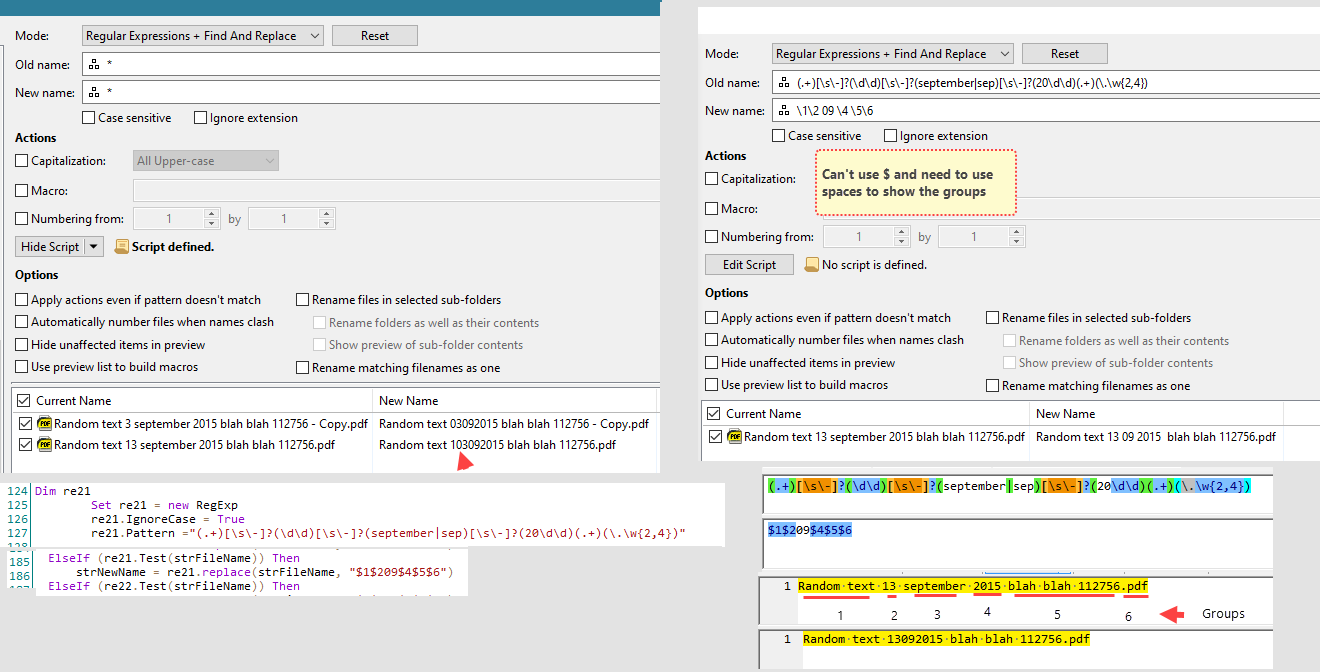
Took a while - busy puzzling on the following issue (best explained with a screenshot)

I use a regex tester, right hand bottom corner on the screenshot, the regex and the replace.
Marked the groups.

Top you see a single regex find and replace. I need to make use of \ character.
Added spaces so as to mark the groups. (can't use the $ character)

Left is same thing but in a script.
In case the day is a single digit (3 september) then the results are okay
In case of a double digit a 0 is added: 13 september 2015 > 103092015

Am very far from being an expert, so I have no idea how to fix this, or better: i can't find the error...

any idea?

Thanks again.

Can't do with just bits and pieces.
Share your script if you want me to look into it.

Probably found the 'problem'. That is to say, I can't explain it...

There were 24 entries,
First part: 12 months with just a single digit day
Second part 12 months with double digit days

I wondered, what happens if I remove the first part (single digit day renames)
The rename went fine, no extra '0'.

So I swapped the renames, i.e. double digit day first, then the single digit day last.

Beats me, it works...
(later: Except, nested error...)

..later again no such error when the rename preset is run from a toolbar button. funny.

FWIW the script code - ignore the 'Re'-numbering
I am sure it can be very much improved: as said, I am not expert, am happy I got it going in the end.

Option Explicit

Function Rename_GetNewName ( strFileName, strFilePath, _
             fIsFolder, strOldName, ByRef strNewName )

' 15-05-2025 script Date script-Full Dates anywhere to ddmmyyyy
'
'double digit day
're.replace 31 december 2001 to 31122001

Dim re13
        Set re13 = new RegExp
        re13.IgnoreCase = True
        re13.Pattern ="(.+)[\s\-]?(\d\d)[\s\-]?(Januari|Jan|January)[\s\-]?((20[012])\d)(.+)(\.\w{2,4})"

Dim re14
        Set re14 = new RegExp
        re14.IgnoreCase = True
        re14.Pattern ="(.+)[\s\-]?(\d\d)[\s\-]?(February|Feb|Februari)[\s\-]?((20[012])\d)(.+)(\.\w{2,4})"

Dim re15
        Set re15 = new RegExp
        re15.IgnoreCase = True
        re15.Pattern ="(.+)[\s\-]?(\d\d)[\s\-]?(March|Mrt|Maart)[\s\-]?((20[012])\d)(.+)(\.\w{2,4})"

Dim re16
        Set re16 = new RegExp
        re16.IgnoreCase = True
        re16.Pattern ="(.+)[\s\-]?(\d\d)[\s\-]?(April|Apr)[\s\-]?((20[012])\d)(.+)(\.\w{2,4})"

Dim re17
        Set re17 = new RegExp
        re17.IgnoreCase = True
        re17.Pattern ="(.+)[\s\-]?(\d\d)[\s\-]?(Mei|May)[\s\-]?(20\d\d)(.+)(\.\w{2,4})"

Dim re18
        Set re18 = new RegExp
        re18.IgnoreCase = True
        re18.Pattern ="(.+)[\s\-]?(\d\d)[\s\-]?(Juni|Jun|June)[\s\-]?((20[012])\d)(.+)(\.\w{2,4})"

Dim re19
        Set re19 = new RegExp
        re19.IgnoreCase = True
        re19.Pattern ="(.+)[\s\-]?(\d\d)[\s\-]?(Juli|jul|July)[\s\-]?((20[012])\d)(.+)(\.\w{2,4})"

Dim re20
        Set re20 = new RegExp
        re20.IgnoreCase = True
        re20.Pattern ="(.+)[\s\-]?(\d\d)[\s\-]?(Augustus|Aug|August)[\s\-]?((20[012])\d)(.+)(\.\w{2,4})"

Dim re21
        Set re21 = new RegExp
        re21.IgnoreCase = True
        re21.Pattern ="(.+)[\s\-]?(\d\d)[\s\-]?(September|Sep)[\s\-]?((20[012])\d)(.+)(\.\w{2,4})"

Dim re22
        Set re22 = new RegExp
        re22.IgnoreCase = True
        re22.Pattern ="(.+)[\s\-]?(\d\d)[\s\-]?(Oktober|Okt|October|Oct)[\s\-]?((20[012])\d)(.+)(\.\w{2,4})"

Dim re23
        Set re23 = new RegExp
        re23.IgnoreCase = True
        re23.Pattern ="(.+)[\s\-]?(\d\d)[\s\-]?(November|Nov)[\s\-]?((20[012])\d)(.+)(\.\w{2,4})"

Dim re24
        Set re24 = new RegExp
        re24.IgnoreCase = True
        re24.Pattern ="(.+)[\s\-]?(\d\d)[\s\-]?(December|Dec)[\s\-]?((20[012])\d)(.+)(\.\w{2,4})"
'
' single digit DAY 1 september 2010 into 01092010
'
Dim re1
        Set re1 = new RegExp
        re1.IgnoreCase = True
        re1.Pattern ="(.+)[\s\-]?(\d)[\s\-]?(Januari|Jan|January)[\s\-]?((20[012])\d)(.+)(\.\w{2,4})"

Dim re2
        Set re2 = new RegExp
        re2.IgnoreCase = True
        re2.Pattern ="(.+)[\s\-]?(\d)[\s\-]?(February|Feb|februari)[\s\-]?((20[012])\d)(.+)(\.\w{2,4})"

Dim re3
        Set re3 = new RegExp
        re3.IgnoreCase = True
        re3.Pattern ="(.+)[\s\-]?(\d)[\s\-]?(March|Mrt|Maart)[\s\-]?((20[012])\d)(.+)(\.\w{2,4})"

Dim re4
        Set re4= new RegExp
        re4.IgnoreCase = True
        re4.Pattern ="(.+)[\s\-]?(\d)[\s\-]?(April|Apr)[\s\-]?((20[012])\d)(.+)(\.\w{2,4})"

Dim re5
        Set re5 = new RegExp
        re5.IgnoreCase = True
        re5.Pattern ="(.+)[\s\-]?(\d)[\s\-]?(Mei|May)[\s\-]?((20[012])\d)(.+)(\.\w{2,4})"

Dim re6
        Set re6 = new RegExp
        re6.IgnoreCase = True
        re6.Pattern ="(.+)[\s\-]?(\d)[\s\-]?(Juni|Jun|June)[\s\-]?((20[012])\d)(.+)(\.\w{2,4})"

Dim re7
        Set re7 = new RegExp
        re7.IgnoreCase = True
        re7.Pattern ="(.+)[\s\-]?(\d)[\s\-]?(Juli|jul|July)[\s\-]?((20[012])\d)(.+)(\.\w{2,4})"

Dim re8
        Set re8 = new RegExp
        re8.IgnoreCase = True
        re8.Pattern ="(.+)[\s\-]?(\d)[\s\-]?(Augustus|Aug|August)[\s\-]?((20[012])\d)(.+)(\.\w{2,4})"

Dim re9
        Set re9 = new RegExp
        re9.IgnoreCase = True
        re9.Pattern ="(.+)[\s\-]?(\d)[\s\-]?(September|Sep)[\s\-]?((20[012])\d)(.+)(\.\w{2,4})"

Dim re10
        Set re10 = new RegExp
        re10.IgnoreCase = True
        re10.Pattern ="(.+)[\s\-]?(\d)[\s\-]?(Oktober|Okt|October|Oct)[\s\-]?((20[012])\d)(.+)(\.\w{2,4})"

Dim re11
        Set re11 = new RegExp
        re11.IgnoreCase = True
        re11.Pattern ="(.+)[\s\-]?(\d)[\s\-]?(November|Nov)[\s\-]?((20[012])\d)(.+)(\.\w{2,4})"

Dim re12
        Set re12 = new RegExp
        re12.IgnoreCase = True
        re12.Pattern ="(.+)[\s\-]?(\d)[\s\-]?(December|Dec)[\s\-]?((20[012])\d)(.+)(\.\w{2,4})"


        If (re13.Test(strFileName)) Then
           strNewName = re13.replace(strFileName, "$1$201$4$6$7")
       ElseIf (re14.Test(strFileName)) Then
           strNewName = re14.replace(strFileName, "$1$202$4$6$7")
       ElseIf (re15.Test(strFileName)) Then
           strNewName = re15.replace(strFileName, "$1$203$4$6$7")
       ElseIf (re16.Test(strFileName)) Then
           strNewName = re16.replace(strFileName, "$1$204$4$6$7")
       ElseIf (re17.Test(strFileName)) Then
           strNewName = re17.replace(strFileName, "$1$205$4$5$6")
       ElseIf (re18.Test(strFileName)) Then
           strNewName = re18.replace(strFileName, "$1$206$4$6$7")
       ElseIf (re19.Test(strFileName)) Then
           strNewName = re19.replace(strFileName, "$1$207$4$6$7")
       ElseIf (re20.Test(strFileName)) Then
           strNewName = re20.replace(strFileName, "$1$208$4$6$7")
       ElseIf (re21.Test(strFileName)) Then
           strNewName = re21.replace(strFileName, "$1$209$4$6$7")
       ElseIf (re22.Test(strFileName)) Then
           strNewName = re22.replace(strFileName, "$1$210$4$6$7")
       ElseIf (re23.Test(strFileName)) Then
           strNewName = re23.replace(strFileName, "$1$211$4$6$7")
       ElseIf (re24.Test(strFileName)) Then
           strNewName = re24.replace(strFileName, "$1$212$4$6$7")

	   Elseif (re1.Test(strFileName)) Then
           strNewName = re1.replace(strFileName, "$10$201$4$6$7")
       ElseIf (re2.Test(strFileName)) Then
           strNewName = re2.replace(strFileName, "$10$202$4$6$7")
       ElseIf (re3.Test(strFileName)) Then
           strNewName = re3.replace(strFileName, "$10$203$4$6$7")
       ElseIf (re4.Test(strFileName)) Then
           strNewName = re4.replace(strFileName, "$10$204$4$6$7")
       ElseIf (re5.Test(strFileName)) Then
           strNewName = re5.replace(strFileName, "$10$205$4$6$7")
       ElseIf (re6.Test(strFileName)) Then
           strNewName = re6.replace(strFileName, "$10$206$4$6$7")
       ElseIf (re7.Test(strFileName)) Then
           strNewName = re7.replace(strFileName, "$10$207$4$6$7")
       ElseIf (re8.Test(strFileName)) Then
           strNewName = re8.replace(strFileName, "$10$208$4$6$7")
       ElseIf (re9.Test(strFileName)) Then
           strNewName = re9.replace(strFileName, "$10$209$4$6$7")
       ElseIf (re10.Test(strFileName)) Then
           strNewName = re10.replace(strFileName, "$10$210$4$6$7")
       ElseIf (re11.Test(strFileName)) Then
           strNewName = re11.replace(strFileName, "$10$211$4$6$7")
       ElseIf (re12.Test(strFileName)) Then
           strNewName = re12.replace(strFileName, "$10$212$4$6$7")

       End if

End Function
It's quite strange and considering the way this was built, it's a bit of a hassle to try and go through all this.

I can propose you some cleaner and easier to read/debug version:
DateReformatter.orp (2.4 KB)

As you'll see below;

  • I switched to JScript, which is more readable IMHO and allows here easier use of arrays
  • There's now only one regexp
  • It's used on the name without the extension to simplify
  • Month name matching is based on a dictionnary (map in Opus) of arrays. Each array contains all the names that can correspond to the according month. It will be easier to maintain if you want to add alternate month names (e.g. other languages or other abbreviations).
  • After that, the actual matching/replace is very compact and all in one place.

Code:

function OnGetNewName(getNewNameData)
{
	var genericRE = /^(.+?)[\s\-]?(\d{1,2})[\s\-]?([a-z]+)[\s\-]?(20[012]\d)(.+)$/i;

	var monthDicts = DOpus.Create.Map();	// use toLowerCase to compare
	monthDicts(1) 	= [ "Januari", 		"Jan", 	"January" 	];
	monthDicts(2) 	= [ "Februari", 	"Feb",	"February" 	];
	monthDicts(3) 	= [ "Maart", 		"Mrt",	"March" 	];
	monthDicts(4)	= [ "April", 		"Apr"	];
	monthDicts(5)	= [ "Mei", 			"May"	];
	monthDicts(6)	= [ "Juni", 		"Jun",	"June" 	];
	monthDicts(7)	= [ "Juli", 		"jul",	"July" 	];
	monthDicts(8)	= [ "Augustus", 	"Aug",	"August" 	];
	monthDicts(9)	= [ "September", 	"Sep" 	];
	monthDicts(10)	= [ "Oktober", 		"Okt",	"Oct", "October" 	];
	monthDicts(11)	= [ "November", 	"Nov" 	];
	monthDicts(12)	= [ "December", 	"Dec"	];

	var inputName = getNewNameData.item.name;
	var match = genericRE.exec(inputName);

	if (!match || match.length < 6)
		return inputName;

	var startOfName = match[1];
	var day 		= match[2];
	var monthName 	= match[3];
	var year 		= match[4];
	var endOfName	= match[5];

	var monthId = SearchMonth(monthName, monthDicts);

	var returnName = startOfName + " " + day.paddingLeft("00") + monthId.paddingLeft("00") + year + endOfName;
	
	return returnName;

}

///////////////////////////////////////////////////////////////////////////
function SearchMonth(monthName, monthDict) {
	for (e = new Enumerator(monthDict); !e.atEnd(); e.moveNext()) {
		var monthId = e.item();
		var arr = monthDict[monthId];
		for (var i = 0; i < arr.length; i++)
			if (arr[i].toLowerCase() == monthName.toLowerCase())
				return String(monthId);
	}
	return "XX";
}

///////////////////////////////////////////////////////////////////////////
String.prototype.paddingLeft = function (paddingValue) {
   return String(paddingValue + this).slice(-paddingValue.length);
};

Many thanks for taking the time to create this script. I am not familiar with scripts at all.
I confess: I depend on experts like you in cases a script is required.
OTOH, frankly, for various reasons I can't bring myself to get to learn it and accept my 'limited capabilities' with regards to Opus.

As for your script, I went on as follows: created a toolbar button, set it to run JScipt and pasted the code into it. The script was succcessfully completed, but it did not change the date in the file name.
For example: blah blah 6dec2023 blah blah.txt (or 6Dec2023, capital D) to 06122023
(really no offense meant: the regex thing in my earlier post did change the date format)

Am really sorry - obviously I have no idea about what might be the cause that it doesn't work.

This script is a rename preset.
To use it:

  • Download the .orp file in my post
  • Go to the Rename dialog in opus
  • Top Left: there is a floppy icon, click it and choose import preset
  • Select the file and import. You now have a preset named "DateReformatter"

To use it in a button: create a button with the command Rename PRESET=DateReformatter

Sorry for the delay. Was out most of the time.

Many thanks indeed for the .orp! Really appreciated. It works perfectly.
Except... (there is always a kind of 'except') :slight_smile:

Initially my focus was how to get the regex working, without the nesting error.
(As said, funny enough, no nesting error when the rename is in a button)
Then in 2nd instance I would try to finetune the regex.

You created the .orp file, am grateful for that!

However, I am not sure if regex-'variations' can be added to 'monthDicts'.
Maybe not.

For example: say I would like to add 6 Nov. 2013
regex: (November|Nov\.?\s?)[\s\-]?((20[012])\d)
Same goes for e.g. Januar[iy] or Augustu?s?
Or in case of for instance June, one might go for: (Jun[ei]?\.?\s?)

thanks again.

If you try and understand the code, here's how it goes:

  • First, it tries to match the filename against the only remaining regexp (genericRE )
  • If it fails to match, it just leaves the name unchanged
  • If it succeeds, then it retrieves the different capture groups
  • For the month name, it's ([a-z]+) preceeded by (\d{1,2})[\s\-]?
  • Then it searches for that captured string with the ones in the arrays of the map (monthDicts) for each of the map entry (1 to 12). That comparison is a pure string compare (in SearchMonth function, line is if (arr[i].toLowerCase() == monthName.toLowerCase()), where arr[i] is the value of index i in the array for the current map entry).

So to make it short, you can not put regexp in these arrays, as they will be used as pure string for comparison.

If we go back to your needs (deal with some specific month names), it would be possible to change the way it works to replace the arrays content with regexp and then try and match them instead of doing string compare.
But (there's always a kind of 'but' :wink: ), I would not advise to do that for a couple of reasons:
  • This will slow things down: these arrays already contain more than 40 names, going for regexp match will be slower than string compare
  • This will add complexity where I'm not sure it's required, leading to a risk of not getting the result you want in the end: regexp can match multiple expressions and depending on the order you execute them, you might get different results (that's what was happening with your original script which was working when first trying to match filenames with days as double digits but failing when matching first for single digits).
    Using regexp is not an excuse not to try to master and know precisely what you throw at them (hoping they will magically sort things out).

I see two paths to get what you want:

  1. Add the different flavors of month names in the different arrays of monthDicts.
  2. Create a second Dictionnary dedicated to regexp in case pure name matching with the first one fails. This second one would have to be shorter.

A couple of remarks on the examples you gave:

  • The first and last one won't work in the current implementation: the month name comes from ([a-z]+), so no dot will ever appear here, not to mention the [\s\-]?((20[012])\d) part in the first one which is something already captured by the next group in the first regexp.
  • Not sure you really meant two spaces can occur after the month name, since the example (Jun[ei]?\.?\s?) adds the possibility of a terminating space, which should already be covered by [\s\-]? which follows month name capture group. It will be of interest if you can have two spaces, and in that case, can be dealt with by changing [\s\-]? to \s?[\s\-]?, but leaving the spaces out of the month names.

So, in the end, my advice is to go for the first solution. It will be a bit heavier to fill the arrays (e.g. 2 entries instead of one for Januar[iy]), but it will remain much more readable and predictible.
If you want to add the possibility that the month names are abbreviations containing dots, you'll want to change:

var genericRE = /^(.+?)[\s\-]?(\d{1,2})[\s\-]?([a-z]+)[\s\-]?(20[012]\d)(.+)$/i;

to

var genericRE = /^(.+?)[\s\-]?(\d{1,2})[\s\-]?([a-z\.]+)[\s\-]?(20[012]\d)(.+)$/i;

And then add entries such as nov. in the appropriate arrays.

THANK you so much for taking the time for such an elaborate reply!
It is truly appreciated.
I am sorry and feel quite ashamed to have put you up with so much work.
Things 'evolved' this way, It wasn't the intention in the beginning, where I assumed having put a question mark too many somewhere in some regex resulting in the 'nested error'.

Will go ahead with your 1st suggestion, adding different flavors of months and the 2nd regex.

Later
Wow!
That worked out well. Super.

Made a change:
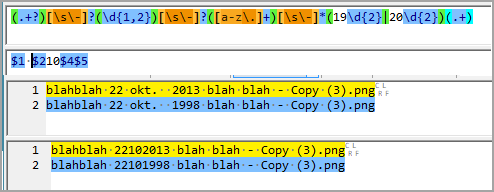
var genericRE = /^(.+?)[\s\-]?(\d{1,2})[\s\-]?([a-z\.]+)[\s\-]*?(20[012]\d)(.+)$/i;

added '*' before ?(20[012]\d)

various people saving files with various date formats each time. Initially I could figure out why 22 okt. 2024 wasn't renamed. (the extra space so it appeared)

the dates as such they are correct.
With the script the dates look fine now and can be used to update the files modified dates.

Again : thanks!

Great to hear that.

You might want to change

var genericRE = /^(.+?)[\s\-]?(\d{1,2})[\s\-]?([a-z\.]+)[\s\-]*?(20[012]\d)(.+)$/i;

into

var genericRE = /^(.+?)[\s\-]?(\d{1,2})[\s\-]?([a-z\.]+)[\s\-]*(20[012]\d)(.+)$/i;

The ? after [\s\-]* is not necessary. [\s\-]* il already saying 'Any number of space or dash'.
Note that, a string like "- - - -- - - - " will match this part of the regexp.

If you want any number of spaces that might (or not) be followed by a dash, \s*-? might be better.
Do not hesitate to use tools like https://regexr.com/ to test your regexp, and go to the Explain tab to see if what is said here corresponds to what you want.

Everything is fine now. tested it on all variations.
Script now reads as per below.

function OnGetNewName(getNewNameData)

{
	var genericRE = /^(.+?)[\s\-]?(\d{1,2})[\s\-]?([a-z\.]+)[\s\-]*(20[012]\d)(.+)$/i;

	var monthDicts = DOpus.Create.Map();	// use toLowerCase to compare
	monthDicts(1)	= ["January",	"Januari",	"Jan",	"Jan."]
	monthDicts(2)	= ["February",	"Februari",	"Feb",	"Feb."]
	monthDicts(3)	= ["March",	"Maart",	"Mar",	"Mrt."]
	monthDicts(4)	= ["April",	"Apr",	"Apr."]
	monthDicts(5)	= ["May",	"Mei"]
	monthDicts(6)	= ["June",	"Juni",	"Jun",	"Jun."]
	monthDicts(7)	= ["July",	"Juli",	"Jul",	"Jul."]
	monthDicts(8)	= ["August",	"Augustus",	"Aug",	"Aug."]
	monthDicts(9)	= ["September",	"September",	"Sept",	"Sept.",	"Sep",	"Sep."]
	monthDicts(10)	= ["October",	"Oktober",	"Oct",	"Okt",	"Oct.",	"Okt."]
	monthDicts(11)	= ["November",	"November",	"Nov",	"Nov."]
	monthDicts(12)	= ["December",	"December",	"Dec",	"Dec."]

	var inputName = getNewNameData.item.name;
	var match = genericRE.exec(inputName);

	if (!match || match.length < 6)
		return inputName;

	var startOfName = match[1];
	var day 		= match[2];
	var monthName 	= match[3];
	var year 		= match[4];
	var endOfName	= match[5];

	var monthId = SearchMonth(monthName, monthDicts);

	var returnName = startOfName + " " + day.paddingLeft("00") + monthId.paddingLeft("00") + year + endOfName;
	
	return returnName;

}

///////////////////////////////////////////////////////////////////////////
function SearchMonth(monthName, monthDict) {
	for (e = new Enumerator(monthDict); !e.atEnd(); e.moveNext()) {
		var monthId = e.item();
		var arr = monthDict[monthId];
		for (var i = 0; i < arr.length; i++)
			if (arr[i].toLowerCase() == monthName.toLowerCase())
				return String(monthId);
	}
	return "XX";
}

///////////////////////////////////////////////////////////////////////////
String.prototype.paddingLeft = function (paddingValue) {
   return String(paddingValue + this).slice(-paddingValue.length);
}
1 Like

To cover pre 2000 years regex might be changed into

var genericRE = /^(.+?)[\s\-]?(\d{1,2})[\s\-]?([a-z\.]+)[\s\-]*(19\d{2}|20\d{2})(.+)$/i;

FWIW as for regexr, I know that site.
Personally I am using Regexbuddy