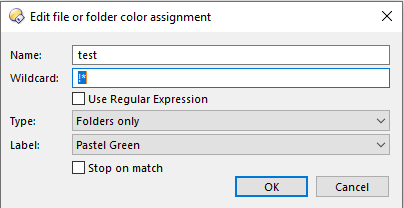
I finally found it...
But this format is not working. On the machine that is working, i checked and it is listed the same way. So i copied the config from the updated comptuer and it stopped working. So i put my old config back in and its working again.
I have no idea why this label is no longer working. It should be changing the color for any folder that begins with a ! but it is not.
Edit:
I tried ticking off the box "use regular expression" but all that did was highlight all folders in green.
I tried to create a new label and put test* and set it to files and folders. i had a file in the folder already that started off with test and it did nothing.
I tried to create other wildcard filters for something else as a test. test* for file using the regular expression box and then that worked.... but wont work for folders.... not sure what else is interfering. As it works on an older config on my other computer. I was just updating my config on one computer to the way I wanted it then would just install it on the others. Not sure what I did to break this
If I change the wildcard to be * !* instead it works, but then all the subfolders whether or not the have a ! in it also have the formatting. But by putting the * in front then any folder that has a ! anywhere in the name is highlighted. So not really what I want either.