I recently upgraded to Windows 11 and I noticed OneDrive icons are no longer showing up on files and folders in Details view but only on thumbnails. Both in Windows file explorer and DOpus. Yet, in Windows, the status column shows more details.
See this from Windows file explorer where we can see the person icon, indicating it's shared:
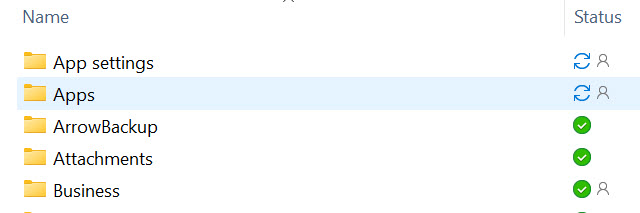
This is in DOpus:
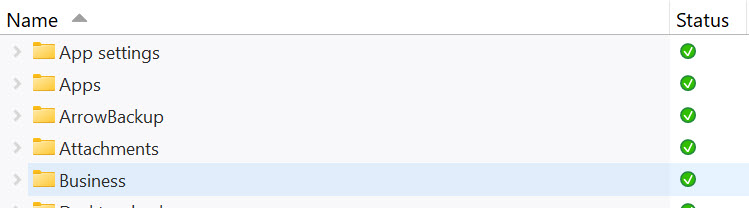
-
Can you please add the person icon/sharing?
-
Also, if you're able to add icons to folders/files in a setting, it would be great, that way I wouldn't need an additional column (see my issue here, for which I am still awaiting a resolution: Add column as addition without overriding subfolders). It would also be nice to be able to make those icons a bit faded out in Colour settings, if you decide to add those and if possible of course.
-
Now, both will show when something is syncing but Windows shows it consistently while DOpus sometimes doesn't show up, even after refreshing.
Which leads me to this issue. When a folder is syncing, then it finishes, Windows shows the latest synced status right away while DOpus will still thinks it's syncing until I refresh. It doesn't automatically acquire the status.
It's actually happening now as you see in the screenshots. Same situation. But yet even refreshing this time does not show the status. I checked OneDrive and indeed it is syncing files.
- The OneDrive icons in Windows are nicer looking than the ones in DOpus. They're also a tiny bit larger. Any way we can get those icons updated to be similar?
Thanks!