Beautiful!
I have also added dynamic buttons for next and previous sibling, to make Leo's next-relative script more useable in this setup. Command: Go-Relative (go to next/prev sibling folder).
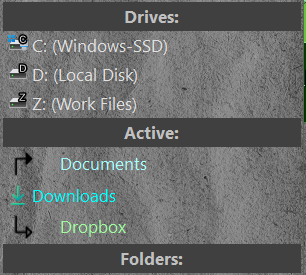
Regarding history (or recent files) , most methods don't allow you to set a character limit, so when you encounter long file names, the toolbar expands in a frustrating way. To get around this, I adapted By Tim's RecentFilesLog - Record recent opened files into Collections. I will post these when I finalize them.
I am considering attempting to reconstruct the entire folder tree, to make it more customizable and open source. I have created an initial VBS script that just parses relevant sections of the tree in the log. I will post it here for some future seeker, in the likely event that I lose interest.
Option Explicit

Function OnInit(initData)
	initData.name = "ReconstructTree"
	initData.desc = "Logs a simple folder tree (current folder and its parents)"
	initData.copyright = "(C) 2025"
	initData.version = "1.0"
	initData.default_enable = True

	Dim cmd
	Set cmd = initData.AddCommand
	cmd.name = "ReconstructTree"
	cmd.method = "OnReconstructTree"
	cmd.desc = "Logs a folder tree for the current path."
	cmd.label = "ReconstructTree"

	initData.min_version = "12.0"
End Function

Function OnReconstructTree(scriptCmdData)
	Dim startPath
	Set startPath = scriptCmdData.Func.sourcetab.path
	If (startPath Is Nothing) Then
		DOpus.Output "ReconstructTree: No source path."
		Exit Function
	End If
	Call ReconstructTree(startPath)
End Function

Sub ReconstructTree(pathStart)

	Dim pathCurrent, pathParent, folderEnum, folderItem, vecSiblings, indentLevel
	Set pathCurrent = DOpus.FSUtil.Resolve(pathStart)
	Set pathParent  = pathCurrent
	indentLevel = 0

	DOpus.Output "============================="
	DOpus.Output "Folder Tree starting from: " & pathCurrent
	DOpus.Output "============================="

	Do While pathParent.test_parent
		pathParent.Parent

		DOpus.Output ""
		DOpus.Output "Level " & indentLevel & ": " & pathParent

		Set vecSiblings = DOpus.Create.Vector
		Set folderEnum = DOpus.FSUtil.ReadDir(pathParent, False)

		If CLng(folderEnum.error) <> 0 Then
			DOpus.Output "ReconstructTree: Error reading folder: " & CLng(folderEnum.error)
			Exit Do
		End If

		Do While Not folderEnum.complete
			Set folderItem = folderEnum.Next
			If folderItem.is_dir Then
				vecSiblings.push_back folderItem
			End If
		Loop

		vecSiblings.sort

		Dim i, treeLine
		For i = 0 To vecSiblings.count - 1
			If (vecSiblings(i) = pathCurrent) Then
				treeLine = Space(indentLevel * 2) & "→ " & vecSiblings(i).name
			Else
				treeLine = Space(indentLevel * 2) & "  " & vecSiblings(i).name
			End If
			DOpus.Output treeLine
		Next

		Set pathCurrent = pathParent
		indentLevel = indentLevel + 1
	Loop

	DOpus.Output ""
	DOpus.Output "============================="
	DOpus.Output "End of Tree"
	DOpus.Output "============================="

End Sub