Ah yes, the first "=" was too much in that line (deleted in my post). I only tested with a file containing stroke="#fff", Couldn't find one with fill="color".
I tested your simplified code and it seems to work fine here.
...and my preferred PNG to SVG Online Converter in case you want to integrate some PNG's to your SVG iconset. Other sites doesn't leave the background transparent but make it black: freeconvert
You can convert up to 10 PNG's per day from your IP-adress for free there.
Another replacement for the experimental "Replace Color" option. When trying to create an iconset using the sourcefiles from the icon collections I provided, it will not work for all files because many of them doesn't contain any color information which could be replaced. These icons will stay black. The following code not only replaces existing color attributes but also adds this information if not existent. It works with all icon collections I provided but possibly not with others.
regex = /(<path|<rect|<circle|<ellipse|<polygon)([\S|\s]*?)(\sstyle="")?([\S|\s]*?)(\n?\/>)/gi;
var matches = [];
var m;
while ((m = regex.exec(content)) !== null) {
matches.push(m[0]);
}
for (var j = 0; j < matches.length; j++) {
var Match = matches[j];
if (Match.indexOf('\\sstyle="') !== -1 && Match.indexOf('fill:none;') === -1) {
var Match1 = Match.replace(/(<path|<rect|<circle|<ellipse|<polygon)([\S|\s]*?)(\sstyle="")?([\S|\s]*?)(\n?\/>)/i,
'$1$2$3fill:currentColor;$4$5');
content = content.split(Match).join(Match1);
}
if (Match.indexOf('fill="none"') === -1 && Match.indexOf('black') === -1 &&
Match.indexOf('fill:none') === -1 && Match.indexOf('style="') === -1) {
var Match2 = Match.replace(/(<path|<rect|<circle|<ellipse|<polygon)([\S|\s]*?)(\sstyle="")?([\S|\s]*?)(\n?\/>)/i,
'$1 style="fill:currentColor"$2$4$5');
content = content.split(Match).join(Match2);
}
}
The code comes from a VBScript "Create white SVG-Files" button I provided with my old Iconset Creator (CreateIconset (Incl. Dark/Light Sets for DOpus13)). I converted the code to JScript using AI.
AI-generated code is normally forbidden on this forum as I saw a while ago, but I assume you tested it - in which case it has become legal "Coder Intelligence" code.
Yes I tested it and changed things to apply to the code here. AI often creates funny code but this time it worked on the first run. It seems to have some basic knowledge about DOpus Scripting.
Sorry, there was a mistake in the last code I posted. The first three lines have to be executed at the end instead at the beginning. Otherwise some icons will be destroyed. I corrected this in the code above.
One more correction to the last code I provided: the three lines I mentioned are obsolete because the four already present "content.replace" lines already did this job. Sorry for the confusion.
The downside of the code is that it slows down the iconset generation. For the "MaterialDesign" collection with 7447 icons I have to wait about a minute to get the job done so PassThePeas may not want to add this to the iconset generator.
You can alternatively convert the original files to use "currentColor" with a button containing the following code. It creates copies of the original files in a subfolder "currentColor":
function OnClick(clickData) {
var cmd = clickData.func.command;
cmd.RunCommand('Select *.svg DESELECTNOMATCH');
clickData.func.sourcetab.Update();
var fso = new ActiveXObject('Scripting.FileSystemObject');
var regex = new RegExp();
regex.global = true;
regex.ignoreCase = true;
var files = clickData.func.sourcetab.selected;
for (var i = 0; i < files.count; i++) {
var file = files(i);
var strFilePath = file;
var text;
try {
var inFile = fso.OpenTextFile(strFilePath);
text = inFile.ReadAll();
inFile.Close();
} catch (e) {
DOpus.Output('Reading error: ' + strFilePath + ' - ' + e.message);
continue;
}
regex = /(<path|<rect|<circle|<ellipse|<polygon)([\S|\s]*?)(\sstyle="")?([\S|\s]*?)(\n?\/>)/gi;
var matches = [];
var m;
while ((m = regex.exec(text)) !== null) {
matches.push(m[0]);
}
for (var j = 0; j < matches.length; j++) {
var Match = matches[j];
if (Match.indexOf('\\sstyle="') !== -1 && Match.indexOf('fill:none;') === -1) {
var Match1 = Match.replace(/(<path|<rect|<circle|<ellipse|<polygon)([\S|\s]*?)(\sstyle="")?([\S|\s]*?)(\n?\/>)/i,
'$1$2$3fill:currentColor;$4$5');
text = text.split(Match).join(Match1);
}
if (Match.indexOf('fill="none"') === -1 && Match.indexOf('black') === -1 &&
Match.indexOf('fill:none') === -1 && Match.indexOf('style="') === -1) {
var Match2 = Match.replace(/(<path|<rect|<circle|<ellipse|<polygon)([\S|\s]*?)(\sstyle="")?([\S|\s]*?)(\n?\/>)/i,
'$1 style="fill:currentColor"$2$4$5');
text = text.split(Match).join(Match2);
}
}
text = text.replace(/\bfill:(?:white|black|#fff|#ffffff|#000|#000000)\b/gi, "fill:currentColor");
text = text.replace(/\bfill\s*=\s*\"(?:#fff|#ffffff|#000|#000000|white|black)\"/gi, 'fill="currentColor"');
text = text.replace(/\bstroke:(?:white|black|#fff|#ffffff|#000|#000000)\b/gi, "stroke:currentColor");
text = text.replace(/\bstroke\s*=\s*\"(?:#fff|#ffffff|#000|#000000|white|black)\"/gi, 'stroke="currentColor"');
cmd.RunCommand('CreateFolder NAME=currentColor');
var outPath = DOpus.FSUtil.Resolve(cmd.sourcetab.path + '\\currentColor\\' + file.name);
try {
var objFile = fso.CreateTextFile(outPath, true);
objFile.Write(text);
objFile.Close();
} catch (e) {
DOpus.Output('Writing error: ' + outPath + ' - ' + e.message);
}
}
}
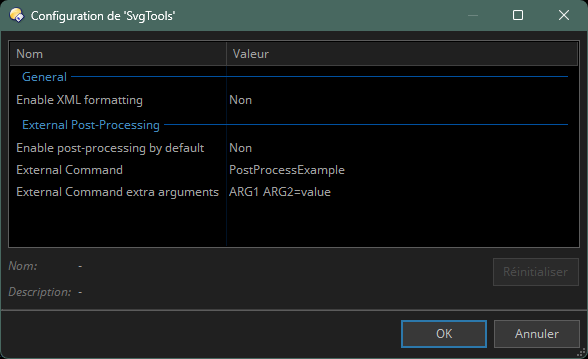
This feature can be enabled/disabled by default in the script configuration (default = disabled)
The configuration allows you to define an external Opus (probably custom :)) command to be called at the end of the XML building process. Some extra options can also be configured both in the UI and the script config (to avoid having to re-enter them each time).
The external command must implement a FILE argument. This argument will be used to give this command the path to the XML file built so far so it can modify it according to its needs. Here's an example "plugin" script containing a couple example commands and also providing a few side functions (read/write xml file as string, read/write xml file as a XML Document). SvgToolsPlugin.opusscriptinstall (2.1 KB)
When no SVG file is found: Instead of not opening, the UI now opens and displays in red the #0 count of svg files found.
Code cleanup and factorisation
The goal of this external post-processing is to allow anyone to try and apply its own post-processing without having to change the core of the iconset making process.
And anyone not needing this will not have to bother and will just be able to leave things as they are pre-configured.
EDIT: The external command must write back to the same file that was provided, so that, after doing its job, the main application can get back to packaging the .dis file from that same file.
Example "plugin" code:
// SvgToolsPlugin
// (c) 2026 Stephane
// This is a script for Directory Opus.
// See https://www.gpsoft.com.au/endpoints/redirect.php?page=scripts for development information.
// Called by Directory Opus to initialize the script
function OnInit(initData)
{
initData.name = "SvgToolsPlugin";
initData.version = "1.0";
initData.copyright = "(c) 2026 Stephane";
// initData.url = "https://resource.dopus.com/c/buttons-scripts/16";
initData.desc = "";
initData.default_enable = true;
initData.min_version = "13.0";
}
// Called to add commands to Opus
function OnAddCommands(addCmdData)
{
var cmd = addCmdData.AddCommand();
cmd.name = "PostProcessExample";
cmd.method = "OnPostProcessExample";
cmd.desc = "";
cmd.label = "PostProcessExample";
cmd.template = "FILE/K,ARG1/S,ARG2/O";
cmd.hide = true;
cmd.icon = "script";
var cmd = addCmdData.AddCommand();
cmd.name = "PostProcessExampleAlt";
cmd.method = "OnPostProcessExampleAlt";
cmd.desc = "";
cmd.label = "PostProcessExampleAlt";
cmd.template = "FILE/K,ARG1/S,ARG2/O";
cmd.hide = true;
cmd.icon = "script";
}
// Implement the PostProcessExample command
function OnPostProcessExample(scriptCmdData)
{
DOpus.Output("Full command line = '" + scriptCmdData.cmdline + "'");
if (!scriptCmdData.func.args.got_arg.file) {
DOpus.Output("Command called without any FILE argument. Exiting.", true);
return;
}
var filePath = scriptCmdData.func.args.file;
var content = GetXmlFileAsString(filePath);
var contentLength = content.length;
// Custom example of file alterations
	content = content.replace(/\bfill:(?:white|black|#fff|#ffffff|#000|#000000)\b/gi, "fill:currentColor");
	content = content.replace(/\bfill\s*=\s*\"(?:#fff|#ffffff|#000|#000000|white|black)\"/gi, 'fill="currentColor"');
	content = content.replace(/\bstroke:(?:white|black|#fff|#ffffff|#000|#000000)\b/gi, "stroke:currentColor");
	content = content.replace(/\bstroke\s*=\s*\"(?:#fff|#ffffff|#000|#000000|white|black)\"/gi, 'stroke="currentColor"');
if (content.length != contentLength) {
DOpus.Output("Found color replacements in the XML. Updating XML.");
SaveXmlFileFromString(filePath, content);
}
else
DOpus.Output("No color replacement needed in the XML.");
}
// Implement the PostProcessExampleAlt command
function OnPostProcessExampleAlt(scriptCmdData)
{
DOpus.Output("Full command line = '" + scriptCmdData.cmdline + "'");
if (!scriptCmdData.func.args.got_arg.file) {
DOpus.Output("Command called without any FILE argument. Exiting.", true);
return;
}
var filePath = scriptCmdData.func.args.file;
var xmlDoc = GetXmlDocFromFile(filePath);
if (!xmlDoc) return;
// Make alterations to the xmlDoc object
// ...
// ...
WriteXmlToFile(filePath, xmlDoc);
}
function GetXmlFileAsString(filePath) {
if (!DOpus.FSUtil.Exists(filePath)) {
DOpus.Output("Source file does not exists : " + filePath);
return "";
}
var file = DOpus.FSUtil.OpenFile(filePath);
var blob = DOpus.Create.Blob();
var size = file.Read(blob);
var st = DOpus.Create.StringTools();
var content = st.Decode(blob, "utf-8");
DOpus.Output("File read with size = " + content.length);
file.Close();
return content;
}
function SaveXmlFileFromString(filePath, content) {
var file = DOpus.FSUtil.OpenFile(filePath, "w");
if (file.error === 0) {
var w = file.Write(content);
file.Close();
}
}
function GetXmlDocFromFile(filePath) {
var xmlDoc = new ActiveXObject("MSXML2.DOMDocument.6.0");
xmlDoc.async = false;
var success = xmlDoc.load(filePath);
if (success) {
DOpus.Output("XML file load successfully.");
return xmlDoc;
}
else {
var error = xmlDoc.parseError;
DOpus.Output("Error encountered while loading XML : " + error.reason + " (line " + error.line + ", position " + error.linepos + ")");
return null;
}
}
function WriteXmlToFile(filePath, xmlDoc, prettyPrint) {
prettyPrint = prettyPrint || false;
var success = false;
// --- First try : Pretty Print (if requested) ---
if (prettyPrint) {
try {
var xmlWriter = new ActiveXObject("MSXML2.MXXMLWriter.6.0");
xmlWriter.indent = true;
xmlWriter.omitXMLDeclaration = false;
xmlWriter.encoding = "UTF-8";
var saxReader = new ActiveXObject("MSXML2.SAXXMLReader.6.0");
saxReader.contentHandler = xmlWriter;
saxReader.dtdHandler = xmlWriter;
saxReader.errorHandler = xmlWriter;
// Can throw if the XML is not well-formed
saxReader.parse(xmlDoc);
// Opus Writing
var fsu = DOpus.FSUtil();
var textFile = fsu.OpenFile(filePath, "wa", "utf8");
if (textFile.error == 0) {
textFile.Write(xmlWriter.output);
textFile.Close();
success = true;
} else {
DOpus.Output("Error on DOpus OpenFile : " + textFile.error, true);
}
}
catch (e) {
DOpus.Output("Failed to format XML : " + e.description, true);
}
}
// --- Attempt #2 : Fallback or standard Raw save ---
if (!success) {
if (prettyPrint) {
DOpus.Output("Trying to save XML in raw format as fallback...", false);
} else {
DOpus.Output("Saving XML in raw format...", false);
}
try {
xmlDoc.save(filePath);
DOpus.Output("Raw save successful.", false);
}
catch (e) {
DOpus.Output("Critical failure : Unable to save the file. " + e.description, true);
}
}
}
Nice! I think that's a good solution. I tested the new version and it seems to work great here with my "AddCurrentColor" Plugin. I'll provide that after further testing.
I'd suggest to add more Script-config options:
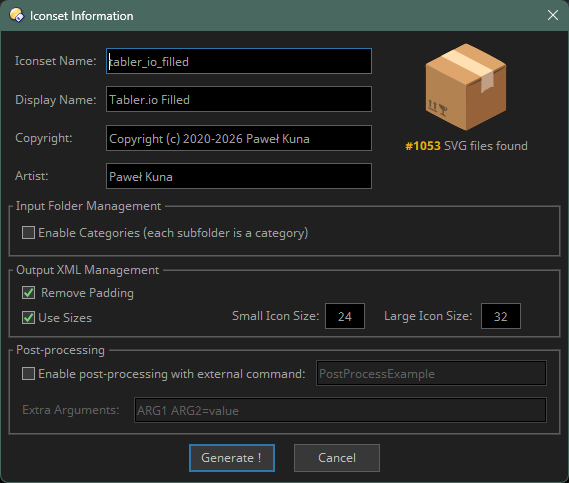
The checkboxes could optional be pre-checked and the values for small/large icons could be customized.
The option to enable post-processing currently doesn't pre-check the checkbox like I expected.
An option to add a prefix and/or suffix like "_SVG" to the name of the Iconset would also be useful.
With XML-formatting "false" I'll get a one-line XML now. DOpus doesn't care but with thousands of icons it's a pain for humans.
Good idea. I'll add that in the script config for the next release.
OK, that's a bug, setting the option to true only enables the edit boxes but does not check the checkbox. I'll fix that.
You already mentioned that before, but since this is a user field, I do not see the point: you enter whatever name you want.
Since it takes, by default, the name of the folder, you only have to add that _SVG to the folder name if you really want that. Otherwise, if the user changes that name, adding SVG makes no real sense to me (and will not be really standard if what the user fills is changed upon edition).
Also note that in the iconsets dialog in Preferences, the fact that the set contains SVG icons is also stated, so I don't see the need to add _SVG to the set name by default. I'd prefer to leave that to the user through filling the appropriate edit box.
The suffix option would only apply to the pre-filled Iconsetname and displayname.
An example: I already have an iconset with the name "Zondicons" created with my old "CreateIconset" tool which converted the SVG's to black/white PNG's. Now I want to create a new set from the same SVG collection with SVG-files in the folder "Zondicons". I need the suffix in this case because I don't want to overwrite the old set.
It's not really necessary to add this because I can simply (temporarily) rename the folder to "Zondicons_SVG" to have the fields correctly prefilled.
Just some thoughts on possible additional features:
The categoy feature using subfolders is great but if I want to apply a category to all icons I currently have to put my files into a subfolder and run the command from the parent folder. An option to enter a category name for sourcepath which defaults to "various" could make sense.
You could add arguments for all options to the "GenSvgIconSet" command making it possible to create a menu with buttons that generates iconsets with different settings optionally without opening the dialog.
Main UI checkboxes and edit fields can be pre-filled with values stored in script configuration:
Remove Padding
Use sizes and small & large sizes
New option introduced in the config: Categories smart triggering:
When the tool is launched, a count of SVG files in active folder and its direct subfolders is made. If that option is enabled (yes/true), the "Enable categories" option of the main dialog is automatically ticked if files are found in subfolders (yet still remains to be unticked if necessary).
UI changes / fixes & misc.:
Colors to display the number of SVG files found both in active folder and direct subfolders changed to something green (was orange before) when files found, and red when no file is found.
If post-processing is activated, a check is made that the provided command name exists in Opus. If not, a dialog is displayed to warn the user, and generation is not launched.
Min version raised to 13.23.1 so that the (SVG) logo on the main dialog can be loaded.
Fixed: Enabling post-processing in the configuration now properly activates that feature in the main dalog.
Fixed: If categories were enabled but not SVG existed in the active folder, an empty category without name was created. It's not created anymore.
Yes, but the script is working from 13.23.1.
What it produces works from the versions you mention, but that's not the purpose of the script min version setting.
Description:
This Plugin for SvgTools replaces the color value of fill/stroke attributes for all icon elements with "currentColor"
If no fill or stroke attribute is present for an element it will be added.
Attention! This should only be used with monochrome black or white SVG-files. Multicolor files would be reduced to use only one color which will destroy the appearance of them most of the time.
With very large files and/or a large number of files it can take a long time to finish.
Instruction:
Install the plugin and use the command AddCurrentColor as external command for the post-processing option.
I love this tool because it made creating an icon set so easy.
I noticed that it now fails to create the XML file due to some error. (I am not a programmer to check for myself.) I was updating my icon set with a few new icons.
I wondered if it was because of the recent update in the DO program. I downloaded and reinstalled the script, but the issue persists.
Any thoughts?