Ok, I'm still confused about Collections. Similar topic from 2015:
I have created a sub-collection, and I assume "the folders below the folder are turned into sub-sub-collections etc.". The problem is, that I do get the option to "Remove from Collection" (in the Delete menu only) but it doesn't do anything when applied to a sub-folder. It only works for files, and for the parent/root folder.
It seems I cannot do what I described in the final post of that thread i.e.
Create a collection
Add a folder to it as "Sub-Collections" (as opposed to "Members")
Remove specific sub-folders from the collection. I mean the "virtual"/collection sub-folders only, not the actual folders and files they point to.
But, aren't we talking about removing sub-collection members here? Not the entire sub-collection. I'll rephrase, since I remember being able to do this (as indicated in the old post) but I could be wrong. Wouldn't be the first time.
Let's say we have Folder A, which contains Folder B, Folder C etc.. B and C may contain further folders, files etc.
So, I go to File Collections, and right-click to create a new Collection. Inside this new Collection, I copy Folder A.
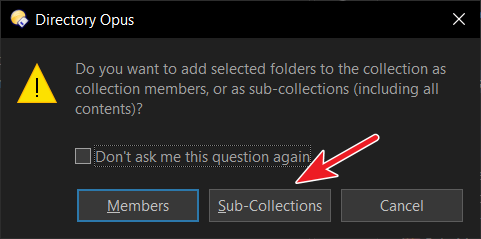
I am asked if I want to add selected folders (I only selected one, but its contents are implied here too I guess) as Members or Sub-Collections. I choose the latter.
Now, when browsing this collection, we have an identical representation of the actual folder/file hierarchy. Are you saying that it is NOT possible to now remove Folder B, or Folder C from this collection? I don't mean to delete the actual folders, just to remove them as members from this sub-collection.
It IS currently possible to remove files ("member-files") from this sub-collection. It's just not possible to remove "member-folders".
Sub-folders from Folder A (B, C, etc.) are not members of the collection. Subfolders B,C, etc, are neither sub-collections. My guess is that you're seeing it that way because of the Expandable Folders feature.
You're selecting the sub-collection, and want to get rid of it, right? So you are deleting the sub-collection.
It works the same on top-level collections. For example, select Find Results and you can delete it, but you can't remove it. There's only one reference to the collection anywhere, and if you get rid of that reference the collection is gone, as there's no other way to access it (and Opus will remove the collection from disk behind the scenes). Opus forces you to choose Delete, not Remove, to make sure you know the operation is one-way. Once you delete a collection, the collection is gone.
The things the collection pointed to are not gone, of course. Deleting a collection doesn't delete the files and folders the collection pointed to. But it does delete the collection, and any sub-collections.
OTOH, if you have actual folders added to a collection as members, you can remove those (without deleting the actual folders) the same as files. Nothing stops you doing that and nothing ever has.
No. I assume here that folder A is the sub-collection. I am not selecting this. I am selecting folders B, C etc. which are inside folder A. I am only trying to remove B and C, but still keep C, D and whatever else is inside folder A. Again, I am not trying to remove folder A which "contains" everything. Virtually, that is. Always talking about the references, not actual folders.
This is what I'm trying to say. I cannot remove these folders the same as files. It only works for files.
It's very late here, but I'll take a good look on the documentation tomorrow, to better understand this.
Ah sorry! I totally forgot about that option since I chose "don't ask again" a long time ago
However, I did properly try what you're saying now, and yes, by selecting "Sub-Collections," subfolders are now sub-collections as well.
If I try to delete one of those subfolders (accessed courtesy of the Expandable Folders feature) from the collection, using a command like Delete (just that), at first it doesn't seems to do anything (you can still see the subfolder in the collection). But then if I refresh the lister, I can see that the subfolder has been removed from the collection (not deleted from disk, just removed). Delete REMOVECOLLECTION=auto also seems to work well (it needs a manual refresh though)
Avoid managing collections inside expanded folders, if that’s what you’re doing. Instead, go into the collection to manage it, so everything is at the current level.
Not doing this. I double-click the "main" folder first. In any case, even if I try to right-click an expanded sub-folder, "Remove from Collection" is greyed out in the Delete menu.
Also tried disabling the "Make folders expandable in the file display" option. Sub-folders still cannot be removed from sub-collection.
Note that I'm not the official voice here, but I think maybe a video could help make things more understandable.
Because if I add a folder to a collection, using the "Sub collections" option, all the subfolders are not seen like filesystem folders anymore, but as sub-collections. So (at least on my side) they have a different context menu, and no "Remove from Collection" entry.
If I use the default Delete Menu > Delete button, I can remove it just fine, so it might be worth checking what command the button you're using actually has.
Edit: I think you're referring the "Remove from Collection" button from the default Delete menu.
That run Delete REMOVECOLLECTION and in this scenario doesn't do anything, and IMHO is correct, because as I say above:
using the "Sub collections" option, all the subfolders are not seen like filesystem folders anymore, but as sub-collections
So when adding items to a collection that way, you want to use the "Delete" button instead, or just edit the button to Delete REMOVECOLLECTION=auto.
So, it was just a matter of hitting Delete... It seems inconsistent though that with files, pressing Delete will delete the actual file. With folders, it behaves the opposite way (and context entry is gone). Expandable folders doesn't seem to make a difference here.
I'm dealing with @$#! migraine so didn't have the energy to study File Collections, but I'm fairly confident it did not work this way in earlier DOpus versions.