I hope that the color marking of the file should change along with the theme, otherwise when switching between bright and dark themes, some suitable colors under the dark theme will become unclear under the bright theme.
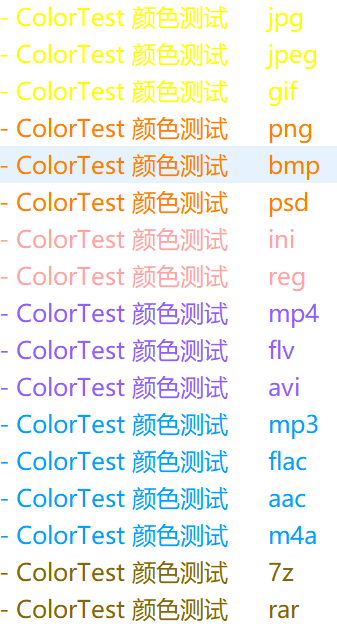
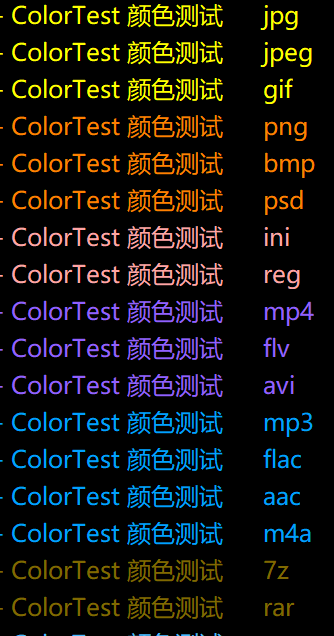
We're thinking about that, but need to come up with a way that's manageable.
Even with separate dark & light colors for labels, they may not work with every theme people make, and themes won't be able to include label colors (since everyone may have different labels), so I'm not sure it can ever work perfectly with every theme, even if it could let you switch.
At the moment, if you want to use both light and dark mode in Opus (not just one or the other), choosing label colors that work in both is best. (Or using both background and foreground colors, so it doesn't matter which mode is in use.)
I've noticed that in a field that accepts color values in hexadecimal format, you can also use markup codes for a color (from DO Colors and Windows Colors).
And it seems that at least by manually editing the colorgroups.oxc file to create such references, in theory you can change the color for a label by changing the color of the referenced markup code (and possibly when switching between dark and light mode?).
If I'm right, a new entry in Directory Opus Colors could be created to define "Colors" for light and dark mode. And then be able to reference those colors when setting up a label using its markup code.
Update : In a quick test it works! But in order to see the change, you have to Exit from DO after changing dark/light mode.
And you have to choose wisely the value from the color that you want. After config both values for dark/light mode, copy their markup code, and in colorgroups.oxc file, change the fg value for the target label, you'll end with something like that:
fg="#%fd_folderexpander_expanded" (I'm using the color for Expanded - Folder Expander)
Thanks!
This method is effective, but every time colorgroups.oxc is modified, Directory Opus must be restarted to take effect.
This is obviously cumbersome.
Hi,
A very simple idea to meet the need : add a simple parameter to adjust luminance offset between light and dark mode, applied globally to all markers in the colour category.
Would it be possible to add this?
I could be wrong but I'd be surprised if that worked well if it was just a single offset applied to every label color. You'd end up with some unreadable labels as the offset would be good for some colors/combinations and bad for others.
There are also going to be labels which use both foreground and background colors where you would not want them to be adjusted at all, or ones which use colors like bright red that show up best in both modes if left alone.
Thank you Leo for your quick reply.
I hear your arguments and you're probably right in absolute terms.
But a parameter (optional, of course) that can be adapted to a large number of situations would be better than no option at all! The aim is not perfection in all situations, but adaptation ‘as best as possible’. 
For me it would only apply to font colours and not backgrounds.
It seems logical that the colours chosen for a dark theme should be lighter than those for a light theme...
I disagree, because if we add that we have to support it forever, and it adds complexity to code and testing, as well as for users configuring things. If it doesn't actually work (or only helps one or two people), the complexity is added for nothing, and we may then have to add even more complexity for a better solution.
There are other ways we might tackle this in the future, once other work is finished.
Only some of them, and it depends which colors they are combined with as well.
It's really not simple, which is something we learned when making all the default colors for both modes and the default labels (which should all be visible in both modes).
Okay, I understand.
As they say: ‘There's no accounting for taste’. so I'm probably restricting the problem too much to my own simple use of labels...
I'll be waiting (impatiently) for the miracle solution then! 
Try this solution. 