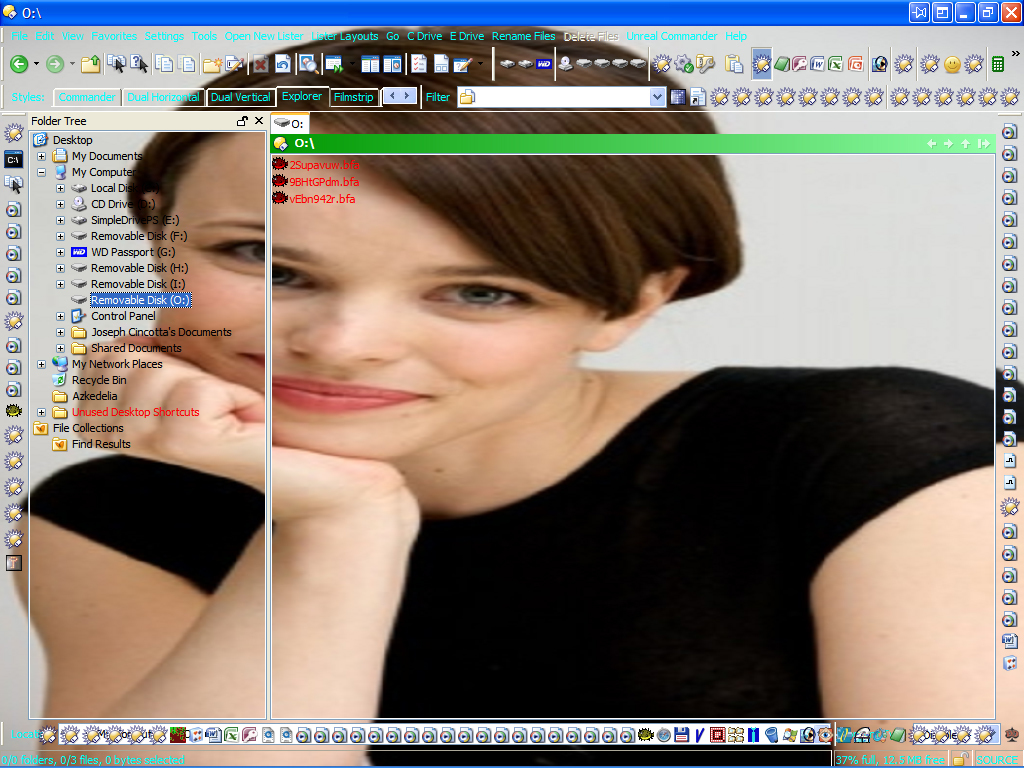
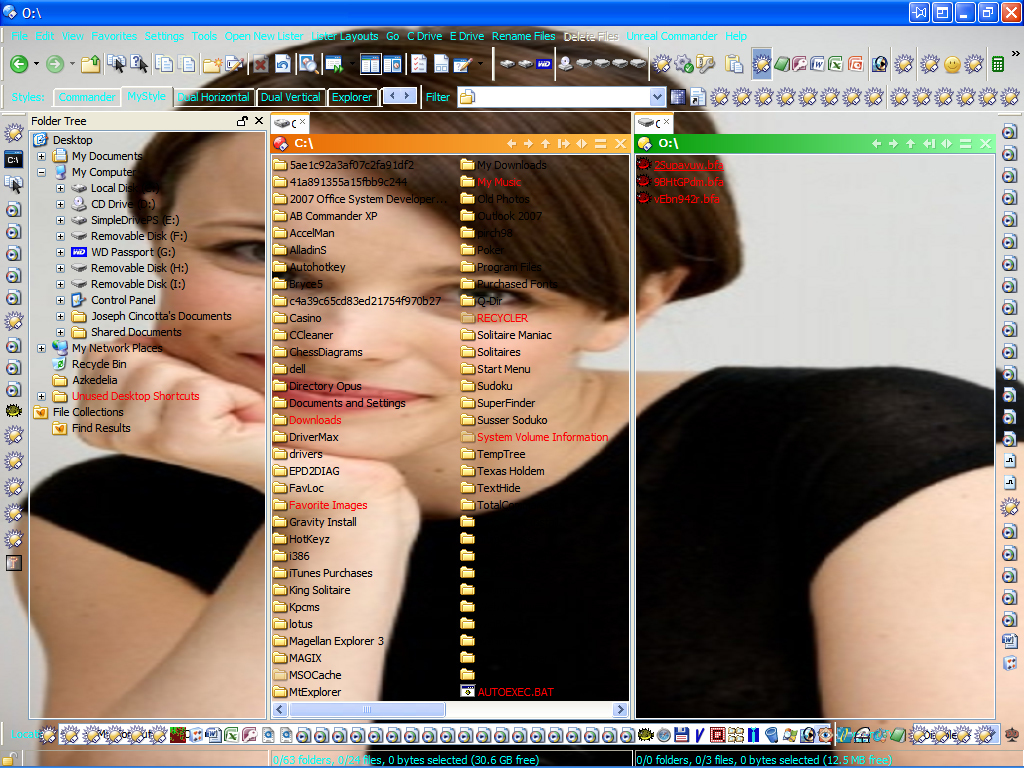
I just created a Truecrypt volume while DOpus was open because I had already created a shortcut from within DOpus to do this. However, after creating the Truecrypt volume DOpus didn't recognize I created a new system volume and there was no icon added to the drive list. I even tried opening the volume from within DOpus and it still wouldn't recognize I made the new partition. The last indignity to this situation is I tried hitting the F5 button to refresh DOpus to see if it would "wake up". This still didn't do the trick. I was forced to literally close the DOpus instance and reopen DOpus and then I finally saw the icon with the new volume.
However, this state of affairs clearly shouldn't be. Once I created a new volume within TrueCrypt...even Windows automatically recognized the new volume immediately but DOpus while open did not. Is this the correct way for DOpus to read newly created partitions? I have to close DOpus before creating new volumes?!
Is TrueCrypt set to mount drives as removable? If not try turning that on. I created several TrueCrypt drives with Opus running and never had to restart Opus, before I switched to BestCrypt. I think I always had TC set to mount the drives as removable.
[quote="leo"]Is TrueCrypt set to mount drives as removable? If not try turning that on. I created several TrueCrypt drives with Opus running and never had to restart Opus, before I switched to BestCrypt. I think I always had TC set to mount the drives as removable.
Did Explorer recognise the drives?[/quote]
Explorer did recognize the drives. Yes. I must point out that I'm using the latest edition of TrueCrypt 5.1a and the latest version of DOpus 9.1.0.6 x486 for Windows XP service pack 2.
I'm wondering if the problem is I'm using the very first option within TrueCrypt which is simply to create a volume container. I used this option when I made the partition. However, I must tell you I had the earlier version of TrueCrypt and when I made those volumes using the first option...I had no problems with DOpus. It was able to see the new volume partitions.
Try what I did...open DOpus; open TrueCrypt and make a simple file container which is the first option...if you're using the newest edition 5.1a. Then do the rest and then mount the partition. When I did this...DOpus didn't recognize the volume. I didn't choose the option to create removable partitions because that option is only available if you're set to use flash drives. So I ignored this option. Are you telling me there's a configuration option within TrueCrypt to let me create simple file containers with the addition of allowing me to mount them as if they're removable? If so, this must be a new option and I didn't see this. Otherwise...I would have to classify what I'm describing to be a bug in this version of DOpus and it should be fixed pronto.
Just tried your suggestion and it didn't work. Even after turning on that option...mounting the new drive wasn't recognized in DOpus while it was open. However, Windows did recognize the drive in the Control Panel. Clearly something is up.
Quick update: I saw an option in TrueCrypt which states to open Explorer when volumes are created. I checked this and then mounted the simple volume container again...this time DOpus launched a new instance with the open volume. Which to me solves the problem...but I never had to check this option before whenever I had to create a volume while DOpus was open.
I was able to simply create the volume partition and then mount it and DOpus was able to read the new partition without opening a second instance to see the volume. In this case, DOpus refuses to see the partition unless I had that option checked in TrueCrypt 5.1a. So the problem now is why DOpus needs to open a new instance to see a new volume partition?
What are you actually saying? That the drives toolbar in Opus doesn't update? Or the tree? If you actually type the path in manually does it then work?
The drives toolbar in DOpus doesn't update. That's correct. As for typing the path manually...there's no need for me to test because I had created a simple shortcut which I dragged to a DOpus toolbar. After clicking on that button opened up TrueCrypt. This automatically listed the entire location within Truecrypt and I then selected "Mount". After doing this, the Opus drive icon listing did not update. The Windows Control panel did show the updated volume partition immediately.
So the "old" method of simply opening up TrueCrypt and then mounting the volume no longer works within DOpus. I had to select the option in Truecrypt to force it to tell Explorer to open an instance showing the new volume partition. Well, guess what? Since I had installed and made DOpus the primary file manager...it intercepted the call and correctly launched an instance opening up the new volume partition I created. However, I'm telling you right now...previous versions of TrueCrypt I used it wasn't necessary for me to select this option to get Dopus to read the new partitions. It simply added the new drive icon in the toolbar. Now...when I launch Truecrypt to "mount" the volume container...DOpus has to open up a new instance in order for me to see the new drive icon. I never had this behavior before in previous versions of DOpus. I'm sorry if I don't know whether or not it's been the new updated version of TrueCrypt that's caused this problem...as there's no way to test for this.
I suggest you try this for yourself to see what I'm describing. Simply download the latest version and do a simple volume container creation and leave DOpus open. It won't read the new volume partition unless or until you close it and then reopen it. At that point you'll see the new drive letter icon with the mounted volume partition. To get around this problem...you have to select an option from TrueCrypt to make it call Explorer to open up whenever a new volume is created. Again, I never had to select this option in previous versions of TrueCrypt whenever I wanted to create a new file container and see the drive icon update in DOpus. So, now...I have to have this option selected in Truecrypt in order for me to see the drive icon updated in DOpus before using the volume partition. From this point on...in order for me to "see" the file container correctly in DOpus...it has to intercept a call from TrueCrypt to Explorer so it can open a separate instance for me to see the new drive letter and a lister opened up to the volume.
So Opus can read the drives okay (e.g. if you type their letter manually, or navigate to them via My Computer); the problem is purely that they don't appear on the toolbar (drive buttons) until Opus is restarted?
Does it actually require a restart of Opus, or does the drive show up if you open a new Opus window?
(BTW, I don't have TrueCrypt installed as it tends to bluescreen my PC, so it's not easy for me to try anything, but I know I've created containers with it and had them appear in drive buttons fine in the past.)
There is only ever one instance of Opus. Every window comes from a single instance.
Ok I've tried this with a plain vanilla install of the latest version of True Crypt and can't see a problem. I created a new File Container as you said, and then mounted it (it doesn't seem to auto-mount new containers as your report implied), and the drive letter immediately appeared in the Drives toolbar and Tree in Opus.
So unless it's a setting in TC that you've changed that somehow affects this, I'm afraid I can't see a problem.
[quote="jon"]Ok I've tried this with a plain vanilla install of the latest version of True Crypt and can't see a problem. I created a new File Container as you said, and then mounted it (it doesn't seem to auto-mount new containers as your report implied), and the drive letter immediately appeared in the Drives toolbar and Tree in Opus.
So unless it's a setting in TC that you've changed that somehow affects this, I'm afraid I can't see a problem.[/quote]
You got one part right...DOpus didn't auto-mount the newly created drive. This part is correct. However, from my standpoint...unless I had turned on that option within TrueCrypt to send a message to Explorer to announce the arrival of the new volume container...DOpus wouldn't have been able to see I had made that new partition. This wasn't the case in prior instances of DOpus...as far as I can tell at this point. It would be pointless for me to reinstall an eariler copy to test my hypothesis on this matter now.
No, I had never tampered with any settings within Truecrypt which could have accounted for this behavior change in DOpus...except for the necessity on my part to check the option for Truecrypt calling Explorer. That was forced since I had a choice between closing DOpus and reopening the instance to see the drive icon change to accommodate the new partition...or make the change which forces DOpus on my machine to open a new instance recognizing the newly created volume container. It might help if others can jump into the fray and settle this matter one way or another with some sample tests using Truecrypt with earlier editions of DOpus 9.0 and others using the latest copy of Truecrypt along with the latest version of DOpus.
I still don't really understand you. Opus isn't responsible for mounting TrueCrypt volumes; TrueCrypt is. Opus has nothing to do with it. When TrueCrypt mounts a volume a message is broadcast system-wide to all processes to announce a new drive is present in the system. When Opus receives this message it updates its drive toolbars and folder tree to display the new drive. From what I can see here, this process is working fine.
Please give a set of clearly defined steps by which I can reproduce the problem - as it is, I can't see anything wrong with how this is currently working.
[quote="jon"]I still don't really understand you. Opus isn't responsible for mounting TrueCrypt volumes; TrueCrypt is. Opus has nothing to do with it. When TrueCrypt mounts a volume a message is broadcast system-wide to all processes to announce a new drive is present in the system. When Opus receives this message it updates its drive toolbars and folder tree to display the new drive. From what I can see here, this process is working fine.
Please give a set of clearly defined steps by which I can reproduce the problem - as it is, I can't see anything wrong with how this is currently working.[/quote]
If what you just said here is correct...then DOpus should be working correctly and updating to reflect the arrival of the new volume drive partition. I am not seeing this when using the vanilla settings in Truecrypt and I am not seeing any drive icon changes when new volumes are created since installing DOpus 9.1.0.6
This is what I do...
DOpus Lister is open.
I click the shortcut to Truecrypt from within DOpus to launch Truecrypt.
I create the Truecrypt volume.
I mount the newly created volume using Truecrypt and I'm doing this while Directory Opus is still open in the background.
No drive icon update is seen to reflect the creation of the new volume partition in DOpus. None whatsoever.
I close DOpus and then doubleclick the desktop to open it again. DOpus now has the icon reflecting the addition of the volume partition.
The problem with the whole scenario I just described is that this never happened before and there were no changes to Truecrypt to account for this behavior change. I did however install Directory Opus 9.1.0.6 before I noticed this problem.
In earlier versions of DOpus 9.1 I was able to have Opus open, click the Truecrypt shortcut, create the volume, mount the volume and DOpus would instantly update the drive list to include the newly created partition. This was the normal behavior I expected when I created the volume partition in DOpus 9.1.0.6 so I was concerned I didn't see the drive list update.
The F5 refresh didn't solve the problem so I kept Truecrypt open and simply closed the DOpus lister and reopened it again by doubleclicking the desktop. This procedure somehow caused DOpus to finally see the new volume partition but this behavior is clearly unusual. So my next stop was to see if any options could be set in Truecrypt to "help" DOpus see the volume creation since installing 9.1.0.6 and there was this one for making Truecrypt send a call to Explorer to open an instance with the new drive volume container. I checked this and redid the volume creation experiment with DOpus open in the background and Truecrypt in the forefront. After hitting the "mount" button in Truecrypt...DOpus immediately launched a new instance with the lister correctly showing the new volume drive. The problem with my solution is I had never seen this behavior before in DOpus and wasn't expecting it. I was hoping the current DOpus lister would update the drive icons to reflect the change. It did not and so...only via the second instance did I see the volume drive partition get noted correctly.
The "Send message to Explorer" thing is simply opening a new Explorer window, which if Explorer Replacement mode is turned on will be trapped by Opus and cause a new Lister to be opened instead.
What command do you have on your Drives toolbar? Is it just the standard Drives toolbar or have you modified the command?
Also - and please try to answer this time! - do you see the new drive appear in the Tree?
Just wanted to add that i'm using the latest version of opus and truecrpyt and both work very well with each other. Once mounted, the drive shows up in the drive toolbar within opus.
The "Send message to Explorer" thing is simply opening a new Explorer window, which if Explorer Replacement mode is turned on will be trapped by Opus and cause a new Lister to be opened instead.
What command do you have on your Drives toolbar? Is it just the standard Drives toolbar or have you modified the command?
Also - and please try to answer this time! - do you see the new drive appear in the Tree?[/quote]
Apparently you've given me the answer to my problem and it's "solved"...yet it also points out what is wrong in DOpus. It seems Dual Commander pane does not work properly in DOpus 9.1.0.6. This is why it wasn't working. However, I must stress I've always used Dual Pane view whenever I open listers in DOpus. This was the way I worked before and that's how I would create my Truecrypt volumes. Never had this problem before. I was able to create my Truecrypt volumes using Dual Pane view and the Drive icons would update immediately after creation of the partitions. Now, since installing DOpus 9.1.0.6 - Dual Pane/Commander view does not let me see the new volumes created.
So, to confirm this...and recreate the issue I have...start DOpus in Commander Dual pane and then try creating the Truecrypt volume. You won't see the drive icon update on the top. It used to do this prior the DOpus 9.1.0.6 release. I'm positive we've now located the problem...Dual Pane view does not update after mounting Truecrypt volumes. So if you can confirm this to be the case...please issue a ticket to have this problem fixed for the next update, please.
(Edit: Looks like Jon & I wrote our replies at the same time.)
You still haven't answered Jon's questions:
[quote]What command do you have on your Drives toolbar? Is it just the standard Drives toolbar or have you modified the command?
Does it appear in the folder tree or not?[/quote]
i.e. Is the drive appearing in the folder tree but not the toolbar? If so, what is the command in the toolbar? And is that the only problem? Or is there more to it than that?
I don't see what any of this has to do with dual-pane mode, either. Where aren't the drives appearing? There's so much going on in your screenshot I don't know where to look.
First off...I've never liked Explorer view...but apparently this is the view that solves the "problem" with the Truecrypt volume being recognized. As for there being too much going on in my instance of DOpus snapshot...well, it's clear I was able to get the Truecrypt volume appearing on using the option to view the tree.
Apparently to solve the problem satisfactorily...I've created a new Style to view the files and folders. I've created it so I have one tree and two Commander panes...something I'm surprised to see isn't included by default in DOpus. I suggest you include this option for the next release? In any case, this should solve the Truecrypt volume creation issue I've been laboriously trying to explain in detail. I missed the detail about using Dual Pane for viewing and working.
But now there's a new problem. Apparently since creating this new style the snapshot is below...DOpus sees the volume partition in the drive icon area in the TOOLBAR location...but not the TREE location. What gives?
Until you can actually answer the questions we ask we're not going to be able to help you. Repeatedly posting screenshots is not going to get you anywhere.