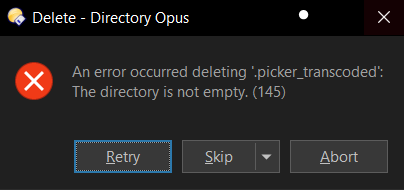
Dopus not able to delete a few folders in Android device, while Windows File Explorer works

Dopus fails to delete a few folders on Android device, folders which have .nomedia file in them

While Windows File Explorer works without issues.

Example folders:

  • .picker_transcoded with .nomedia file in it.
  • Pictures folder with .thumbnails/.nomedia file in it.

Gives the following error:

The .nomedia file instantly reappears upon deletion (this is not specific to dopus), my guess is that it is causing the issue in dopus.

I am using Samsung Tab on Windows 10 22H2.

If you need any logs, please do ask.

Maybe just as what Leo said in Is there still no fix for Media Transfer Protocol?, problems are caused by bugs in Android and Windows rather than Opus.

MTP is not particularly useful. If it must be used, it seems to be more stable in Windows Explorer. Otherwise, using another protocol might be a better solution. For example, using some ADB GUI tools.

But Windows File Explorer works without any issues here.

Do they integrate with Dopus? As otherwise I don't see any point of using them, when Windows File Explorer works perfectly for this.

Thanks for sharing that post btw, the thread mentioned there: MTP and transferring files with Android and iOS phones, Cameras will come handy. Will try mtp_enable = false.

With mtp_enable = false, the phone storage is not even accessible, Internal Storage folder doesn't open. (I did Exit Dopus after changing the preference.)

So, would have to use Windows File Explorer to work on portable devices ig.

If you haven't already, try FTP.

If you must use MTP, try different cables/ports.

Since Windows File Explorer works for me, I would prefer that, FTP is too much trouble for slower speeds.

I did try with two different wires and on both the ports, same issue. As I pointed out earlier, the issue is .nomedia files (in the folders mentioned above) getting created automatically instantly after deletion. That auto creation happens even when deleting using Files app or third party explorers on the device.

Thanks for trying to help.

Since it's a Samsung device, and they are messy with standards, I think best option for me is just use Windows File Explorer when I have to deal with such folders.