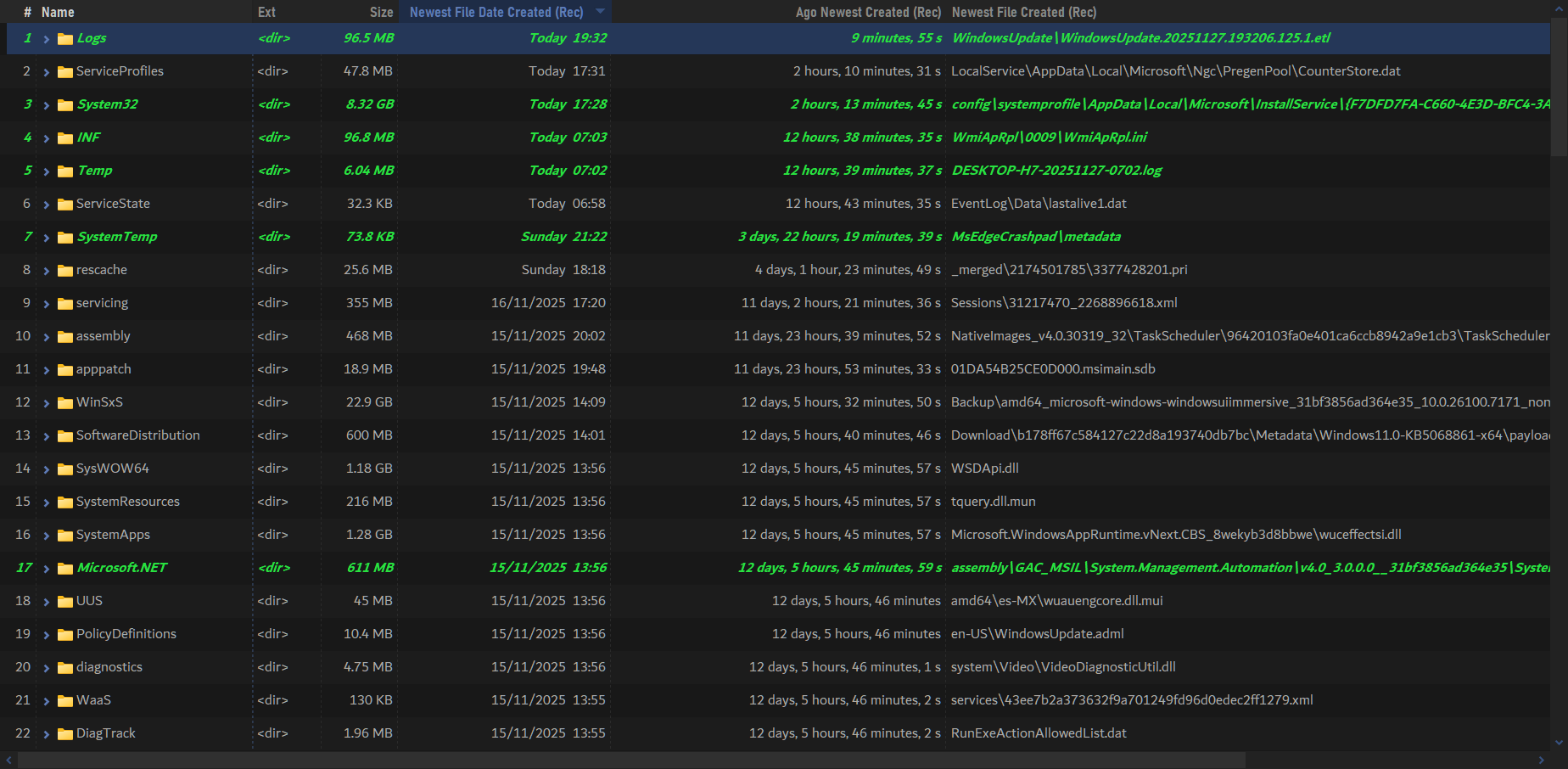
This script add-in adds columns showing min/max values for common properties of a folder's contents, leveraging Opus's integration with Everything (voidtools).
If you don't have Everything running all the time, it's highly recommended to set up autorun in Opus. To do that, go to Preferences / Miscellaneous / Advanced. There look for everything_autolaunch and put the full path (or alias) of the Everything executable, followed by the -startup argument.
This will allow the script to launch Everything automatically if needed.
How to Install
IMPORTANT: Requires DOpus v13.19 or later
Download the file below. Then go to Script Management (or run Prefs SCRIPTINSTALL) and select the downloaded file.
ignore folders properties : Set to True to ignore properties from folders itself
additional query : Additional Everything query to use as a refinement tool for results, e.g. to exclude some file types, etc.
relative filenames : When True, filename-related columns will have their content set relative to the calculated folder
age-related columns format : Format for age-related columns.
days : Show as days elapsed. Numeric value (e.g. 30)
duration : Show as a duration type column (e.g. 2 days, 12:01:23)
text : Show as a full textual duration (e.g. 2 days, 12 hours, 1 minute, 23 s)
Usage
You'll find the new columns under Script > EvDirRanges.
Notes / Technical Details
I made this add-in using the latest Everything alpha build, it might work with v1.4.x. but there's no guarantee.
You can use the additional query config to refine the results. Just make sure to use Everything's own syntax. E.g. !ext:dat;bin to exclude all the dat and bin files from results.
Changing age-related columns format value effectively change age-related columns type between double(signed), duration or text. When using text formatting, the columns will be language-aware.
If a folder gets a value higher than the current date and time, the script will detect it and display it according to its type: signed for numeric, 0 for duration (negative durations aren't allowed), and prefixed with + for text.
For size-related columns, only files are considered. (ignore folders properties value won't be used).
Opus devs, for an amazing program that goes beyond a file manager.
Changelog
v2.1 (05-Feb-2026):
Fixed folder properties not being considered, since Everything sorts them separately from files (might be a recent EV change).
v2.0 (27-Nov-2025):
Added new columns :
Biggest Filesize
Biggest File
Biggest Filesize (Rec)
Biggest File (Rec)
Smaller Filesize
Smaller File
Smaller Filesize (Rec)
Smaller File (Rec)
Changed script name to EvDirRanges (sorry about that).
Columns now update more reliably when certain configuration settings are changed.
Some minor changes.
v1.5 (27-Nov-2025):
Added new columns :
Ago Newest Created
Ago Oldest Created
Ago Newest Created (Rec)
Ago Oldest Created (Rec)
Ago Newest Modified
Ago Oldest Modified
Ago Newest Modified (Rec)
Ago Oldest Modified (Rec)
Added age-related columns format option in the Script config so you can choose the type you want these new columns to use (double(signed), duration or text). Numeric and duration type should work better for filtering.
Added a notification update (when opening the script config dialog).
Added age-related columns format option in the Script config so you can choose the type you want these new columns to use (double(signed), duration or text). Numeric and duration type should work better for filtering.
Added a notification update (when opening the script config dialog).
@errante I wonder how this could be applied to path depth, as discussed here: PathDepth (Display depth in folder hierarchy) . Specifically, could EVDirRanges be used to quickly calculate the depth of the current folder relative to the drive (i.e., C:\) AND calculate that folder’s deepest file depth relative to that folder’s position in the path given its leverage of Everything?
For example, say one has a directory structured as C:\Users\Name\Documents\D-5\D-6\D-7\D-8\
A file in C:\Users\Name\Documents would be at path Depth = 4
A file named “New Document” is in C:\Users\Name\Documents\D-5\D-6\D-7\D-8\ would be at path Depth = 8
Imagine three columns:
Current Depth: Shows depth of file or folder while in the given folder path
Largest Depth: Shows depth of file in the largest depth of the file path
File Depth: for file search results, shows depth of file in its folder path
Yes, Everything could handle all three much faster, but there are a few things to consider:
Everything's SDK3 should let you do this really easily with a single query. The bad news is that Opus still hasn't implemented it.
With the current SDK, it would only help with enumeration, which would only be useful for case 2. But then you'd have to process potentially a huge number of paths, which would slow things down on deeper folder structures.
One thing you can do is use the CLI version of Everything, which does support SDK 3. I actually use it in another script to grab certain properties from Everything. It should be fast enough because in most cases you should only need to query once. The main issue with that approach is that you don't have a reliable way to tell which items are expecting values, as discussed here without a solution.
When I have time, I'll check the best way to include the Everything CLI and blend it with the current work here (or if it'd be better to keep it in a separate script). Since I'm not the main audience for this script , I keep wondering what the real use and purpose of that data is inside Opus. It feels pretty niche to me.
You will then see 2 new columns : Folder Depth and Max Child Depth. Is that the data you want in Opus, right? Any other values besides those two? Give some reproducible examples using Everything if possible.
AFAIK, currently the easiest option would be to use Everything CLI to export those values into Opus.
Yes.
Given that you want the exact same values, that gives me some ideas :
Wouldn't it be neat to have a script with a GUI like MediaInfo++ that lets you import all your desired properties from Everything? That way, if you have any additional indexed properties there, you can import them into Opus and get instant values in bulk. Currently I have something similar for my personal use, which doesn't have any GUI though.
That should be something way more useful to do, IMO
Well, I had to look up what “CLI” and “SDK” stood for, if that’s any indication of my skill level. I also reviewed the EVDirRanges script above, the Run Count for Opus script, and Command Line Options - voidtools to see what I could learn.
In short, I learned two things:
You are clearly gifted
I am clearly not
At this point, I simply have no idea how to get from an Everything query to a DOpus column.
That said, I will keep poking around for a simple example that I can follow or reverse-engineer.
Sure. Overall, I think it’s just best practice and a common setting. My personal reasons are that I’d like to control which of my apps communicate with external servers (and how often). It wasn’t clear to me from the code whether it happens on every DOPus start-up or more frequently when I saw the while(true) loop.
So I’d say it’s mainly security and privacy reasons. Thinking of all the supply-chain attacks we’ve seen previously, I try to be cautious when installing scripts and running code from sources (public forums) I don’t know. So the less external communication (and possibly even automatic upgrades*) the better.
For the same reason, I personally also prefer the to provide the source code in clear-text instead of in a packaged .opusscriptinstall file**, but that’s of course a tradeoff between security and usability.
That’s my approach/opinion and I hope it makes sense to you.
Again, many thanks for the script!
* I know your script doesn’t do automatic upgrades, it’s just an example.
 IMPORTANT: Requires DOpus v13.19 or later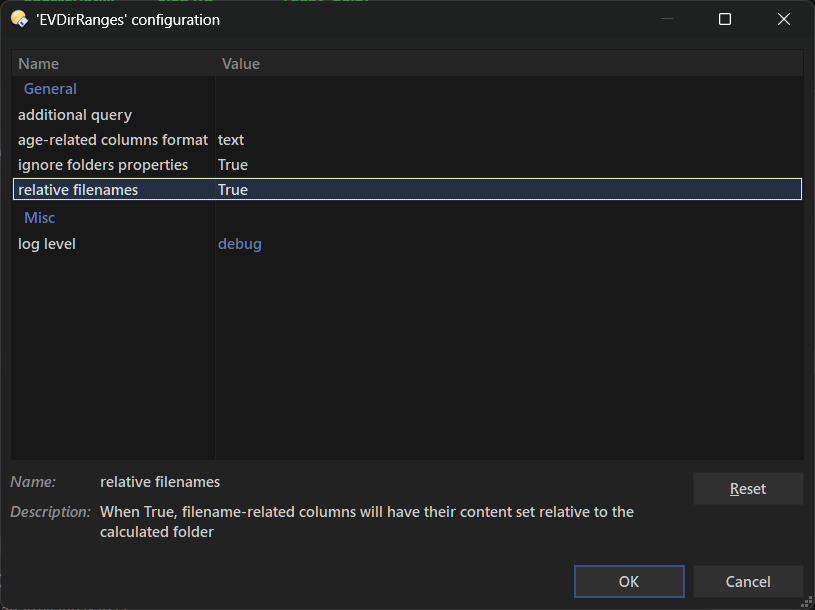
 , I keep wondering what the real use and purpose of that data is inside Opus. It feels pretty niche to me.