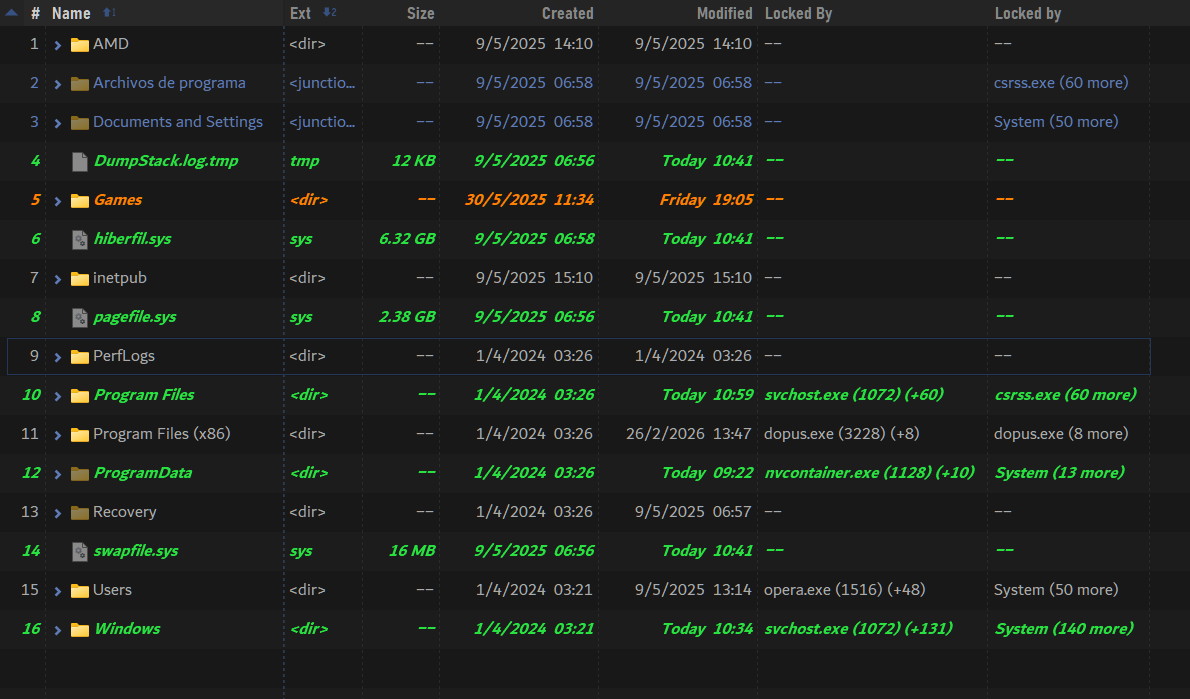
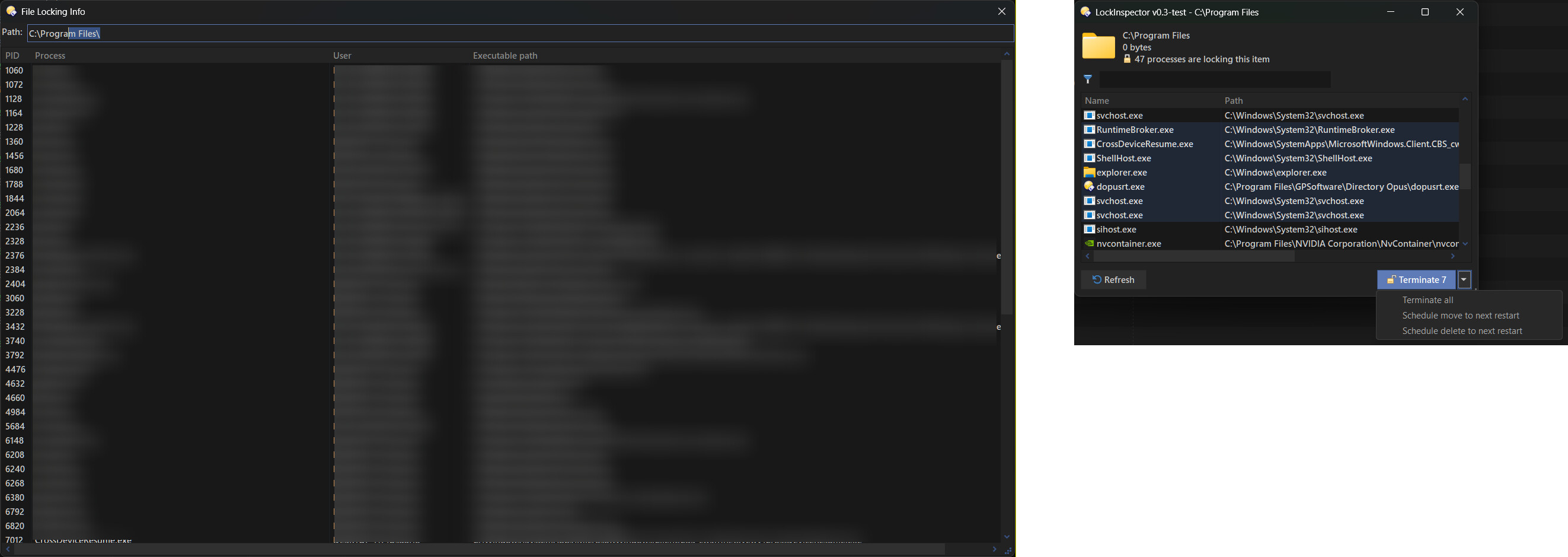
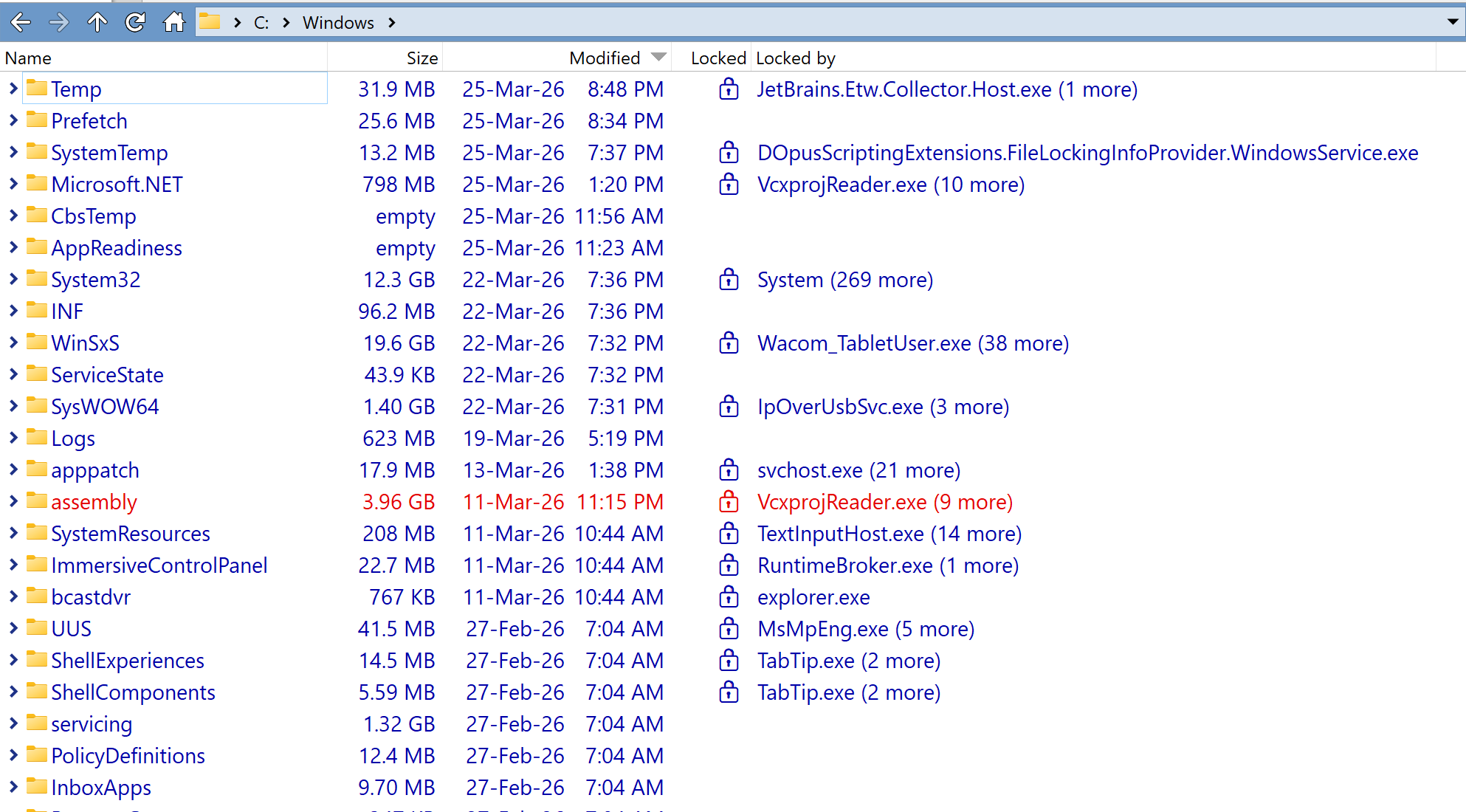
File locking information columns ("Locked" and "Locked by") and a dialog

I have finally finished my wild idea that I discussed here Wild idea: custom column and dialog to show what locks a file

Description

This script provides 2 custom columns, Locked and Locked by. They show whether a folder is locked by any processes and which processes currently lock it.
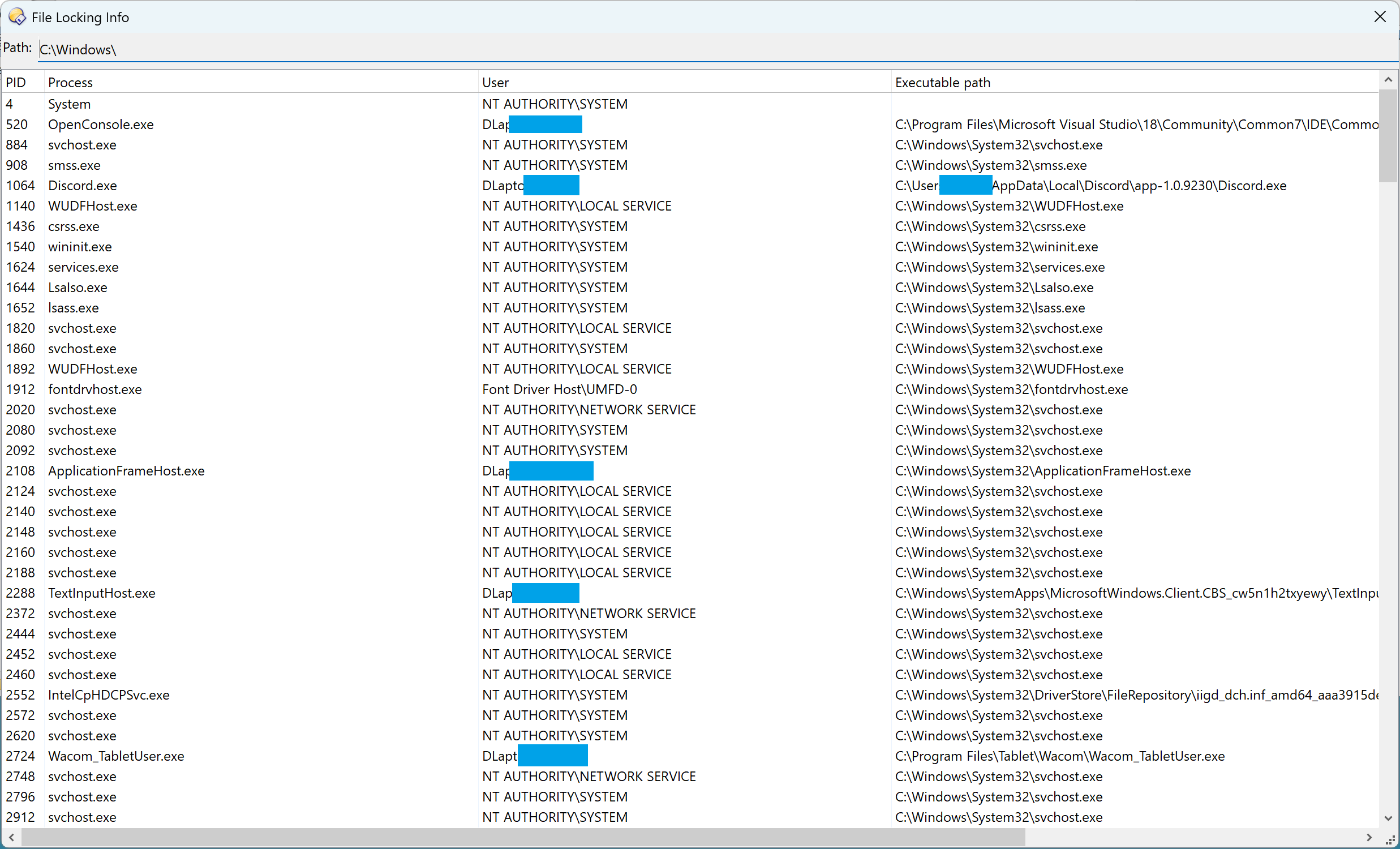
It also has a dialog that shows the full list of processes that lock a particular file or folder:
What does it mean "file is locked"?

File is locked in case:

  • A process opens a file. For example, you open a PDF file with an Adobe PDF reader. While Adobe PDF Reader is open, you can't remove the PDF file.
  • A process loads a DLL. In this case, this DLL can't be removed until the process is terminated.
  • A process loads a file into memory (memory map). For example, a console command like more maps the file into memory to show its content.

Note: Programs like VSCode and other text editors don't lock the files that they use because they read them into memory and then close the file. This is why you can remove a text file that is opened in such text editors.

What does it mean "folder is locked"?

In this script, the folder is locked if any file or folder inside it is locked. Basically, it means "you can't remove this folder".

If you open a command prompt inside a folder, the folder itself gets locked even if it is empty.

How to use

Please refer to the "How to use" section in the readme to learn how to use it:
DirectoryOpus-FileLockingInfo-columns-and-dialog
7 Likes
Directory Opus: 13.22.0 Build 9428 x64
OS: 10.0 Pro 22H2 Build 19045.5247
Hardware: Intel Core i7-1065G7 • 16GB DDR4 RAM

Following the GitHub directions, I installed DOpusScriptingExtensions.FileLockingInfoProvider, downloaded exif-tool-dialog.js and moved it to %AppData%\GPSoftware\Directory Opus\Script AddIns.

I receive this message in the script log:

Visual Indicators: Python executable not found: C:\Users\Work_Desktop\AppData\Local\Programs\Python\Python313\python.exe

Is the python executable meant to be a part of this download or installed separately?

Yeah, the link is incorrect.
Look for releases in the upper right column of the page.
That's how I got it. It works great !

1 Like

Thanks! Python message cleared.

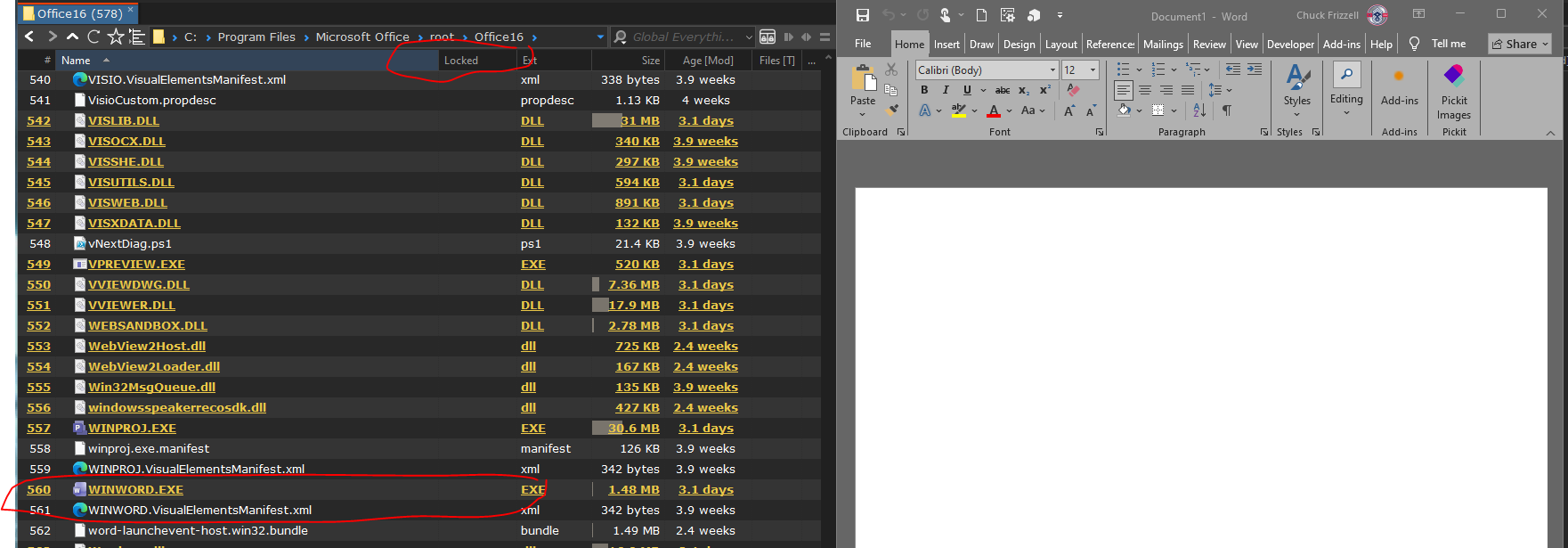
Going to the Windows folder indicates no locked folders. I attempted to create a locked folder situation by opening a command prompt inside a Windows subfolder. That subfolder does not indicate it's locked.

Either I have no locked folders or am missing something.

Open a word document.

I'm missing something here

EDIT: I am still getting the message "Visual Indicators: Python executable not found: C:\Users\Work_Desktop\AppData\Local\Programs\Python\Python313\python.exe"

I don't have a /localappdata/Programs/Python/Python313/python.exe .

You'll need @PolarGoose to solve this.

1 Like

downloaded exif-tool-dialog.js

Sorry, the link was incorrect. I have fixed the README. You were supposed to use DirectoryOpus-FileLockingInfo-columns-and-dialog.js file.

"Visual Indicators: Python executable not found: C:\Users\Work_Desktop\AppData\Local\Programs\Python\Python313\python.exe"

At no point does my code use Python. It is strange. It might not coming from my script.

Could you please post the content of the

  • C:\Windows\SystemTemp\DOpusScriptingExtensions.FileLockingInfoProvider.WindowsService.log.txt
  • %TMP%\DOpusScriptingExtensions.FileLockingInfoProvider.log-*.txt

I'm missing something here

You do everything right. Something doesn't work. We need to investigate. I have tested that the code works in Windows 8, 10, 11.

1 Like

You are seeing an error message from my visual indicators script. For that you do need to point to a python executable. It is confusing because our columns have the same name. You need to ensure you turn on his columns not mine :grin:

2 Likes

That was it, thanks!

1 Like

I'm not sure why but it doesnt return any values for me. It requests the info in the log but no values ever appear. My pc is pretty locked down so perhaps antivirus is catching it?

@jfour18,
Could you share the logs, please? You can do it as a private message.

1 Like

Current status of the problem that @jfour18 has:

It is something in hard configurator. I disabled more thoroughly and it works now. I also added an exception in defender UI, so not sure if that contributed. I'll try to pin down the exact setting since hard configurator just toggles windows settings.

Thanks!
I was looking forward to being able to test this.

Yep, it's pretty fast. And it works with several types of locking, even detecting things its competitors can't.
Have you thought about expanding it into a full program, like a LockHunter Plus Ultra :grinning_face:?

I've been comparing it with my Python implementation too. Not looking good for me :melting_face:.

Some things I've noticed:

  • Once you've used it, the process performs indexing every few seconds, which shows up as a small spike in resource usage. The only way to stop it is by stopping the service. This is obviously nothing to worry about or that affects anything, but it's good to know.
  • The dialog is purely informational.
  • When the service starts (e.g., after being manually stopped), there's a delay where no data is returned (around 30 seconds, but it's arbitrary).

Basically (for my user case), there are some differences to consider when choosing between one or the other. Note that this is my personal take, based on my own subjective biases.

Compared to my implementation (my column is the one on the left):


(my implementation is the one on the right)

About my python implementation:
The good:

  • It doesn't run in the background all the time doing things. This is OK in my case, since I don't need that information constantly.
  • The dialog has more useful options.
  • It opens a potential way to expand scripts through other languages (I found the best way to intercommunicate between the two).

The bad:

  • It's slower than the service-based implementation.
  • It doesn't detect locks from processes running as SYSTEM (yet).
  • It doesn't detect certain types of locks, like memory-mapped ones, etc.
  • Since I need admin privileges, it can be annoying if UAC is enabled.

FYI, last night I think I found a way (surprisingly without triggering ESET alerts) to elevate the script to SYSTEM. I need to test more, but it seems to work (in Task Manager it shows as running as SYSTEM). Since my implementation isn't meant to be shared, I guess that's a good option for me.

That said, is it really necessary for your plugin to perform continuous indexing? If it were always running but only fetched data on demand, how much delay would we be talking about when retrieving results? If it had that option, I'd 100% drop my implementation.

I understand the impact is minimal, it's just a personal preference. I usually try to keep only the most essential processes running, I don't mind waiting an extra couple of seconds if with that I can avoid the unnecesary indexing.

Could you repeat this experiment and share the log file?

  • C:\Windows\SystemTemp\DOpusScriptingExtensions.FileLockingInfoProvider.WindowsService.log.txt

The info should return in about 5 seconds.

About my python implementation:

What WinApi function do you use to get information?

Have you thought about expanding it into a full program, like a LockHunter Plus Ultra

I actually did almost exactly that many years ago with ShowWhatProcessLocksFile. It was before Microsoft made their File LockSmith.
It is the best compromise for a standalone tool. It requires elevation to show files locked by Admin. It doesn't show files locked by System. But it shows memory-mapped files and DLLs.
I could also integrate this new approach with the Windows Service, but it would make it more complex and less antivirus/firewall-friendly. I concluded that it just isn't worth it.

The dialog has more useful options.

Your dialog is amazing. I don't have the patience to make it so functional.

That said, is it really necessary for your plugin to perform continuous indexing?

I think it is possible to use a different strategy when I do it on demand. I need to think about it and experiment a bit.

Sure.
DOpusScriptingExtensions.FileLockingInfoProvider.log-7744.txt (88.6 KB)

The log unfortunately doesn't show when the service was stopped/restarted.
But I noticed that most of the time after stopping/starting the service, the error WSAGetOverlappedResult: Connection refused keeps getting spammed several times after the service starts (there was one occasion where the info couldn't be retrieved for more than a minute). This happens only if you manually stop/start the service, not when Windows start.

I'm really a noob on this one, so bear with me.
When a single item is involved, I was using NtQueryInformationFile for a quick check. Right after that (in this case the script acts as a server), I run a more complete approach to create the illusion that results are delivered faster (show fast results, then complement them with the full method in the background).

For that (which also applies to the columns), I was using NtQuerySystemInformation and EnumProcessModules. I'm also using several others for duplicate handles, getting paths, etc.

When a single item is involved, I was using NtQueryInformationFile for a quick check.

I can add this mechanism to my COM dll and the Windows service. It will be much easier than doing it via Python.

For that (which also applies to the columns), I was using NtQuerySystemInformation and EnumProcessModules. I'm also using several others for duplicate handles, getting paths, etc.

If you get all information about handles and then check every handle name, then this method doesn't work because it hangs if you encounter a pipe. This is why I had to use PROCEXP152.sys driver. LockHunter also uses a driver.

That's true, for that I was using threads and timeouts, but I admit the best approach would be to do it via a driver, like in your case.

What is the drawback of using this? Only performance?

Note that I'm by no means an expert.
Initially I used it because you can get the data in a more direct and simple way.
I noticed that's more useful when you want info about a specific file (e.g., in a dialog), but it doesn't fit well with how columns work in Opus (you'd have to query each file, and if there are many, it becomes a bottleneck). That's it, it's faster, but that can work against if you need info for multiple files continuously.

Another drawback is that you wouldn't be able to detect certain types of locks like DLLs, memory-mapped files, etc. I've also seen that it doesn't return data for some processes like SYSTEM or protected ones (even if you run it from a SYSTEM process and with SeDebugPrivilege).