Filter bug in Chinese input method,and others

Preference-->filtering and sort-->quick keys, filter bar is default
If using Chinese input method, only the first character can be entered.

others,
In Preference, There is an issue with the tips text

If the language is Chinese,when there are spaces, the text will wrap.
When the width is not enough to display all the text, it will occur.
This will lead to layout confusion and poor display effects.

2 Likes

What keys are you pressing in #1? It's too hard to tell from the video.

Also what IME are you using?

I am using Microsoft Pinyin and typing Chinese normally with spaces.
Even if I use carriage return to input English, there will still only be one character.
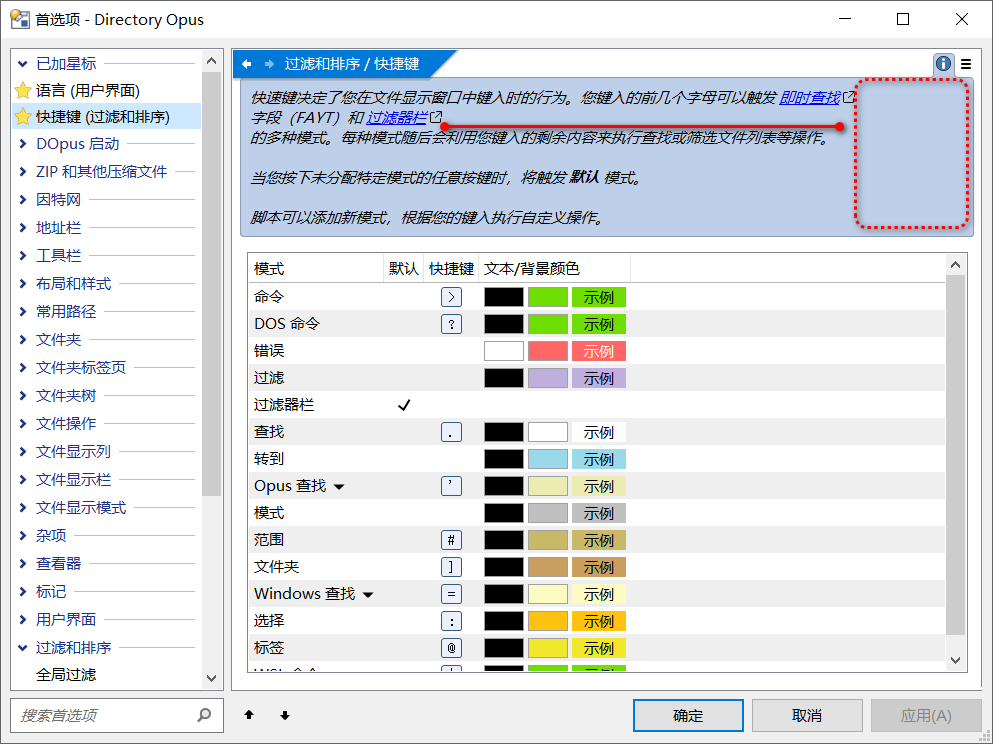
like this

Same issue
Moreover, I also found that clicking on the directory background once causes a second character to appear and overwrite the first one.

It does have a bit of a problem, hopefully it will be fixed

Please try the next beta.