Is there a way to force only lossless transforms of JPEG files? As in, abort/skip if lossless is not possible?
Not built-in. It'll do a lossless rotation if it can, but if the image dimensions don't allow it then it'll fall back on normal rotation.
You could have a script which filters the selected files to just the ones with appropriate dimensions.
Thanks. In that case would you consider adding that feature in future?
For now the simplest option seems to be to make a script that uses jpegtran to do it. That app will only do it losslessly, even if the resulting image has some errors (which it can also optionally trim).
Can you give more detail on how you would use this, and why a script couldn't solve the same problem?
If you want the images to be rotated but they can't be rotated losslessly, wouldn't you still want to rotate them, since that was the aim?
Using the EXIF rotation field is another option which is always lossless, although not everything supports that, of course.
It's really just that the DOpus UI is a nice way to handle it. A script would work and maybe you could build a similar UI with preview, I don't know. It's basically the same reason that DOpus has this feature at all, rather than it just being a script and helper application.
I appreciate what you are saying about still wanting the image to be rotated, but sometimes people would rather accept a bit of trimming at the edges, or some error pixels, rather than having the whole image recompressed. It might not even be visible, e.g. if the image is framed with a solid colour border.
I suppose converting to a lossless format is an option too, but of course the file gets much larger. EXIF works as well but again there is no nice UI in DOpus for it.
I need to figure out how to make a script that uses jpegtran to rotate, checks the result, and if OK overwrites the original file. Maybe it will have a UI to select the rotation direction, or maybe I'll just have three of them to cover 90 degree transforms.
It must be understood that the dimension issue in JPEG lossless transformations is a core design flaw of the JPEG format.
It cannot be fixed without losing backwards compatibility.
I have proposed such fix, but there is little support for advancing JPEG in general, and so I must give priority to more important features. The effort to maintain such non-backwards-compatible correction would be too high in comparison to the benefits which only few people could appreciate.
It is a pity that we who appreciate the benefits of advanced JPEG have to deal with such curiosities, but what can we do?
So there is no automatic solution, and the best we can do is to apply manual adjustments for each individual case.
I have integrated several options for this purpose in my Jpegcrop utility:
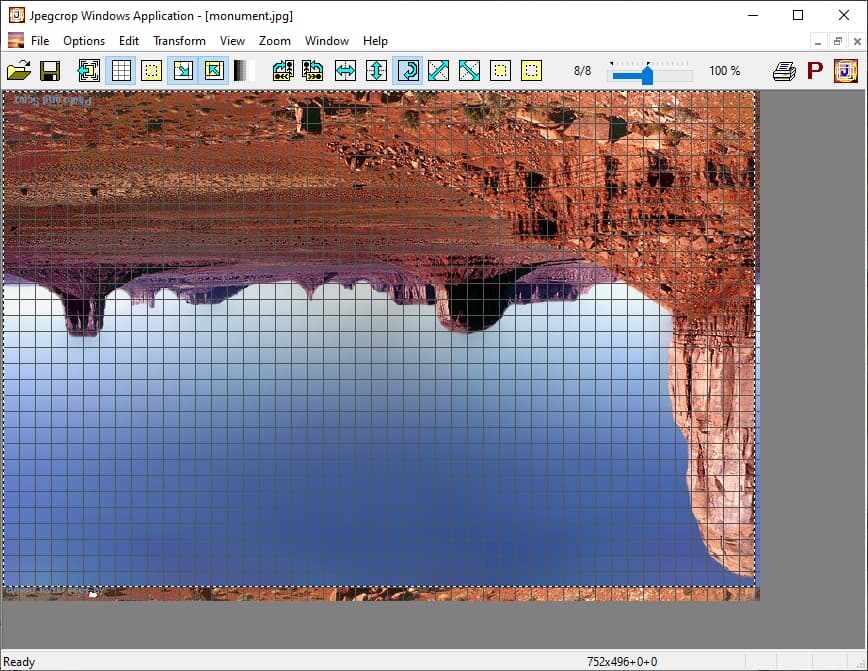
See also the Jpegcrop Preferences and Options description.
A special trick which I use in some cases is to manipulate the image dimensions in the SOF (Start Of Frame) marker with a Hex editor so that it completes the block size. Other than trimming, this adds more or less appropriate content depending on the encoder (the IJG encoder simply replicates the right/bottom edge to fill the block, which is mostly acceptable when becoming visible by such patch).
This dimension patch method I also use regularly with Instagram images which sometimes deviate only by one or few pixels from a standard format (1080x1350 is very common, for example, and regularly you find 1080x1349 or so).
If the deviation is more than a block size, I combine this method with the reflecting crop extension feature of jpegtran which in most cases gives pretty results.
So a number of things can be done from case to case if you know the opportunities.
Regards
Guido
JPEG developer
We've added this for the next update (13.13.6).
Thanks, very much appreciated. Looking forward to it.
Thank you for your answer. I have a less technical question (because I can only describe it intuitively). When I use Do's rotation function, I can clearly see that the file size changes (over 1MB). However, if I use the built-in photo software (Old) in Windows 10 to open and rotate these files, it seems that the file size does not change, but only the direction is altered. I don't quite understand the technical details, but from a visual perspective, it seems to be lossless. Is this actually lossless? or did Windows use some method to achieve this? If Do could call this method, could it achieve a lossless conversion? Looking forward to your answer
There are three ways to rotate a JPEG.
-
Change the metadata. All this does is tell the computer to rotate the JPEG after it has been decoded. It's lossless but may change the file size if the JPEG doesn't already have metadata. Most JPEGs out of cameras and phones already have it.
-
Do a lossless rotation of the JPEG data. Without getting technical, if the JPEG image meets certain requirements about its dimensions, it can be rotated losslessly by just modifying how the data is decoded.
-
Lossy rotation where the JPEG is decoded and then re-encoded. Quality is degraded but it works on any JPEG.
Metadata change way as mentioned by mojo-chan is not reliable, because JPEG decoder is not obligated to respect metadata.
Lossless rotation of the JPEG data is always reliable, provided the image dimensions meet certain criteria (divisible by 16 should always work, divisible by 8 in some cases as well).
Moderate file size change after lossless rotation (depending on entropy coding method) is normal!
This is because the final lossless entropy coding stage sees different data order after rearrangement of data for rotation.
This is similar to text compression with zip: Rearrange words or letters in a text and you get different compressed file size, because compression depends on data order.
More puzzling:
Even the decoded pixels of a losslessly rotated JPEG image may not match with rearrangement, because also the lossy parts of the decoding process depend on data order.
All what the JPEG lossless rotation feature promises is data match after applying the reverse operation on the JPEG data, internally represented as DCT (Discrete Cosine Transform) coefficients.
This is important to know if you want to verify lossless rotation by decoded pixel comparison: First reverse the operation on the JPEG file, then compare the decoded pixels (with the same decoder!). Do not decode the original and rotated files and then rotate the pixel image. Need not match.
Regards
Guido
JPEG developer
From this statement, I assume you are in Windows 10, because honestly in 2025, there are no situation where having a .jpg with metadata changes that is not reliable. Even Windows 11 is rotating .jpg images using orientation metadata.
Do you have a concrete example with tools that are up to date in 2025, where it is not reliable?
I am not convinced with this approach: this is the same as recommending to some one to use only plain text files instead of .docx files because Word doc are not always reliable. Basically that's true, but it should not fully stop you to use .docx files when you need them.
The file size change is not just moderate, it can be massive (Rotate images using linked viewer - #9 by Kris) so we can have strong doubts about the lossless behavior.
I am in Windows 10 x64, in Windows 11 x64, in Windows 11 Arm64, in Windows 7 x32, in Windows XP x32, and in macOS 15 Apple silicon.
The metadata way is a dumb method, and Windows is a dumb OS regarding JPEG support.
For more info see my post in Rotate images using linked viewer.
Dalija Prasnikar is a respected member in the Delphi development community.
Look what she has to say in the Moving from W10 -> W11 thread:
But who honestly wants to go back to 98 or XP?
I would go back to Vista or Win 7 in blink of an eye. I would be thrilled if I could have stayed on Win 10, too.
Windows 11 is by far the worst Windows version ever (and I could not believe this was possible after Windows 8). There are zero new features I want to have and they messed up everything else.
For start half of the things no longer cannot be configured. Taskbar height is too big, colors and icons are awful, Windows theme even worse (selection colors, checkboxes, and similar), you need ten clicks more to do things, fonts are total nightmare and cannot be uninstalled. Whoever designed that Cascadia Mono font needs to be tarred and feathered. It is absolutely illegible and half of the websites are using it as the default monospace font.
And this is just scratching the surface...
Well, I wouldn't go as far as Dalija - the latest Windows 11 2024 Update (Version 24H2) is somewhat usable (after finally adding jump lists in the start menu). But there are still serious flaws (e.g. the Taskbar height issue) so that I will stay in Windows 10 as long as possible on the main system.
I'm sorry, I don't have the time to list all use cases where JPEG images are used without metadata, and I have no intention to convince you with a particular example.
With jpegtran or Jpegcrop, you can strip all metadata off a JPEG file (-copy none), and the image will still be properly reconstructed.
The conclusion is simple:
Metadata is not the right place for information which is essential for proper image reconstruction.
Period.
It has nothing to do with 2025, and it doesn't matter if you agree or disagree.
Quite the contrary:
Opus has up to date JPEG 9 support, while Windows supports only JPEG 6, which is the JPEG development status of year 1998.
So Opus is the .docx supporter, and you want to use only Windows 98 and plain text.
Regards
Guido
JPEG developer
Why not use a dedicated viewer like Irfanview
We are talking about JPEG:
- Windows => JPEG 6 support (1998)
- IrfanView => JPEG 7 support (arithmetic coding)
- macOS => partial JPEG 8 support (SmartScale)
- Directory Opus => JPEG 9 support (SmartScale/lossless)
Regards
Guido
JPEG developer
I have now checked the latest Windows 11 2024 Update (Version 24H2), both x64 and Arm64 platforms, and found that there is finally support for JPEG with arithmetic coding (JPEG 7) in the system, but not in the Edge browser:
 File Explorer Thumbnails View
- Windows Photo Viewer
- GDI+ (checked with SimpleImage)
 Edge browser
Good that there is finally some JPEG progress in Windows, albeit slowly.
Apple managed to use their own enhanced image functions with their Safari browser in macOS.
Microsoft seems not so smart, they use a vanilla browser engine with inferior image support.
Regards
Guido
JPEG developer