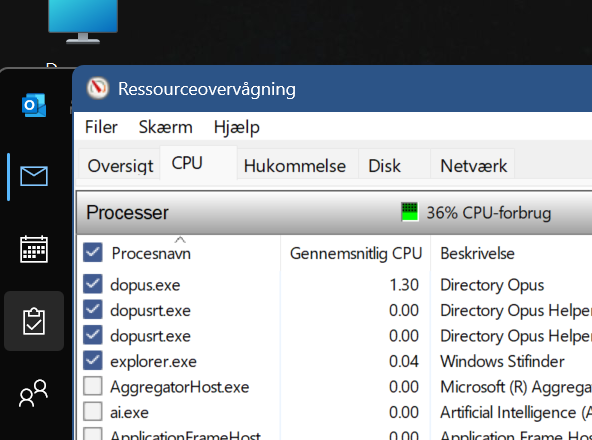
What else is going on at the same time? Are other processes using the CPU or disk in Task Manager?
Opus may just be responding to filesystem change events if something else is generating a lot of them. But it could many different things depending on your configuration, scripts you've installed, and so on.
its all just left idle and no changes the past days. In the process of trying to figure this out i had the toolbar showing "favorites" and removed "other favorites" on that toolbar, any way to get that back ? It didnt seem to have anything to do with that
If i want to set everything back to standard (equivalant to a uninstall and reinstall) but before that make a copy of all settings, toolsbars, setup etc so i can restore in case this does not solve this. How do i do that?
Explorer.exe uses 0 % cpu and opus.exe about 0,6 % idle
nothing worked, I found this which differs on th elaptop compared to stationary: svchost.exe (LocalServiceNoNetworkFirewall -p) has a higher CPU load. I have no idea if its relevant, any thought if this could be related as this was the most obvious difference
If the firewall is using a lot of CPU, something is doing something with the network. Work out what that is, and it's probably also making a lot of file changes which Opus is having to work through (if you have Opus windows open).
Since you're on a new machine, my guess would be cloud storage or backup software synching in the background.
There is a config reset option in the Backup & Restore dialog.
i disabled the wifi connection this set cpu 0 % for svchost.exe (LocalServiceNoNetworkFirewall -p)
however dopus.exe on laptop (not brand new its 6 months) still consumes about 10 times cpu than comp to stationary.
When opus is not open as window cpu reduces to same level as stationary ie om1 % but opening a opus window increases it constant to 1 %, on the stationary its still 0,1 % when opus windows is open. So theres a noticeable difference i have not seen before.
Would you say thats normal ie whats cpu usage idle on your laptops on opus open windows (not doing anything just idle and open) ?
i managed to reduce cpu idle for svchost.exe (LocalServiceNoNetworkFirewall -p) to app 0% by disabling in network setting => network and sharing => advanced => network registration => off
but opus.exe cpu idle still is 10 times higher on the laptop than on the stationary idle. Strange.
I am guessing that if the CPU usage of dopus.exe on your laptop was lower previously than it is now, then something else on the laptop has changed or updated that now causes more file system activity than you were accustomed to, which in turn makes DOpus work a little more.
....
One thing to keep in mind, generally, is that laptop CPU models are typically smaller/weaker (fewer and slower cores, designed for mobile) compared to stationary desktop CPUs (typically more, faster, higher-power cores).
An application running on a weaker CPU will report a higher % CPU usage even if it's doing the exact same amount of 'work' as on a stronger desktop CPU. This isn't the same as actual power usage, however. The laptop CPU could be reporting a 'higher' CPU usage, but it may be more power efficient for that work.
This could be especially noticeable if the laptop is in any power-saving/battery-saving modes, since that will reduce the max frequency of the CPU further (meaning the same process will take a higher % of the remaining CPU 'capacity').
...
You may know these already, but I recommend a couple tools in your quest to tame your system power usage:
HWiNFO
Use the Sensors + graphs to see relationships between cpu speed, power usage, etc. It's a great tool! But obviously, don't run it all the time on your laptop after your investigation since it will also use power.
System Informer
I prefer System Informer over Process Explorer (Microsoft) since it has extra functionality and quality of life features I use. Its 'Disk' tab for filesystem activity may help you compare your two computers for what file activity could give DOpus extra work to monitor on the laptop.
I am not an expert on this, but here's a quick list of file activity I'm guessing can affect DOpus:
(From smallest to largest impact)
Idle monitoring
Occasional file writes (size/date updates)
Frequent writes to many files
File create/delete bursts (especially thousands)
Automatic folder size recalculation (This option should be off by default)
Thanks yes i had these considerations too after digging a little deeper (laptop vs stationary and proportional usage) - so very good points. It appears as opus.exe after a few minutes of no file activity by me reduces to about 0,1 % too.
but thinking of it i installed everything search and even though its very efficient it indexes files ever so often and if thats related to opus in some way that may be part of the explanation.
And thanks for the tips on opus setting ill go through then and see if i find anything
I don't think I've ever seen Everything use CPU while idle, ever. Or affect Opus in that way either.
Regarding your question, no, it's not normal for Opus to use CPU all the time. It may spike in specific cases (like loading thumbnails). And no, we have no way of knowing what's happening since we don't have access to your computer.
As already suggested, you could try using Process Explorer to see what's going on. I think even the Windows Resource Monitor could give you some clues.
If it gets too confusing, you could back up your Opus configuration and then reset it (both can be done from the Settings/Backup and Restore dialog, is not neccesary/recomended to manually erase it). That way you can figure out whether it's something specific to Opus and your configuration, or something else.
thanks yes i tried a reset it didnt solve it unfortunately. My best guess now is the analyses of laptop cpu behaviour and the cpu numbers that does not express a true comparison with a stationary
Resmon shows explorer.exe uses idle uses way less that opus.exe
what you see on the screenshot is that dismanager clceans temporary files, which causes file movement however explorer.exe use nu cpu and opus much more
i dont know how to use process explorer to do an analysis

 thanks so many (great) options sometimes hard to find - thanks