I have spent hours and hours of fruitless time reading about, and experimenting with annoying system folders in Win10 and Win11. Can anyone provide a way of eliminating them? Most annoying are Music, Pictures, and Videos. Thanks.
Why not ask Auntie Google? -> "remove library folder windows 10"
Eliminate them in what sense, and from where?
Windows has several folders/libraries named "Music" now, for example.
Eliminate them from the Folder Tree.
I have spent hours researching posts given by Google. No solution.
Just RIGHT-CLICKED on Documents, Music, Pictures ... and found the option "SHOW IN FOLDER TREE" - deactivated, and those folders didn't show anymore...
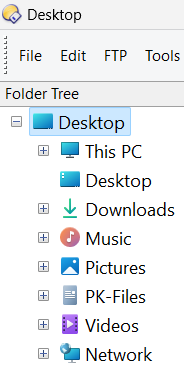
Yep, seems (<-SEEMS) to be where I found (RIGHT-CLICK) the option "SHOW IN FOLDER TREE".
I don't have that option.
RIGHT CLICK with mouse?
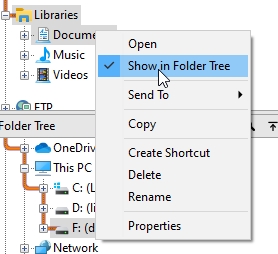
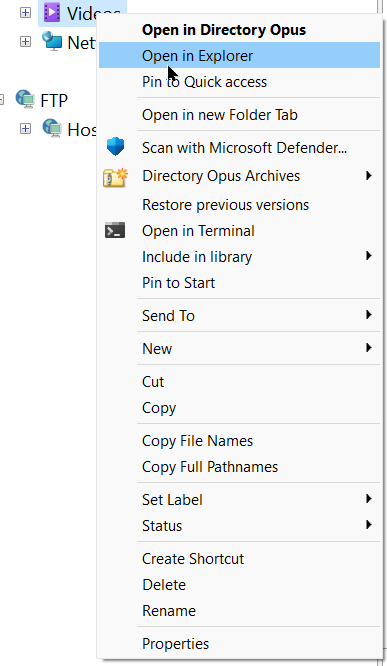
I am amazed - but that doesn't help, does it?
Can we have a look at your complete folder tree?
I sent that already.
Nothing above "Video"?
Here it is, again.
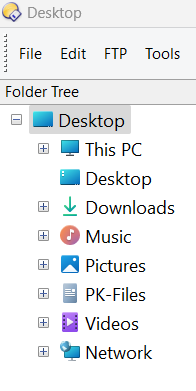
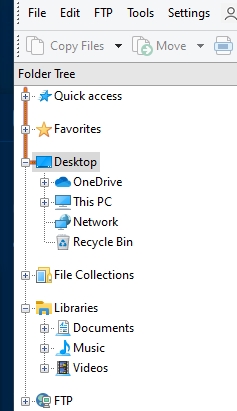
There's something very different in your setup, which I cannot identify. There are library-folders under your "Desktop" whereas in my folder tree I find them under "Libraries".
I'm sorry, we need to wait for @Leo
Check "Settings" and search for "Folder Tree" and there, check "Contents". Let me know if this helps, please 
For those folders that Windows 11 now clutters the tree with, an answer is here:
Jon’s post here may also be of interest:
1 Like