Yes. @oberold I want to know how buggy is too.
v0.9.3 (27/06/2025) :
- When you run
CONFIG, if there aren't any saved columns yet, you'll be prompted to pick a file for preview and to populate the list. - Improved how controls get enabled and disabled in
CONFIG. - Added new arguments:
EXPORT: Export columns to a file.IMPORT: Import columns from a file without deleting existing ones (accepts a filepath).!IMPORT: Import columns from a file and remove existing ones (accepts a filepath).
Note:IMPORTneeds a JSON file in a specific format (explained in the first post), or it won't run.
1 Like
v0.9.9 (01/07/2025) :
- When you run
CONFIGand the list is empty, you'll be prompted to pick a file. Hopefully this clears up confusion about how to add new values that some users had. CONFIGnow accepts a file path as an argument. SoMediaInfo++ CONFIG c:\path\to\file.mp4will open the dialog with the preview already loaded.- After opening a file for preview in the dialog, every keyword you see is saved in a database to populate the list on future runs. This is really useful, since you no longer have to remember which file had the entry you wanted—you just need to have previewed it at least once.
- The preview now converts values to the specified type, just like they'd appear in the column.
- Thanks to @PolarGoose and the latest MediaInfoRetriever plugin, localization (unit fields and certain translated values) is supported. The language used will match the one Opus is running in.
- Files marked "offline" are ignored when fetching data, to avoid unintentionally downloading them.
- Improved how new file-type groups are added to avoid issues when using Opus in multiple languages.
- The "star" type is now properly recognized in column types.
- Fixed a possible error that could occur in saved data when switching languages in some cases.
- Other minor tweaks.
Once the new version of Opus comes out, this script add-in will officially move to the Script & Buttons section, with a clearer description of how to use it, etc.
Please report any bugs or suggestions—thanks!
1 Like
It introduces the following features/changes:
-
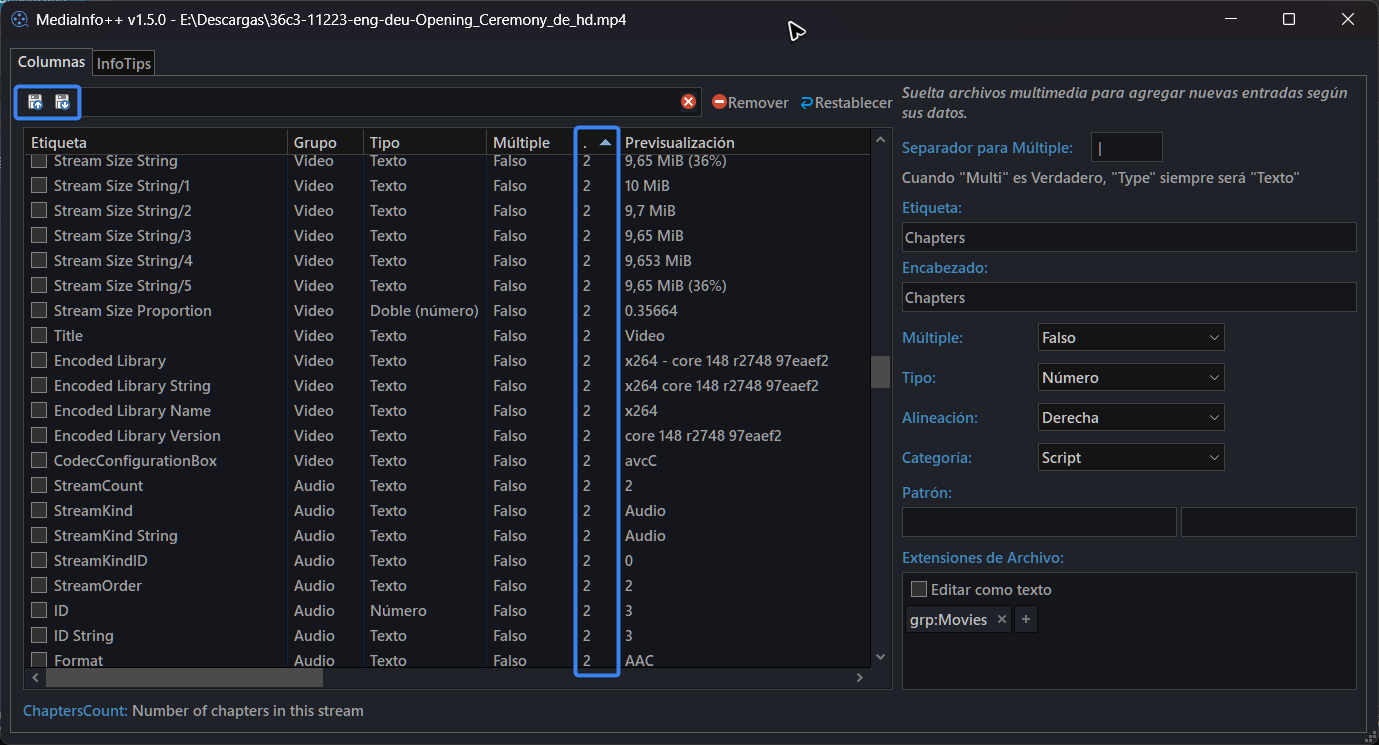
New column in the config window that shows how many values a given keyword has—helpful to decide whether it's worth enabling "Multiple" or not.
-
Added the ability to import/export columns from that same window.
-
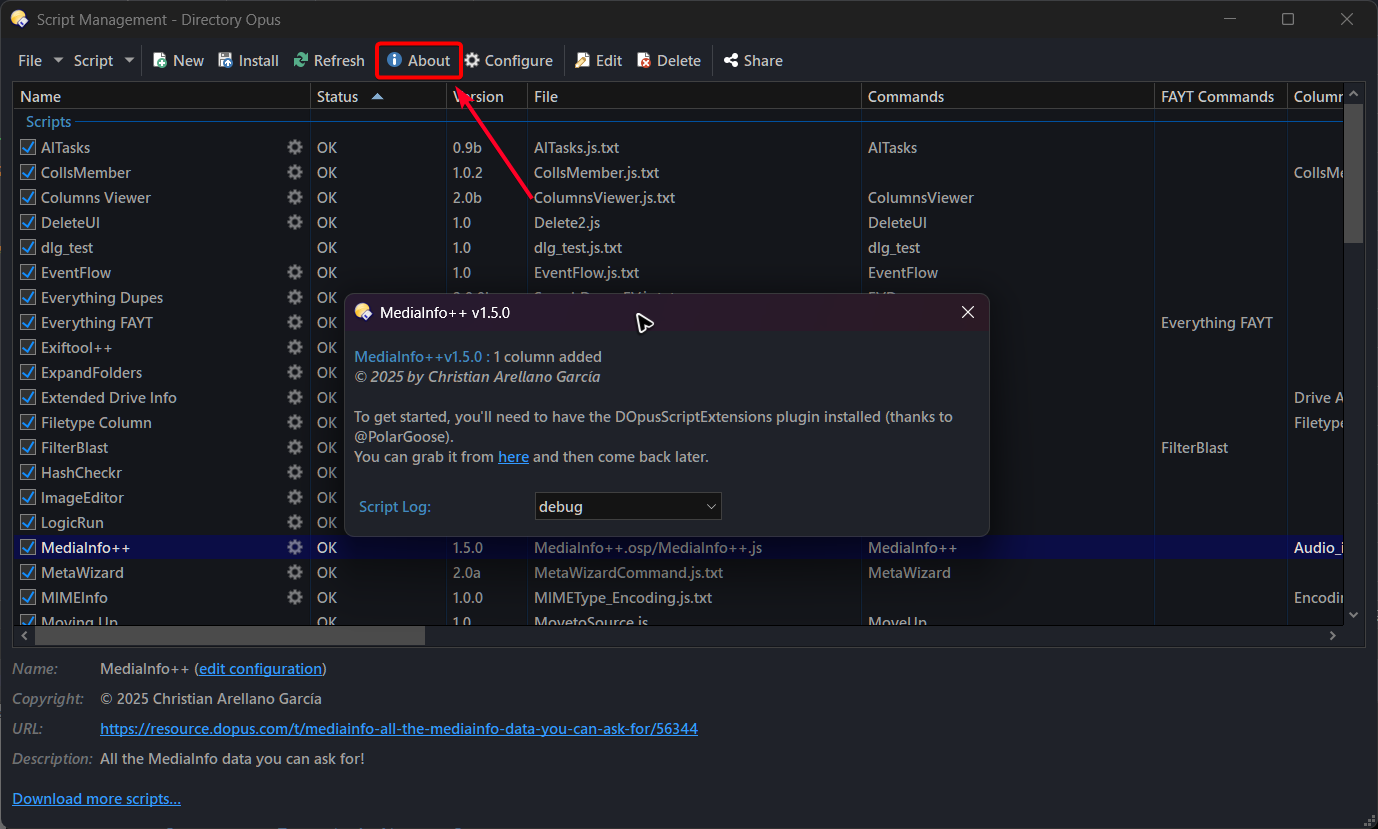
New "About" dialog. It includes useful info, like the number of columns added, and the script log settings have been moved there for easier access.
-
Fixed some quirks when previewing values in the config dialog. Now, all values are reset every time a new file is used, to avoid confusion with merged metadata from a previous file.
-
Better handling when trying to import/export columns via command arguments while the config window is open. This should no longer be allowed.
-
Other minor fixes and improvements.
Why am I posting this here?
Because I've noticed some random crashes while using it (usually when using the new import/export buttons or after closing the dialog). I haven't tracked down the exact cause, because it seems random, but I think it's related to something I reported a while back. It seems tied to the dialog object behavior, including file open/save dialogs.
That said, I've made some changes and I haven't run into any more crashes all day while testing the script. But just in case if you do encounter a crash, please report it here with some detailed explanation and send the crash dumps using the existing command in Opus, maybe that'll help to find the cause.
2 Likes
Please add the version number to the Install packages.
v2.4.0b1 (21/09/2025) :
- Implemented a fallback for MediaInfo if DOpus-Scripting-Extensions isn't installed:
- Recommended for portable Opus use, since it's slightly slower and shows data a bit differently (e.g., values encoded in base64).
- If the script doesn't detect MediaInfoRetriever, it will look for the CLI version of MediaInfo, which must be placed in
/dopusdata\User Data\MediaInfo++\mediainfo.exe - For localization support, place the corresponding .csv files in the same folder. These files can be obtained from the MediaInfo GUI version, from here, or copied from the folder where DOpus-Scripting-Extensions was installed.
- Improved the script uninstall process. It now asks whether you want to delete the config folder (
/dopusdata\User Data\MediaInfo++) - The saved-fields file is now moved to the script's config folder. Migration is automatic.
- Now, for date/datetime columns, you can pass a partial date (year or year/month) only. This is useful for fields like ReleaseDate or TaggedDate, where sometimes only the year is available. In those cases, the date is set to 01/01/year.
- Improved preview for date/datetime type fields.
Report any bug/idea here.
2 Likes
Is there any way to install this in to C:\Users\Khalid\AppData\Roaming\GPSoftware\Directory Opus\User Data\PolarGoose folder and MediaInfo++ script should automaticaly recognize the path and works with that?
My goal is when I create a Backup of Opus settings then DOpus-Scripting-Extensions also added with my Opus Backup files. Then Next time I format My windows the DOpus-Scripting-Extensions need to be installed again in my system.
No AFAIK, and that wouldn't help you either since the .dll needs to be registered, which is more complicated than the installation itself.
1 Like
Hi. Just stopping by to see if anyone’s had a chance to test this. Has anyone run into any issues?
I haven’t used it lately, but will be soon, so I’ll let you know.
Has anyone using v3.0 with the ConformanceErrors column enabled found a file where the script shows "1" but MediaInfo (either in its GUI or via MediaInfo++ DUMP) reports more than 1?
I ask because I found a few cases that show discrepancies in how this data appears in the report, and it looks like there are at least two different formats to show this data. I wanted to check other examples to be sure.
1 Like
I was looking for options to cache data to improve the performance of scripts like this. Options considered:
-
Save as ADS
- Would only work on NTFS drives.
- No dependencies.
- Still has to read multiple files from disk.
-
Save in a database
- Works for all files regardless of origin.
- It's almost twice as fast as the previous method.
- Only a single file is used which, once indexed, returns results instantly.
- A driver must be installed (which 99% of the time comes with Office).
I chose the second option for testing reasons.
Anyone up for giving it a try? Especially if you have a ton of media, to see if it's the right choice or not.
To consider :
- Reading columns from cache takes 1ms.
- Cache can be disabled via Options. (is enabled by default).
- You need Microsoft Access Database Engine 2016 Redistributable (which comes if you installed Microsoft Office 2016 o superior)
- File changes and updates should be done automatically.
- Files smaller than 10kb are never included in the database.
- There may be some quirks I haven't run into yet, so feedback is really appreciated.
- (If this works out, it would be a big help in speeding up the release of Exiftools Columns+
 )
)
Other changes:
- Some minor UI tweaks.
- Now some options are accessible from their own dialog, both from the main window and from Script Management > About.
- Added the option to use a data cache (enabled by default if available on the system).
- Other fixes when resetting entries and creating custom columns.
1 Like
I encountered an issue with the Export/Import columns feature. After exporting my customized columns to a JSON file using the Export columns to a file button, I immediately attempted to import the same file back using the Import columns from a file button. However, the import failed with the following error:
"File does not have a valid format. Check the script log for details."
According to the script log, the specific error is:
ERROR => => Error importing columns: "Audio_BitRate_Mode" property "keyword" is not valid!
Audio_BitRate_Mode is located at the very beginning of the JSON file. Here is the corresponding section:
"Audio_BitRate_Mode": {
    "label": "Bit Rate Mode",
    "exts": "grp:Music; grp:Movies",
    "header": "Bit Rate",
    "align": "left",
    "type": "string",
    "category": "script",
    "enabled": 1,
    "group": "Audio",
    "keyword": "BitRate_Mode",
    "multi": false,
    "regex": "",
    "regex1": "",
    "regex2": ""
},
What is most concerning is that this issue persists even after a clean reinstall of the script. Even with all settings at their defaults, a freshly exported file cannot be re-imported, consistently triggering the same "property 'keyword' is not valid" error (this time is Audio_infotip). It seems there is a fundamental mismatch between the export format and the import validation logic.
Is this a known bug? I reproduce in both 3.1.0 and 3.9-test.
Thank you for your hard work. I’ve been using this script consistently, and it makes browsing video file parameters on my NAS very convenient. I’ve added the columns provided by this script to my 'Videos' folder format and I’ve even written some evaluator scripts to make use of several column values.
Regarding the potential name change: I might need to make some adjustments to my existing configuration if the script name changes... so keeping the current name would definitely be ideal. However, renaming is also acceptable since the necessary adjustments shouldn't be too many. Thank you again for your contribution!
1 Like
Thanks for testing 
Does the database work reliably in that scenario? If so, that would be awesome.
I suggest setting the minimum file size to something that fits your needs (it is currently set to 600KB by default). The script actually does a kind of small checksum for every file, which works fine for actual media files, and reupdate the values if necessary, so I'm not really sure how this would behave in your setup.
I was thinking about changing the name to something like OpusMediaInfo, since I can't call the ExifTool one Exiftool++, but I haven't decided yet, mainly because there might be people already using it. Besides that, you would also need to change any reference in your Opus config, and copy the contents of the User Data folder into the new one that would be created with the new name.
1 Like