I'll start out with my setup before I explain my issue:
Windows 11 23H2 build 22631.3737
Directory Opus 13.6 build 8890
Two input languages installed: English (default) and Japanese
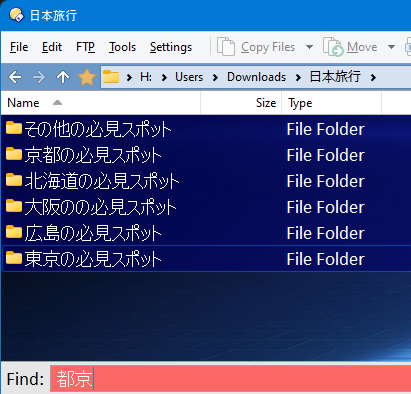
So my issue is that I have a bunch of folders full of notes and images from places that I want to visit in Japan for an upcoming trip there, and all the folder names are in Japanese:

which are all in the format の必見スポット.
In order to navigate to the correct folder more quickly, I use DOpus's quick search so I just start typing and it jumps down to the folder I need.
My issue is that whenever I use the IME to type in Japanese for the quick search, the IME displays what I've typed correctly (the example in the screenshot is when I'm searching for 京都 which means Kyoto):

However, when I push Enter to confirm that the IME has converted what I typed into the correct kanji, and it transfers that over to DOpus, DOpus always reverses the first two characters of whatever I type. For example it changes 京都 to 都京、so that quick search doesn't find any matches:
So I'm wondering if this might be some kind of bug in how DOpus gets the input from the Windows IME...
It might be worth noting that this only seems to happen when I start a quick search when the quick search bar at the bottom isn't already up. When the bar is there with the two reversed kanji characters, I can backspace to clear the search, type the same exact kanji again and DOpus then displays it in quick search bar in the correct order:
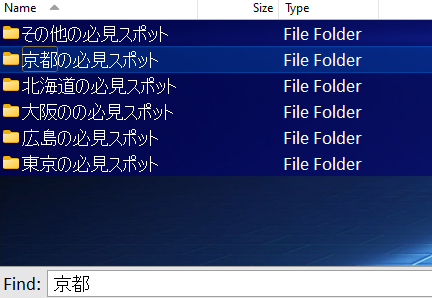
So it kind of works, but it's very annoying and difficult to have to type my search, quickly backspace to clear my search before the quick search bar disappears, then type the same exact thing a second time before it will work correctly.
I've also noticed that it will always only have this issue with the first two characters. For example, if I type in a longer search such as 京都の, DOpus will end up searching for 都の京 (with the first character moved to the end of the search string), and therefore not find anything.
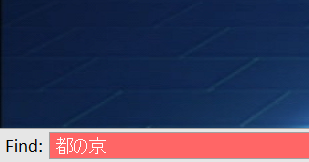
This function worked perfectly in DOpus 12, but I only started having this issue once I upgraded to 13. So I was wondering if there's some setting that I need to change in the new version to make this work correctly, or if this is an actual bug that you can fix.
I hope you can help me with this problem either way, because while this is just planning for a recreational sightseeing trip, I also deal with Japanese as a profession, and this problem also hinders my work.
