strange one this.
Only noticed it with Background Changer V1.2 atm
Have changed a config setting - Global Opacity - all OK
sometime later after a complete restart I have noticed the setting is back to what it was previously ?
It has happened a few times recently, probably since introducing UpdateConfig()
Has not happened with anything else that I've noticed and the code in the script has not been updated for a while.
Have tried calling Script.UpdateConfig() in the OnScriptConfigChange() event, but does not fix the problem - (All config changes are resetting to defaults or previous settings after a DO restart.)
Not happening with any other scripts, the only difference I can think of is that this script is not always running.
How do you debug your scripts?
It's probably a good idea to check whether there's a variable saving you're not noticing by adding some kind of logging.
FWIW, I haven't noticed that in any script, and I use scripts a lot.
I'm not sure what you mean. I have multiple commands that are meant to be run manually only. I don't use or install your script, but from its description it looks like it reacts to events. Maybe you're missing something there.
Also note I don't think I've ever used Script.UpdateConfig(), though that's extremely unlikely, it might play a role here.
The script has been working with no problems since 3-7-2024.
A few weeks ago, I noticed the problem in the OP, indicating a recent update has broken it.
The only thing I can recall is the addition of Script.UpdateConfig() to DO.
One thought - it looks like it is being re-initialised after every DO restart. Were there any changes to how scripts are initialised recently ?
edit: not being re-initialised, it's restoring config settings from a previous session, it looks like.
As for debugging
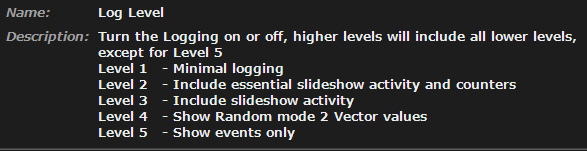
Logging is getting turned off after a DO restart.
edit2: it is just config variables that are affected, persistent variables are OK
edit3: have rolled back DO. No beta versions available but 13.16 working and 13.17 broken.
Afaik Script config are read-only values for the script, something that only the user should be able to change.
There have been recent changes in how these variables can be configured, but I haven't noticed anything like changes not being saved or anything like that.
I do recall @abr once mentioning that one of my scripts was resetting one (yes, just one) of these script configs values. But that was months ago. Given how bizarre the case was, I didn't pay much attention to it since, as I told you, you can't change those values within a script.
Something that can cause all (not just some) of the saved config values to reset to defaults is if Opus sees the script as if it were new (either because you changed its name, etc.). But that would include Script variables as well.
Have you tried changing a setting, saving the change, and restarting Opus to see if the change persists?
Have you tried reproducing it with other scripts?
One thing you can do is log a config var that you know doesn't stick, before and after your script interacts with it, and right before exiting Opus, to see if it maintains its value up to that point.
might have something to do with the config changes in Directory Opus 13.16.6 (Beta)
I'm on 13.19.6 and I just installed your script. I only added this part to make cleanup easier later.
function OnDeleteScript(deleteScriptData) {
	DeleteVariables();
	Script.vars.Delete('*');
}
Then I changed several config values (including the Global Opacity you mentioned). I tried resetting Opus (via dopusrt), exiting, and reopening Opus. I did this at least five times. In all tests the changes stayed.
Note that I only changed config values to test whether they'd stick ( and they did). So no actual use. Although that shouldn’t matter for what you’re suggesting, maybe someone else actively using your script can confirm whether they see the same problem you mentioned?