Hi,
I have the same problem with the names of files and folders being cut off, and they are in capital letters in my case
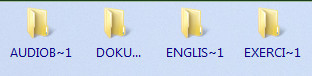
When I turned off Preferences / Display / Options / Use visual style to draw items (Vista/Win7 only, overrides background colors) as suggested I got normal Segoe UI font, and full file and folders names but the font reversed to capital letters and cut off names after the mouse is inactive for a few minutes, and, as far as I could notice, only when the Dopus window is shown in the foreground on the monitor.
The same problem with files and folders names being cut off occasionally occurred when I switched between styles, which doesn't seem to occur any more after I unchecked Folder lock boxes in the individual styles settings. I also noticed that any updating of a style for some reason gets this boxes automatically checked. I tried everything including deleting all styles and tab groups, replacing folder formats for all folders through Folder Options, saving new styles and listers, as instructed here on the forum Folder Formats: Quick Guide but I still have the problem with this. Hope that you have solution for this, thank you for the help.