Hello,
I utilize a remote control software application called RustDesk.
It allows for the creation of a desktop shortcut that allows someone to double-click the shortcut and it will launch the application and connect to the host.
Double clicking the shortcut directly from the desk top or from a "windows explorer" window, The application launches and connects as one would expect.
But if I try the same thing from within Directory Opus... the application will not launch.
This is the target of the shortcut "D:\Programs\RustDesk\rustdesk.exe --connect 131347432"
And the shortcut is created by RustDesk.
I am running windows 10 pro 64 version 22H2
Directory Opus 13.21
Hello,
I do not get an error message of any kind. It seems like it is not making any interaction at all.
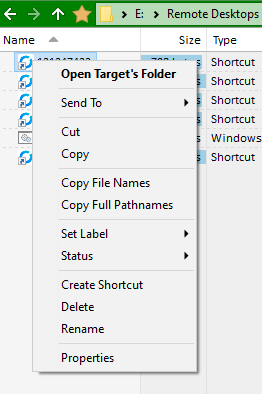
However when I right-click the shortcut I see the attached dialog
Which makes me think DO is not seeing it as a shortcut.
I have attached the actual shortcut in a RAR archive Shortcut.rar (1.2 KB)
And strange thing about putting it in an archive I could not add it through DO
I had to create an empty WinRAR archive first and then drop it in using the WinRAR interface.
Hello Leo.
That would be my first guess too. but I am not running an antivirus other than the built in windows.
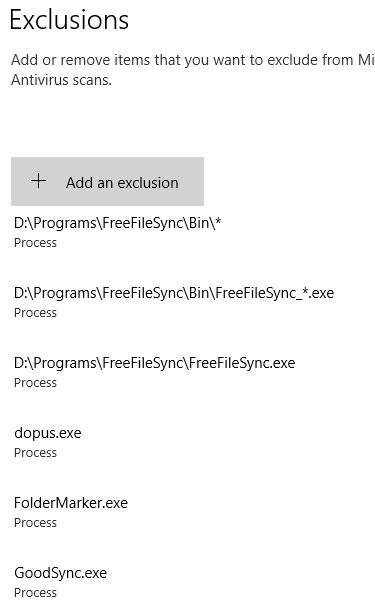
I even have an exclusion for the dopus executable.
Hello Leo. I already had the dopus in the exception list.
I added it years ago as I didn't want windows scanning the application that I use everyday all day.
I did add the rest of the Directory Opus executables but it dod not seem to make a difference after a reboot.
FWIW, rustdeck shortcuts are working fine here when opened with Opus.
Windows 11 Pro 25H2 / Opus 13.20.
Nothing related to Opus nor Rustdeck in my exclusion list.
Thanks gang for not giving up on me... still trying to figure it out.
This issue persists even after I turned off / disabled real time protection including the stuff under "App & browser control"
and for Jon this is what I see when I enable those columns
I am flumuxed as to why shortcuts work in Windows Explorer but not in DO
It just occured to me ... I just reset directory opus back to factory default and the issue persists.
I will reboot and try again with the reset config before putting my theme back
Since it works in W11 and not on W10: have you tried to create the link on a W11 machine, and copy it to the W10 computer to see if it works? And the opposite?
Hello PassThePeas. Yes I have copied a working shortcut on my W11 to my W10 and the shortcut does not work when trying to launch from DO. but it does work from Windows Explorer.
I have also tried Jon's suggestion being sure to reboot.
Additionally I ran the DISM commands:
DISM /online /Cleanup-image /CheckHealth
DISM /online /Cleanup-image /ScanHealth
DISM /online /Cleanup-image /RestoreHealth
and SFC /Scannow
Then rebooted... but to no avail.
I can see we are running out of options... I will just have to either launch my shortcuts from windows explorer or use my windows 11 machine