I have some text files that use tabs for spacing, When displayed in the preview pane there are quite a few more spaces than appear when editing the file in Notepad or whatever where tab spacing is set to 4. Any way to control the tab spacing in the preview pane?
try this editorWrapper : a viewer Using Notepad4 / Notepad++ / EmEditor to preview and edit text files
make sure its above normal text previewer
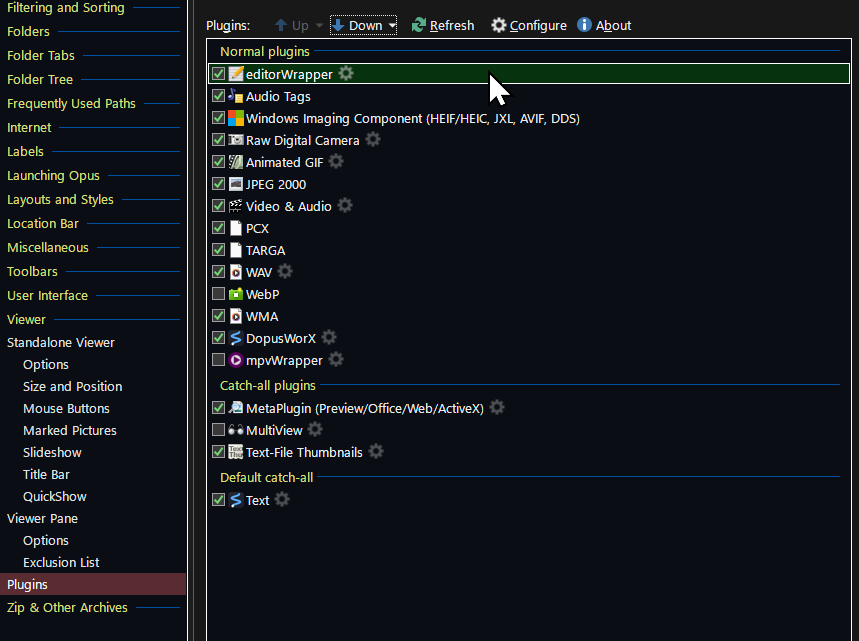
Thanks for the recommendation. I hadn't really done an extension before, so naturally I screwed it up the first time. I forgot to add the link the Notepad ++. Once I did that, everything looks good in the preview window. Thanks so much for the help.
Not sure that I want to edit in the preview pane after playing with it for a bit. Is there a viewer-only plug-in that maintains the right spacing relative to tabs?
this one has view & edit modes, same procedure as above (as in place above the old text viewer)
Will do. Thanks for getting back to me so quickly.