Hi,
Apologies if this has been addressed elsewhere, but is there any way to visually identify (status icon or highlight) folders with aliases, like you can with favourited folders. Would make it easy to see when links are broken, or a folder has been missed.
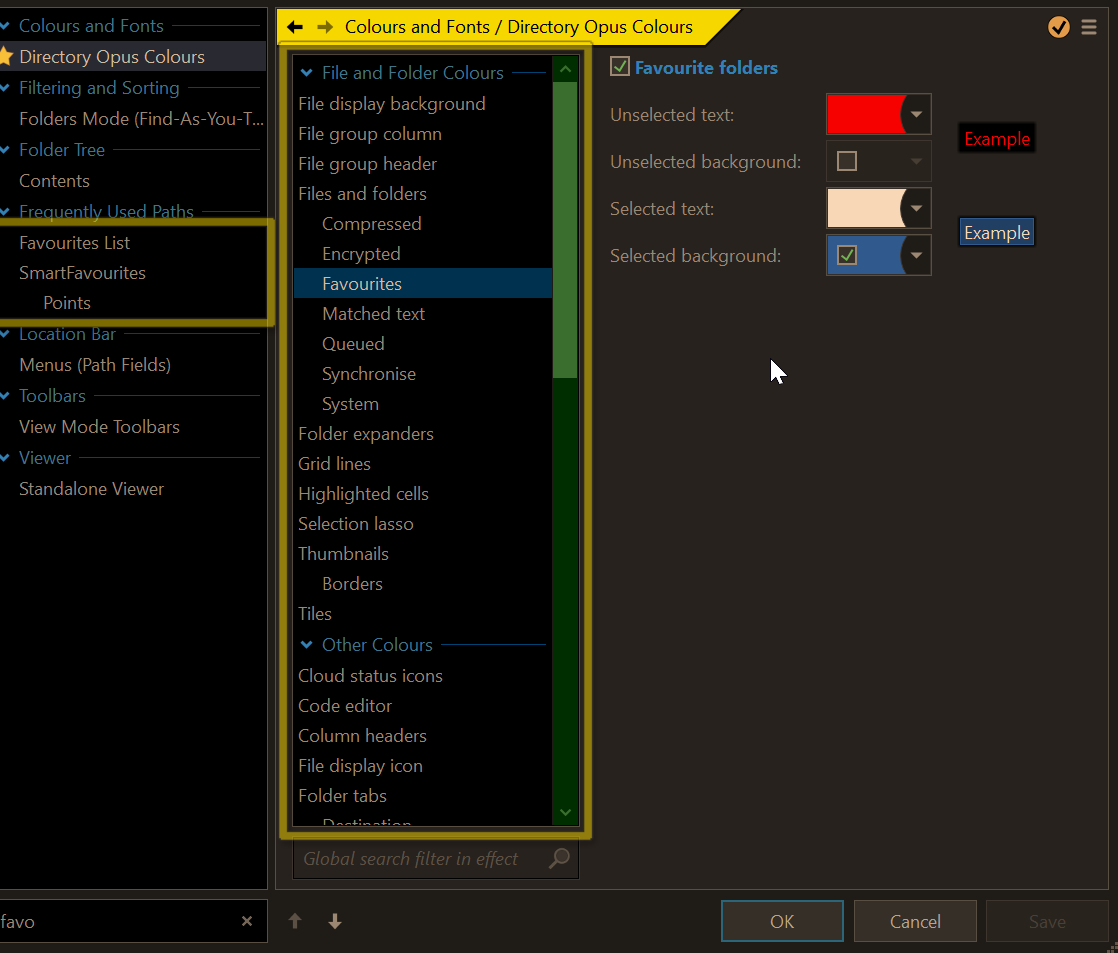
Sorry, but I can't quite understand what you mean by this. As far as I know, in the file display no folder in Favorites shows any kind of visual indicator to show that in fact it's in Favorites.
Or are you talking about the Favorites bar?
And what you're really asking is if something similar can be done for Aliases?
Hey, I am referring to the fact that favourite folders can be visually identified (see attached), and was wondering whether this is any known way of doing this for file/folders that have an alias attached to them (e.g. if I create an alias for 'documents', is there any way to make it automatically have a visual indicator (like different color, or icon), and to have that visual indicator go away when the link is broken (e.g. if the folder is renamed, or the file moved).
Thanks for the tip.
Honestly I had no idea something like that existed.
But it's true, I don't think there's any built-in equivalent for aliases.
Correct me if I'm wrong, but even if such an option existed (showing an alias in another color), it wouldn't really help you validate an alias, since you'd need to know beforehand that a specific folder points (or should point) to an alias. Without that info, you wouldn't know if "its link is broken" or not (a broken one would just look like a normal folder), which kind of defeats the purpose of the suggestion itself.
You are right. It would be difficult (and probably computationally heavy) to try to find a way to represent broken aliases. I imagine that it could perhaps be done via metadata but that is currently beyond my needs.
I still find the indicators that I have created useful. They allow you to see whether a folder that you know should be aliased or favorited is (e.g. if you have multiple folders within a directory that you want to be able to get to with go functions).
But even with that you can't detect broken aliases, right?
I don't see it as something too heavy to compute (at least the column), and it will depend on what your real need is for having that data (I don't have that need, FWIW).
Two ideas come to mind.
One uses a label (as a state) called alias, which you place explicitly when you create an alias (you can also automate this in various ways). Then, with a column, you can detect if a folder breaks its alias link among other things.
An example:
function OnInit(initData) {
	initData.name = "AliasPolice";
	initData.version = "1.0";
	initData.copyright = "(c) 2025 Cris";
	//	initData.url = "https://resource.dopus.com/c/buttons-scripts/16";
	initData.desc = "";
	initData.default_enable = true;
	initData.min_version = "13.18";

}

// Called to add columns to Opus
function OnAddColumns(addColData) {
	var col = addColData.AddColumn();
	col.name = "AliasPolice";
	col.method = "OnAliases";
	col.label = "Aliases";
	col.justify = "left";
	col.autogroup = true;
	col.autorefresh = true;
	col.namerefresh = true;
}
var g_AliasObj;
// Implement the Aliases column
function OnAliases(scriptColData) {
	if (!g_AliasObj) BuildAliasObject();
	try {
		var item = scriptColData.item;
		if (!item.is_dir) return;
		var alias_status = 0;
		var value = '';
		if (HasLabel(item, 'alias')) //item have the "alias" status
			alias_status += 1 << 0;
		if (g_AliasObj.hasOwnProperty(item)) //item is a recognized alias
			alias_status += 1 << 1;
		if (alias_status & 1 << 0) //recognize broken alias
			value += alias_status & 1 << 1 ? '<%ddbi:91>' : '<%ddbi:92>';
		else if (alias_status & 1 << 1 && !(alias_status & 1 << 0)) //if is a recognized alias but does not have the "alias" status
		{
			//In this part you can also correct the "alias" status by setting it
			//here we'll just show a different icon
			value += '<%ddbi:62>';
		}
		scriptColData.markup = value;

	}
	catch (err) {
		DOpus.Output('Error : ' + err.description);
		scriptColData.markup = '';
	}
}

function BuildAliasObject() {
	g_AliasObj = {};
	var aliases = DOpus.Aliases;
	var alias;
	for (var e = new Enumerator(aliases); !e.atEnd(); e.moveNext()) {
		alias = aliases(e.item());
		//We are going to ignore system aliases, change the line below if you want them back
		if (alias.system) continue;
		g_AliasObj[alias.path.def_value] = e.item();
	}
	aliases = null;
}

function HasLabel(item, label) {
	try {
		var labels = item.Labels('*', 'explicit'); //"*" because we don't know the "Status" actual current name
		for (var i = labels.length - 1; i >= 0; i--) {
			if (labels(i) === label) return true;
		}
	}
	catch (err) {
		DOpus.Output('Error reading labels for "' + item + '":' + err.description);
	}
	return false;
}
A test to see how it reacts.
(check how the icon change when I intentionally broke the alias)
Another way would be to leave the filedisplay aside and focus on toolbars, creating several dynamic buttons (via OnAddButton) that list the aliases (similar to the built-in), but with the difference that they show (or even do things according to your needs) when they detect a broken alias (this can be controlled by monitoring changes in folderaliases.oxc, plus controls on each generated button).
The Folder Aliases page in Preferences can find (and optionally delete) broken aliases, if that helps.
Click the Delete icon/menu and the option is in there. It'll tell you the names of any broken aliases it finds and ask for confirmation before deleting anything.
It's not shown in the list itself as it can take a long time to work out (e.g. if something points to a network server that doesn't exist, asking Windows if it exists can take 30 seconds).