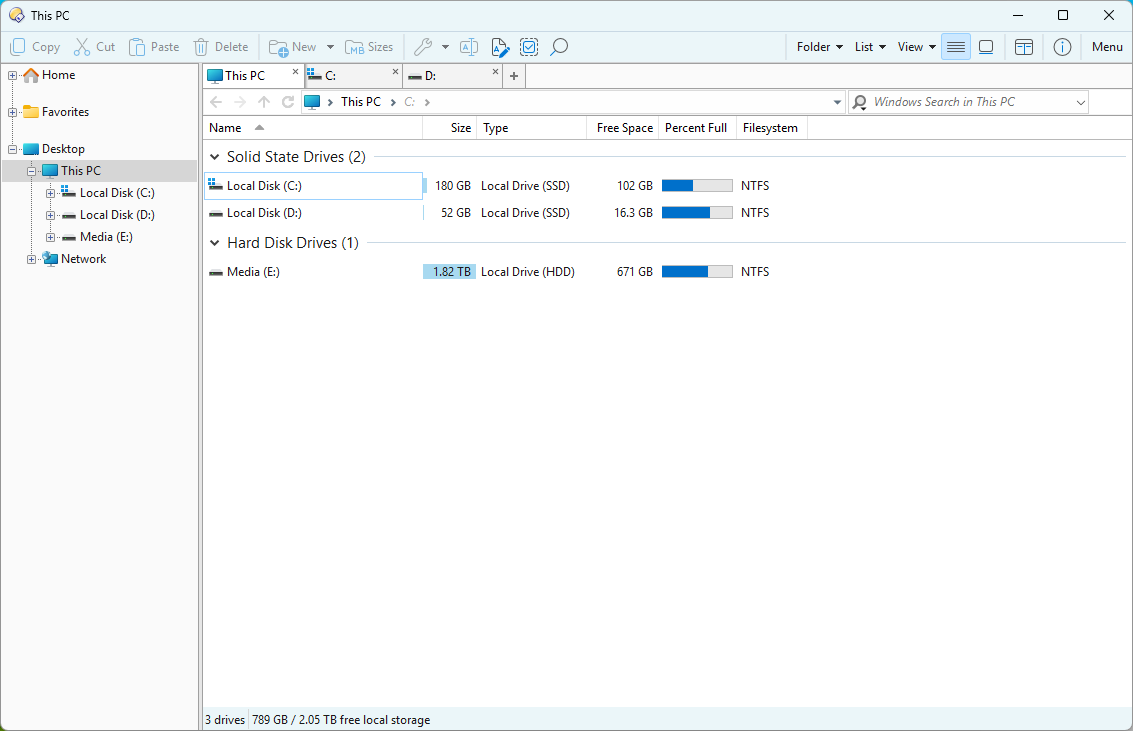
A minimal and clean light theme for Directory Opus designed to replicate the native Windows 11 File Explorer interface.
Windows 11.dlt (1.4 KB)
Technical Specifications & Requirements
-
Base Layout Skin: Built upon the Windows 11 Explorer Style by plomasney.
-
Recommended Icon Pack: For the complete visual experience, use the Fluent Style Icon Set.
Installation Steps
1. Importing the Theme Configuration
-
Open Directory Opus.
-
go to Preferences > Colors and Fonts > Themes > Import, and select the “Windows 11.dlt”.
2. Installing the Fluent Icon Set
-
Download the icon set .dis file from the link above.
-
In Directory Opus, go to Settings > Preferences.
-
Navigate to Toolbars > Icons.
-
Click the Import button (or the + icon depending on your version) and select the downloaded .dis file.
-
Move the Fluent Style Icon Set to the top of the list to ensure it overrides the default system icons, then click Apply.