FUNCTIONAL UPDATES (latest: 25 Feb. 2026)
- v.1.4 Added OnSourceDestChange() event handler to make it work correctly in dual lister view (when you switch from source to dest. either by clicking on the already active tab belonging to the other window, or by clicking anywhere within the lister window itself).
- v1.5 Can now be used as a folder lister (show all folders, not just pinned ones - but with pinned ones on top). Also renamed AltFolderPrepare => AltFolderHandler.
- v1.6 Problem with icon display solved (see Scripted dynamic buttons: icon sizes? )
- v1.8 Hidden folders (via Opus Folder Formats>Filters) now also displayed (with param: g_DisplayHiddenFolders); System foldes & windows-hidden f. can still be kept out.
UPDATE: This script can now show all folders on a vertical (or horizontal) toolbar, with the option to show pinned folders in front of the rest - or, still, the option to ONLY show pinned folders, if you want those in particular to keep in sight e.g. when you scroll down fhe files list.
The script is based on suggestions offered by some people here:
The script implements a relatively new feature of Directory Opus, which I would call "script-generated buttons", introduced in Opus v.13.15.2:
PS. (TL;DR) To be honest, I found the explanation by the Opus team pretty cryptic. My intuitive expectation was that the new feature would let a script loop through all toolbars (this was already possible) and then find a particular "placeholder" button (or - why not - something else, a label for instance) by its name, and then replace the placeholder with one or more buttons or a menu. The current implementation is more abstract, and in a way more powerful: no need to search for the button: the button must implement a command, and this command must also be declared in the scripts OnAddCommands section. Apparently, under the hood, Opus finds the button on the basis of this abstract connection. This is obviously carefully analyzed, but there’s an odd “round-tripping” too: the button exposes a command, which enables the script to make the button call the script without anyone clicking the button (in contradiction to the very purpose of a button), then the script replaces the button with new buttons, in which the script can add commands which are then executed... Quite a feat. Moreover, "between these actions" the programmer must put any data needed for the buttons in a Lister or DOpus variable, otherwise the data get lost in space.
In this script I attempted to make it feel more straightforward, keeping 'OnAddButtons' out of sight and also making the caching of data in-between kind of a background thing. I am a fan of making processes as straightforward as possible, rather than “nerdy”. Yet, all in all, I’m very much appreciating what the Opus guys have done. it is a very powerful, very useful addition.
The actions in the script are as follows:
- The core routine is the button implementation, used to show pinned folders on a toolbar (if you enter a folder that has them) - now expanded to show all folders, if you want it, and pinned folders on top of the list.
- The button generator section in the script makes the buttons appear.
- Finally, the routine to run the button command when you click a button (using the feedback loop back to your script). In the standard implementation the buttons just receive a simple Go command with the folder path in the buttons, so clicking on the pinned folder button will open this folder in Opus, and dropping a file on the button will move that file to that folder - this is standard behavior of the Go command. But I also added the possibility for a command that calls back the script. Both can be used.
(A more trivial, added feature…)
The script also has a function to automatically widen the “Status” column (supposing you enabled this option, and this column), so that if more than one status icon (label) is available, it expands so all label icons should always be visible when you enter the folder. You can of course do this directly in the Opus column settings, but this is just an example to show that you can also do other things via the same script, unrelated to the scripting of dynamic buttons.
My first implementation showed pinned folders on a horizontal toolbar:
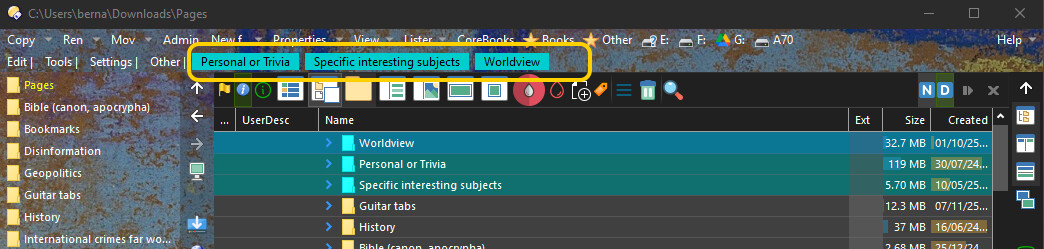
In the newest update, you can also show all folders (and pinned ones on top, if you like), something which obviously works best on a vertical toolbar! It gives you more control over the toolbar, although there are some issues (with showing icons - but maybe this will be solved by the Opus team).
This script may perhaps also serve as another example of the new "script-generated buttons" feature.
The prize for the most complex example however must go to @PassThePeas - for his FAYT script:
The change in v.1.5 made it possible to make better use of it in the vertical toolbar of my “Alternative Directory Tree”, where the folder listing now looks as follows:

DOWNLOADS:
AltFolderHandler.opusscriptinstall (5.6 KB)
Display pinned folders.dcf (260 Bytes)
Install script via Settings > Install Script.
Drag & drop the button (.dcf file) to a toolbar when you’re in “Customize” mode.