Process Monitor instructions

  • Download Microsoft's Process Monitor and extract the zip somewhere. (No installation is required.)

  • Double-click Procmon.exe to launch it and accept the default filters.

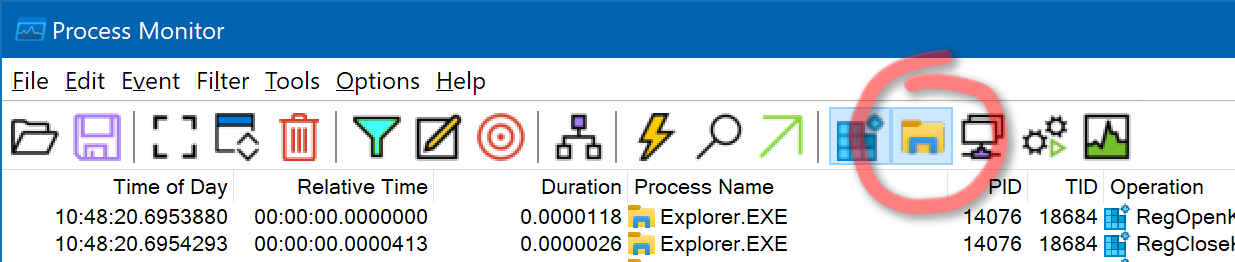
  • Make sure it is logging filesystem events. It should be by default, by just in case, make sure the image icon is activated, so the toolbar looks like this:

  • Do not filter the output in any other way. We can filter the results if needed. We often need to see what other programs are doing at the same time, in case one of them is involved in what is happening within Opus. (Opus itself also uses multiple processes for certain things, not just dopus.exe.)

  • With Process Monitor still logging, perform the action in Opus (or the installer, or whatever is going wrong), then wait about 10 seconds.

  • Back in Process Monitor, use File > Save, select the Native Process Monitor Format (PML), and save the log to somewhere.

  • Zip up the log. It will be quite large if not compressed, but much smaller when added to a zip file.

  • Send the result to crashdumps@gpsoft.com.au or via a private message. Don't post the log publicly, just in case it contains anything you don't want the world to see. If the file is too large for your email system, please mail us a link to it via a cloud storage provider or similar.

  • Important: When sending logs, tell us which action was done when recording the log, so we know what to look for. For example, "I copied a file named abc.xyz from C:\Folder1 to D:\Folder2."
"The system cannot find the path specified"
DOpus stalling out at random intervals... how can I help track down the problem?
Dropbox - Right-click Menu Stuck and Automatically Localize Files
"Can't find device" while syncing
Opus slow to navigate after opening a file
Shortcuts to maped drives don't work ("Application not found")
Copy and paste twice: File in use by another process
Can't install Opus 12 on Win 10: error 0x8000FFFF
License Certificate not accepted
Double-clicks don't work; DO often doesn't start at all
A Noticeable Delay Opening Text Files
(False alarm, not Opus) Performance Drain After Upgrading To 12.9.x
W10 Copy and Move Permission Errors
Can't send to desktop as shortcut - no UAC?
Takes 2-3 seconds to read any folder in Network Drive (My Cloud Home)
Slow Context Menu after Update to 12.29.1 Beta
Crash: search with name matching and containing text
Big Google Team Drive make DO "slow"
Poor handling of large TIFs and ZIPs
Slow Reading Folder
Error 145 when deleting a folder
Two Questions about Beta 13.1
Dopus not loading on my Windows 10 PC
List of FAQs organised by topic
Userdata.omd permission error after upgrading to 12.10.2b
Dopus Locking Files so I can't move them
Descript.ion handling seems very flaky
Delay opening SendTo
Docx files won't open by single or double mouse clicks
Folder Tree Slow to Show Folders
Move Files updated the Modified Date, but not all
No video thumbnails when file has ALP attribute set by QSYNC, OneDrive or similar sync app
Disk thrashing on initial starting of Directory Opus
Context menu takes long time to show up for network folders
(False alarm, not Opus) Performance Drain After Upgrading To 12.9.x
Defender prevents Photoshop and Blender from saving files
Slow Find dialog appearance
Access is denied. (5) message in DOpus 12 with OneDrive but not with File Explorer
Change notifications not working intermittently
File locked after copy
Can't open some files with double click
Copying fails
Last used lister opens approx. 20 times at Windows startup
Long startup in Windows 10 (update: related to network printers)
DOPUS 11 installation
Avira antivirus preventing Opus licence being accepted
Rename files in ZIP files fails, hangs, and deletes original ZIP
Dopus 12.19 does not start
Cannot save preferences
Empty Fantom Folder
File > Exit but dopus.exe keeps on running the background
Keep getting a popup that an error occurred reading a folder
Batch file rename over a network folder or NAS does not work
Convert JPG to resized/quality changed JPG error
Not working command for file type after upgrading Dopus 11->12
Slow saved layout change
12.12 to 12.14 - hangs showing My Computer with lots of network drives
Upgrading to 12.14 with W10 64
Slow folder changes (PDF-XChange shell extension)
Copy As / Move As transfers and then deletes from destination
F-Secure manual scan option gone since SAFE version 8.1
Handle is invalid
Directory Opus holds on to *.rar files
Hi, almost constant HD light when opus has been on a while
Network drives and folders access too slow
Slow network access compared to Windows Explorer
Changes to folders are not being detected
Editing metadata... file disappears?
DOpus is locking files
Opus sometimes freezes with 7-zip which works when Opus closes
New Text Document and Ctrl-O not working
Userdata.omd permission error after upgrading to 12.10.2b
Momentary Freezing in Windows 10
Cannot access DO folder shortcuts on desktop
Sharepoint folder slow .. very slow
DOpus stops responding while dealing with huge number of files
When synchronising folders why can't DOpus 'find specified file'?
No pdf view in viewer pane
Short lag entering folder
Slow folder changes on some folders
The search box does not work on drives mounted to folders
Tools > Find Files not finding things in WebDAV drive
Unable to read NAS folders that Win Explorer can
"attempting to write to non existent drive" copying large file to HDD dock
Items in Context Menu not working (due to PC Reviver)
Opus malfunctions with various functions regularly
DOpus very slow when reading big directories
The request is not supported (50) when moving sparse files
Can not update Meta data in Citrix File folder
AutoCAD shell extension makes Directory Opus crash
Speed of opening folder
I tried moving the file extension "ARW"
Lister display with file icons extremely slow
Ridiculous delay on right click
File > Exit but dopus.exe keeps on running the background
Slow loading Library unless localized names turned off
13.0.48 start slower after boot
Delay on first run due to offline network drive
No thumbnails with specific archives extracted via 7Zip
Strange bug with toolbars
MKVs Beginning with Hash Tags Missing Metadata
Access Denied Error Copying Folders over SSH-FS (FUSE)
Cannot open files with long names on Synology drive
Crash opening context menu on music files
Long file list performance vs Explorer (Owner column)
Labels don't appear immediately after copying ~120mb files
New Laptop - Opus won't start
Changes to files and folders are not being detected
Dopus 13 not running after install
Archive Folder In Use
File properties of audio and image files are sometimes not displayed
Noticable lag until responsive after opening lister since 13.7 (from 13.6)
Network Credentials issue after upgrade to V13
Copying some files results in "The parameter is incorrect. (87)" error
Silent Installation in a corporate Environment
Permission Issues
Error 267 when copying from NAS
Beta won't start on Ru machine
MKVs Beginning with Hash Tags Missing Metadata
Can't search for containing text on Linux partition
Error message when copying files
DO (and other tools) can't start again