Manually generating process snapshots

If you find Directory Opus is hanging, using a lot of CPU, or otherwise exhibiting unexplained behaviour, one important diagnostic tool is the generation of manual process snapshots (often called "dumps").

These snapshots capture the state of the Opus process, and any DLLs loaded into it, on your machine. Snapshots can be sent to GP Software for analysis.

Note that in the event of an actual crash, Opus will usually save a crash log automatically. These can also be submitted to GP Software by following the instructions in the Automatic crash logs FAQ.

Creating the .DMP snapshots

:warning: CREATE MULTIPLE SNAPSHOTS :warning:

THE INSTRUCTIONS SUGGEST MAKING FIVE.

MOST PEOPLE DON'T READ THEM PROPERLY SO WE'LL SAY IT AGAIN HERE IN CAPS. :slight_smile:

To generate a manual process snapshot:

  • Wait until the problem is happening. (Snapshots made when nothing is wrong will not reveal anything useful.)

  • Go to Task Manager (right-click on the taskbar, or press Ctrl+Shift+Escape).

  • Click on the the Details tab.

  • Locate dopus.exe in the process list and right-click it.

  • Select Create Dump File from the context menu.

  • Repeat the last step until you have created a total of five (5) dumps.
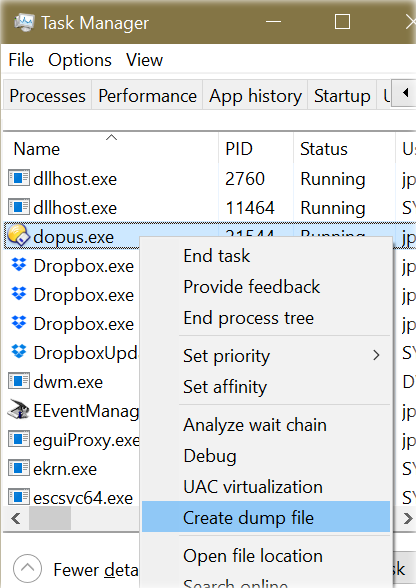
That will create a series of files in your temporary folder called:

  • dopus.DMP
  • dopus (2).DMP
  • dopus (3).DMP
  • dopus (4).DMP
  • dopus (5).DMP

Locating the .DMP files

To find the snapshot files, in Opus or Explorer, type %TEMP% into the location field and push return.

The actual path to the first file will look something like this:

C:\Users\<username>\AppData\Local\Temp\dopus.DMP

Compressing the .DMP files

The .DMP files are usually large, but compress well. You can put them in a Zip archive, although using the 7Z archive format will be much smaller. Opus supports both.

To create an archive in Opus, select the files, right-click them and choose Directory Opus Archives -> Add to Archive.

Alternatively, if Opus isn't working, you can use the standalone 7-Zip utility, or the archiving tool of your choice (WinRAR, etc.).

Sending the .DMP files

Please email the snapshots archive to crashdumps@gpsoft.com.au.

These files will contain personal data so you should never attach them to a public forum post.

There should be at least five snapshots in your archive.

If the archive is too large for your email service, you could upload it to OneDrive, DropBox, Google Drive, WeTransfer (no account required) or a similar service and email the link to us.

Please include a link to the forum thread in the email. (Or information about what happens, if there is no forum thread, so we know what we are looking for.)

4 Likes
Standalone image viewer crashes
20 second freezes while iDrive is synching
List of FAQs organised by topic
DO becomes unresponsive for folder that contains 800,000 files
12.23.x64 build 7655 freezing on Win 10.0.19041
Loading layout and double clicking desktop results in crash
Corporate network access freezes DOpus
DOpus stalls when opening when myCloudDesktop.exe is installed
Opus slow to navigate after opening a file
High CPU usage, message 033920 = 0x08480
Create Folder Text Box Freezes
Why are the thumbnails so slow?
Opus "not responding" (unavailable network drive)
{smp3} / {tmp3} restart fixes
What have you done to this wonderful program?
DO freezes when I select more than a 1000 pictures files
High CPU usage (and other issues) when folder tree locked
Crashes (solved by reboot)
Issues with mass change of Date Modified
Opus Not Responding when accessing any drive
Double-clicks don't work; DO often doesn't start at all
Script HashCompare SHA
Two Version 13 Questions
Create new folder seems to loop
Software bug
Freeze while dropping files on Nero Burning Rom
Suddenly when I try to open my previously working listers, DO hangs
Opus freezing, Explorer slow
DO starts up and freezes frequently -Have to use Task Manager to exit
Dopus (v. 13.1) Hangs When Trying To Move files open in Viewer
Reoccurring hanging of DO on waking from sleep
PrevHost.exe not stopping, freezing tabs/listers
Slow Lister On Initial Load
V13.1 - What does the "Other Cloud Folders" setting do?
DOpus freezes win 10 Surface Pro 5 tablet
Dopus keeps "Reading folder..." without actually displaying it
Opus 12.23 Crashing on Copy
Not Responding switching .MOV videos in viewer
Cannot access my Directory Opus
Software does not work after a period of inactivity
Not responding when opening EaseUS Todo Backup archives
EaseUS Todod Backup Files causes program to hang
Drag and drop from DOpus not working
Clicking 'File' menu results in 'Not Responding'
DO sometimes gets stuck on "counting files" when starting a transfer from SFTP
DO (and other tools) can't start again
DO Freezing up after inactivity
Heavy CPU usage due to Intel Optane drivers
Exit but still running?
Hangs during large folder copy on the desktop. Reproducible at will
DOpusv12 enter in NotResponding intermittently
Spinning wheel occurs sometimes when collapsing File Tree hive
Moving Floating toolbars freezes+crashes OPUS
Windows 11 and DOpus
DOpus gets very slow or freeze after copying files
Right Click Problem on Disks
After last 2 update Directory Opus is (Not responding)
File > Exit but dopus.exe keeps on running the background
Slow on 3/4 asterisks in Filter Bar
CPU Usage is High
Folder with 3805 PDF files takes 31 seconds to display any name, size, modified
Slowdown after some time
DOPUS issue: Lenovo X1 Carbon gen 10 / Win64 Pro
Problems/Program Freezing when using 'Select by Pattern' with a Filter
Long wait times after search / close search in branch view
Freezing of Opus 12 by using Folder Marker
Please migrate Directory Opus to native Linux
Can't open a folder with thousands of subfolders in Google DriveFS
Crashing after Windows update (Solidworks shell extension)
Network drives and folders access too slow
Directory Opus locking/freezing
DO not responding opening folders
Failure of version 3.16
Tech support help - Right-click issue
Slowness / Non responsive in window showing Drive List
App freezes when network storage unavailable
Opus sometimes freezes with 7-zip which works when Opus closes
GoPro USB file transfer freezes Opus
Long time reading a folder?
Freezing after attaching file in Outlook
Dopus Freezing
Dopus (v. 13.1) Hangs When Trying To Move files open in Viewer
Automatic crash logs (for bug reports)
Sort music files and go to the target folder
Uninstall and Reinstall
Opus not responding while editing a Javascript button
Start tabs in a separate process
Searching Doesn't Work Anymore
Cursor jumps due to VSCode extension
Running search using high CPU, slow to cancel
Cannot access DO folder shortcuts on desktop
Update gone awry
Copy progress dialogs flashing / unresponsive
Delayed reaction to double click
Interminable wait "Reading Folder" on SharePoint/OneDrive folder
Dragging files sticks on tree items
Thumbnails slow to load
The Specified Procedure could not be found
Opus 11 not responding in Windows 10
Opus (and another program) hangs until reboot
Infotips for mp3 files (hover)
Crash, exit or high CPU when right-clicking certain files
Directory opus screen freezing
Synchronization / copying; image conversion tool bug
Opening unfinished archive keeps other tab waiting (but not folder tree)
Input Director - file transfer prompt will not go away
Music file metadata isn't displayed in any file list view
Prevent freeze in folder with 85k gif and 85k mp3 files
Installed latest version - crash
Cache thumbnails?
Cache thumbnails?
Doesn't open on (re)boot
'Add Tab' in the 'Tab Group' freezes DOpus 12.29 x64
DOpus very slow when reading big directories
Preview Pane instability with Dropbox's online-only files
Dopus slows to a crawl, when I run a download to google drive
Directory Opus slow in starting and opening or changing folder windows
Navigating from collection to (nearly) any drive via drivebuttons causes infinte "reading folder"
Freezing
How to stop .parts files being read by viewer pane?
Incredibly slow file copies (update: AdAware was the cause)
Running 12 and 13
Changing values on the 'folder thumbnail settings' dialog causes Opus to stop displaying thumbnails
Windows 11 woes (possibly related to gSyncit)
Assigning ratings for over 15,000 files freezes parts of Opus
Delay on first run due to offline network drive
Freezing when ejecting USB drive (BitDefender)
Opus freezes when saving a new rename preset
Opus and Explorer slow to drag & drop large number of small files
Next and Previous Picture is skipping over images
Find Files Stop button ignored when searching PDF content
Directory Opus makes text fields unresponsive
Find Text search does not finish or stop. Stop button unresponsive
Opus 12 Freezes
Opus 13 updates generate dozens of warnings and open ~30 listers
Rename & copy / cut - paste delay
Window does not respond to mouse after {dlgstring} button (RBTray issue)
Can't Open Lister (Google Drive FileStream)
Directory Opus frozen accessing Libraries
Double-click no longer working (Wacom / Windows Ink)
DOpus slow to load Google Drive File Stream folder with many items
High memory and CPU while torrents download to NAS
Searching resulting in 'Not Responding' [Boxcryptor icon overlays]
Lister freezes when accessing folders with shortcuts to universal applications
Data in columns are not always displayed
Windows 11 - DOpus 12.33 x64 - DbPowerAmp Context Menu
Excessive CPU consumption and long wait times by turning off a filter in a library environment
Unable to install Font
No thumbnails on network drives
Corrupted video file causing high idle usage when navigating to folder that contains said file
"This PC" bug
Found a bug in FAYT command
Directory Opus no longer runs
File properties of audio and image files are sometimes not displayed
Lag when changing folders
Current folder marker trail stops working on network drives
Keep getting "unable to open "Dopuslib.dll" on startup of W10 Pro
Noticable lag until responsive after opening lister since 13.7 (from 13.6)
Refreshing (F5) no longer updates file and folder counts
Silent Installation in a corporate Environment
Favorites Tree Freeze
[SOLVED] Dragging files from grouped folder causes freeze
Lister Reading Folder Not Resolving
Closed DOpus accidentally while copying and it left the status dialog stuck behind
DAX error ("Context Menu Audio Converter")
Drag & Drop in collection will cause ui stuck and crashing
What appears to be random freezing
Thumbnails/tiles [high disk usage]
DOpus 13 hanging on startup
Error message
DOpus 13 Not Responding / Hanging
Short lag entering folder
I can't reopen Dopus when I close the software window
Freezing when reading files on Android phone
Toolbar icon bugs - mixed up icons and hangs
Word .doc viewer freezes constantly
Dopus is stuck loading thumbnails in newer versions
DOPUS not restarting -no message in event log
Files display in subdir after dragging into it?
Dopus hangs on closing (last?) window 13.19
DO (very) slow to open when Citrix Workspace App is running
Limit for infotips
App freezes when network storage unavailable
Opus Application Hang question
1–3 second delay activating/opening Lister
Directory Opus is locking up after opening it
PC freezes copying large amounts of data
Module Version column broken
Unable to do anything (update: Problem with iCue)
Frequent temporary freezing
Preview freezes by leafing through my pictures