How to use buttons and scripts from this forum

This post explains how to add buttons to toolbars and menus, and also applies to raw commands for things like standalone hotkeys.

For how to use Script Add-Ins, please scroll down to the post below this one.


See Also: The manual has more detail in Editing The Toolbar and the Customize section in general.


Buttons and toolbars can be shared in several different ways.

Raw Commands

Posts often contain commands which you can put in a button, hotkey or menu. For example:

Copy INSTALLFONT

To create a toolbar button which runs that command:

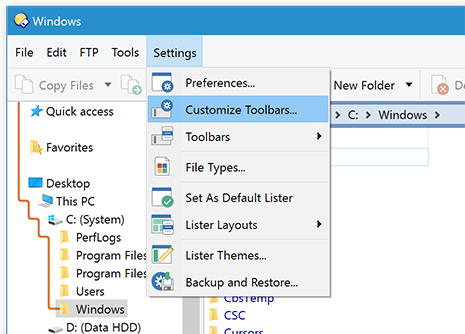
  1. Select Settings -> Customize Toolbars (the Customize window will open; keep it open but move it out of the way)
  2. Back in the main window, right-click your toolbar somewhere and (depending on where you clicked) there will be a New or Insert New sub-menu. Click that sub-menu, and then New Button.
  3. Right-click the button that was just added and choose Edit. (Or double-click the button.)
  4. Prior to Opus 13:
    For single-line commands: Paste the command into the Function field.
    For multi-line commands: Click the Advanced button, then paste the command into the big area at the bottom.
  5. Click OK in the button editor, then OK in the Customize window.

For more details, see Editing the Toolbar in the Opus manual.


XML Button Definitions

Some posts contain blocks of XML which define all aspects of a button (or even a menu containing several buttons).

These blocks of XML define not just the command (like in the Raw Commands example above), but also the button's icon, label and other attributes.

Don't worry, you don't need to know anything about XML. You just need to copy the text and paste it to your toolbar to create the button.

Here is an example:

<?xml version="1.0"?>
<button display="both" separate="yes">
	<label>Install Font</label>
	<icon1>#otherplugins</icon1>
	<function type="normal">
		<instruction>Copy INSTALLFONT</instruction>
	</function>
</button>

(What the button does isn't important for this explanation but, if you are wondering, it installs any selected font files into your system.)

Here's how to take the code box above and turn it into a button in a toolbar or menu:

  1. In your web browser, copy the contents of the code box to your clipboard.

    The easiest way is to use the button in the top-right corner of the code box: Copy_Icon
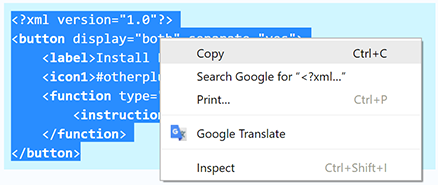
    Alternatively, select everything in the code box and right-click to copy it to your clipboard.

  2. Switch to Opus and enter Customize mode via the menu: Settings -> Customize Toolbars

    The Customize dialog will open and your toolbars and menus may change appearance slightly.

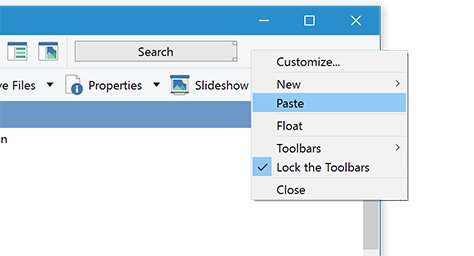
  3. Find where you want to put the new button in your toolbars or menus, then right-click that place and select Paste.

    (The screenshot shows the menu you get if you right-click an empty part of the toolbar. You'll get a slightly different menu if you right-click one of the buttons on the toolbar. In either case, you still want the same Paste item.)

    The button will have been added to your toolbar or menu.

  4. (Optional)

    While in Customize mode you can move and edit your buttons and menus:

    • To move buttons simply drag them around.
    • To create a separator bar between two buttons, drag one slightly away from the other until a marker appears.
    • To change the appearance of a button, for example to remove the label or put the label in a different place, right-click the button and select Edit (or double-click it).
  5. Click OK in the Customize dialog to exit Customize mode and save your changes.

    The new button is now ready to use.
(See also: Sharing functions with others, in the Opus manual.)


Toolbar .dop Files

A few posts contain entire toolbars, in .dop files. To load one, simply double-click it and Opus will import it.


Button .dcf Files

Individual buttons can be stored as .dcf files by dragging them to your desktop while in Customize mode.

:warning: If you double-click a .dcf file it will run the commands inside it. :warning:

(If you open a .dcf file in a text editor, you'll see it is similar to the XML codes shared on the forum. It's really just another way of storing the same data.)

To add a button from a .dcf file to your toolbar:

  1. Download the .dcf file and navigate to where it is. (If it is inside a zip, extract it first.)
  2. Select Settings -> Customize Toolbars.
  3. Drag the .dcf file to your toolbar.
  4. Click OK in the Customize window.

Scripts: Continue to the post below...

5 Likes
Open new lister with a specific Folder Format?
Toolbar button that can NAME a created zip file on the fly?
Select only the same files
Dynamic SWITCHPATH v2.2
A few suggestions
New user switching from Total Commander
Register or Unregister DLL or OCX
Quick buttons for directory organisation
Can I hide a specific file type?
Add applications to Favorites? / Grid in file display?
Copy and change date
Is there a Copy To... that will create a folder?
Copy sequential folder with increment
Renaming + numbering multiple files?
Creating folders from filename
Copy music metadata to clipboard
How do you display actual number of bytes in Size column?
Refresh folder tree, not just lister
Lister in Admin Mode, programs not elevated
"<?xml" not found - can't use Tera Copy with toolbar button
Directory sort order
Dopus with Virtual Dub button
Need help with a button!
Can i save selection state?
Copy path to text file, then create zip?
Create/Move-To Dated Folder, etc
XML Help -
Obtaining text from an existing text file
Dots to spaces except in numbers. (For files and folders.)
Text extraction in viewer plugin
Create folder name from parent name + 'Covers'
Multiple opened tab groups
Move found files and recreate directory stucture
Adding Explorer Search Command
SELECT Field: Partial Match; Deselect
"Create File" option?
Find duplicate filenames with different extensions
How to close the FIND dialog from a button
Combo box which contains all drive letters (like TC)?
Questions about TeraCopy and Directory Opus
Rename Parent Folder as Selected File/Folder (or vice versa)
XML code . How to use
RegExp basics: Removing characters from start/end of names
Trouble Saving Layouts
Request: Favorite Feature
Button for Hide Filters in Folder Options
Copy & Move with TeraCopy
How to filter current view to just display subfolders
Feature request: stop the focus stealing "insert a disk"
Copy paths of selected files to clipboard
Save current layout
Hide System Files
Hide System Files
Column Excel Workbook Info
SELECT user command
Column: Pandoc Word Count
Button to send the contents of a folder to an app?
Recursive copy/rename function
Renaming files
Manual ftp get and chdir
Is there a way to batch shrink CBR & CBZ files?
Help needed for creating a special copy-create folder button
Copy files to Windows 10 Sandbox shared folder and start Sandbox
Create Dated Zip
Customize grouping function (group by modified year/month or year/week number)
Start Menu button
Date/Time Metadata
Duplicate and Rename
ClipEdit (Modify the clipboard)
Hotkey to toggle file extensions in Name column for all files?
EditBOM - Command to add, remove or toggle UTF-8 byte-order-mark
ClipPaste (Paste clipboard to various destinations)
New Folder Drop Down Button
Creating a zip file based on existing folders
How do I make my style looks like this?
LinkedTab_AutoClose_Handler: Auto-close linked tabs
LinkedTab_AutoOpen_Handler: Open related folder tabs automatically
Create a folder from the path of a file and move the file inside
How do I give mixed custom shortcuts?
Synchronising files of different types
Looking to always open tree selection in the same tab
Create .m3u playlist file from dir contents
Column sizes in Commander View
Help creating a dialog input, please
SmartGetSizes_Handler: Toggle automatic folder size calculation
Why are my Opus windows on-top?
Button to move files in folder named from file
Delete or rename non-matching files only
Sort dd-mm-yyyy
Customize Lister window title
Script to covert text files (e.g. srt) into UTF-8, without BoM
Copying Files to changes Owner Name? :S
"Play All" audio functionality is missing
Work Offline / Online button?
Rename selected file, preserve activate inline rename at specific position
Display or select unique or distinct files
Granular Date controls?
Paste at selected location in expandable folders
Remove empty folders (I know this isn't new on the forum)
Windows 8 File History
Is there a way to create a shortcut to copy the file size in bytes?
MTP & Set FOCUS=Dest command
Updating Many files that have the same name
Thumbnail size override
Collection feature
Button to go to directory and show only one file type
Thumbnail Appearance - hot switch from landscape to portrait
Grouping of File and Folder Names
Can I add a toolbar button to extract a zip to current folder, but within its own folder?
Smart archive extraction (enhanced)
How to restore FTP menu?
How to reset status and execute video with button?
Export directory structure to txt
Time taken to complete file copy
TV Episode XBMC Renamer
PowerISO integration question
Swap the names of two files
Rename files with number sequentially
Modify Rename menu item script
Script to take micro4/3 (MFT) Focal Length & fill 35mm column
Copy & Move with TeraCopy
How to install fonts
Editing a MS-DOS batch function
Individual manual headline text per Lister window
Insert new text file "info.txt" by shortcut?
Parents to Collection
Looking for a list of files without wildcards
Close all listers except source and destination
Star Rating (+ toggling) a file `site-wide`
PDF-Toolkit Menu (PDF merge, extract, protect, unprotect, organize)
Menu to Open a File Popup?
Looking for Help Creating Commands Scripts Buttons
No thumbnails with specific archives extracted via 7Zip
RecentToCollection (Create a collection from Recent folders)
Sort music files and go to the target folder
V12 - Multiple status icons and stacked labels not working for me
Show mp3 genre in FOLDER InfoTip?
New button not available
How to create a button to switch to a particular lister style?
Info Tip - File Collections
Button:ParentContent
ZIP compression level ignored
Deleted Shortcut
Metadata copy from one field to another
TortoiseSVN Buttons
Tab Lock Icons
Possible To Check For Folder/File in .ZIP File?
Set label shortcut
Compare directories based on first part of filename
Flat View how to setup
Remove Redundant Subfolders
Quickly find shell property names
Easy way to make files 0 KB with a button?
Copy into multiple selected destinations
Select files in Destination that START with the filenames in Source
Button to open same PDF file with changing index number?
Favorites NEWTAB not working
'Fetch' command: Find and copy related files
Sort Folder Tabs (on-demand, or when listers open)
Drive test button
Question - Paste same file to different folders
Move viewers or layouts into separate Taskbar groups
Hotkey for Edit a file
Creating "extract here" button when inside archive
GetExtendedFileAttributes
Megapixels column
Robocopy Drive Mirror
DO12.7b1 Secure Screenshot in Help Menu
Duplicate file query?
Tool bar button commands for tab groups
Open an instance of DO with only a branch of the tree?
Keep original file ext name in link name when "Paste Shortcut"
Rename folder based on mp3 tag of included files
Ask Gemini
EBook Metadata Editor
Quickly find shell property names
Want Help for Edit .flac Tag from file name
PowerShell Here not in Tools menu
What should happen when I enter "Go DRIVEBUTTONS" in the CLI?
Persistent Viewer Pane Previews Problems
How to retrieve the modification date of a selected file in a command line?
Possible to copy iphone images with correct creation date, or rename to correct creation date?
Layout UpdateOnClose: Autosave non-default layouts when listers close
Filter/Select Multiple Files
Tab-related buttons
Flat View without files (2)
Files for Favorites
Wallpaper Changer
Button: Show MD5/SHA
Background Changer V1.2
Command: Regulate CalcFolderSizes setting
Display UserCommands overview
S2MP: Send files matching file type groups to media player of choice
Using the filterbar to only show items with a certain label?
How to create a button to select all items below the current selection?
Easy access to favorite >files<
Merge Folders and Collections
Add rightclick menu to button
File: copy, trim and add current date
Outlook Email Custom Columns
Lister filter for highlighted filetype (hotkeys and toggle functions i guess)
EditBOM - Command to add, remove or toggle UTF-8 byte-order-mark
Placing geodata in PDFs
Read files from Multiple subfolders in Dual Vertical?
Is there an Opus equivalent to the "Date" column as implemented in Win10 File Explorer?
Robocopy Scripts for Directory Opus
Convert Office docs to PDF
Hide Layout Buttons
DurationAV (Duration columns for folders)
RegExp to capitalize all words in filename, without modifying existing camelCase or HumpCase words
Paste clipboard text to multiple selected text files?
How to add Open command to the Operations toolbar?
Cut/Copy/Paste shortcuts for left handers Dopus-12
Reopening toolbar getting placed in wrong location
Sync ratings between files
Folder listing with precalculated sizes exported to txt files without recalculation
COPYNAMES, copy name and filesize to clipboard
How to add filetype to context menu?
How to select and/or delete raw files when selecting or deleting the parallel .jpg files
Can a script do a custom search of a directory/folder
Adding metadata tags based on different parts of the file name
Column with information about the format size of a document
CopyFromFiles (Copy files from text files)
Create multiple files based on one input name
Item Count in Tab Name
Save and restore QuickFilter settings
Command to show selectected files only
Where to start making a button that deletes all of a specified type below the current folder
Move files to predefined location, appending version numbers
Can not display the thumbmails - O attribute
DeDuplicateTabs: Auto-close duplicate tabs when new windows open
EverythingFolderSize (Use Everything to calculate folder sizes)
CopyFlat (Flat Copy selection without Flat View)
RemoveEmptyColumns
SelectNext (Select the next n items)
How to change default "Rename" operation
How to hide the .url extension in all folders
How to force move search result files with folder structure?
Command or Macro to create a pre-defined list of directories and files?
Sort by Tag Length?
Can a script do a custom search of a directory/folder
Rename folders with number of FLAC, MP3, M4A and WAV files
TabAppendDriveLabel (Show Drive Labels in Tabs)
In command mod: how to launch a specific external program depending on the current selected filename
Copying and renaming a file, adding creation/modified date
BackupMeta (Backup and restore Opus metadata)
Switching Folders From Double Pane to Single pane And Back -Please explain
WslFind (Find files with Linux)
Small feature request: option 'both' for Set Gridlinesh=toggle
Paste Here to New Subfolder & Paste Here with Path & Rich Paste
Disable toolbar button if source path does not exist
Limit number of open tabs
Script Request – Check for Exif Thumbnails in Photos (JPEG)
Ratio column
Turn off autosize for filename column
Move all subfolder files to the current / selected folder (Flatten folders) (Unpack folders)
Can I always use a new tab in search results to open a folder in the results?
Assign JPG "date digitized" & "date taken" from "date created"
Automatically resize pane
MP3 Metadata - Copy "Artist" to "Album Artist"
Shortcut key for "Group By - Type"?
How to get folder columns to populate info
What is the fastest & easiest way to access the Favorites Toolbar?
How do I add a file to Favorites?
Saving file formats
WatchFoobar (Monitor what foobar2000 is playing)
Paste files to telegram
Sort just files
Automatically rename new files added to a specific folder
Create new folder in DO13
Renaming a file by specifying a name
Copy Address As Text
Automatically rename new files added to a specific folder
Can't put custom lister on toolbar
Remeber the focused file/folder as you navigate
Default file copy options to avoid having to check unintentional operations everytime
Rename Folder
Show full path in tab name
Sort files before folders only when sorting other than Name?
GoRootArchive (Jump back to the root of an archive)
Go FolderContent
CopyRecreatePath (Recreate paths for archive files)
Watching New Features - How to implement "Go to PAIR"
Copy folder but excluding certain file types
Drive Toolbar Auto Hide on Folder Tree
SyncLabels (Sync labels between files)
AutoOpenPairedFolder (Add-in)
Combining thumbnail slider and a smart list
Create new folder in DO13
Compare Directories with only partial names/pattern matching (Files converting)
Button for "Close all other tabs"?
Remove All After
How Do I Add To The Menu Toolbar The Single Lister Icon?
Find-As-You-Type (FAYT) scripts
Close tabs when folder is deleted or moved
How to open current folder's context menu
OpusMediaInfo Script Add-in (Feedback needed)
Testing RAR & Zip Files Within DO
How to make manual sorting universal in Directory Opus?
I want to show breadcrumb path for a file like MAC but with added glamour
Is it possible to go to a settings section through a button (example: manage tab groups)
How to Filter Files by Name in a Program
Show hidden system folders
Expand Arrow's size
File rename (extension)
Is there a way to limit the number of open instances of DO?
SyncTags (Merge tags of file pairs)
Folder type format "Cloud storage" is not used for cloud storage folders
Cut & paste into N folder using keyboard shortcut
File rename (extension)
Navigator
ClipCopy (Copy content to the clipboard)
Quick overview
Add some extra LEFT side padding for details view
DeleteFromFiles (Delete files from text files)
One Button Navigation to Access, Copy to or Move to Any One of Many Cascading Subfolders
FolderBitrate (Columns with average bitrates for video files in folders)
Is it possible to visualize fonts properties?
Copy folder names
2 questions about Folder Tabs
Rename using metadata from outlook msg files
How To Open Metadata Panel To The Right Side Of A Lister
Add prefix alphabet to filename when filename contains month name in ascending order
My “ISO” volume is not visible in “Toolbars”
Where Do I Add TeraCopy?
Viewing film lengths from the folder level, can it be done?
Share button suddenly disappeared in OneDrive Folders
Group Burst Shot Images
Toggle between view folders and files and view just files
Command: SelectEx (extended Select command)
How to create new buttons?
Assigning Shortcut key to "Folder Options..."
Script to delete file 1 and 3 and rename file 2 if all 3 files are selected?
MemberOfCollection (Column displaying all collections containing an item)
ShowMulti (Launch multiple viewers)
SessionsManager Command
How can I rename a file title that contains "/" without creating a new folder, simply by ignoring it
Adding Series MetaData to Audio Files
Adding a single file to list of favorites?
Open .md files in Obsidian
"open" button
Dopus 'Pin to Start' context menu doesn't pin to Stardock Start11 Menu
Backup Reminder
File Data Not Showing In Details Columns
It is possible to select all subfolders and files only in expanded folder?
Can i use Opus for renaming path where filename+path exceeds 256 (or x) characters?
Help with Find feature
Change automatically created tab names
Copy/paste and replace file ignoring extensions
Search+ (search & AI in browser widget)
How is it that I am opening up a second instance of Opus?
Empty Recycle Bin (with icon matching state)
Select based on "version"
Basic pdf page handling
Copy/Move items to the tab next to current active tab (script button)
Combining thumbnail slider and a smart list
No more Select None cmmand?
ConvertArchive (Convert archives to a different format)
Display target folder in a column
Move subfolders up one level
Fully display Search panel including the Find Button
Delete (hidden) RAW files from Viewer as once with JPG
"Select By Filter" menu button
Manual sort
Find images and convert them
"Select Similar Dimensions" menu button
Universal Zoom
Dynamic Folderformat: setting folderformat for subfolders but not for parent
Append Tags
Convert image file to pdf?
Date format for dated folder
Refine synchronisation
How do I save after rotating in the image viewer?
Geting a Script To Focus on the Source Pane Strategically
Command IMAGE change DPI
Suggestion : Undo Closed Lister
Button to Copy product version?
How to make 'create shortcut to current folder' button?
How to Create a Folder Alias
Seek recommendation for directory compare utility
Open new lister with a specific Folder Format?
Yes/no Dialogue with variables in CMD
Secure wipe - confusion about settings
Iconset Maker Pixel Perfect
Iconset Maker
Moving pictures and videos within Sub-folders
Open path from clipboard on current or active lister display?
Text Replace for folder path copied
Struggling to copy a list of files (in txt file) to another folder
Select SIMILAR based upon a file's last extension
Copy filenames into description
A button check and show status column if there is at least one file/folder has status
Making the FIND window close as soon as it has done its job
Folder / File Sorting & Mixing
Help with Clipboard Copyname button
Rename a file to its parent folder's name
"Move to new folder" Button
List Tags and Labels
QuickFilter Button
Extract archives with condition?
Copy into multiple selected destinations
How to Put favorite label and status icons in the top toolbar
Focus of Lister Files
Change Date Taken on JPG or other picture files
Duplicate current lister
RAW and JPEG preview selection
Toggle active pane
Copy & Move with TeraCopy
Keep on Top
Rename and copy
7zip - Copy As [Directory]
Command for Alias listing?
Button: Random Shuffle
How to copy file contents from the context menu
Command to copy all files inside a selected folder into a destination folder
Text file line count
Activate a Folder Format using a hotkey?
Help creating drive buttons in Opus 11
Change "Style Tab" font
Help Menu has disappeared
DO Archives
"Paste As" command
Suggestion: modified date from clipboard?
On the fly resizing window :)
"Play All" audio functionality is missing
Long delay when right-clicking 39,000 files
Copy files to specific folders
CBX_Handler: Comic Book Reader
Grouping files by a date
NavSync - an alternative to NavLock
Problems / Questions regarding file preview
How to assign more than 1 label for a file?
Button: Recursive Slideshow
Directory Opus config paths checker (DOChecker)
Quickly Moving Duplicate Files and Their Folders
Auto create a new folder for each file, then transfer each file into its own folder
Open folder of flat filtered file
Calibre Buttons
Scrollable list of drives to select from
Script for Tab Naming
WinRAR Compress/Decompress Buttons (and other)
Apply a command to each selected files separately
Collection by Label and Reorder Labels
Select Between Selected
'Bookmark' file or 'go to' Last viewed file option?
Search the same folders in Find Panel
Determine & add correct file extensions
Create multiple folders?
Ultracopier Integration
Quick access - expand tree
How to add file and folder direct shortcuts in the top toolbar?
Create multiple folders once such as 50 at once
SetAttr from Clipboard date
Documentation suggestion -- ">" to get a command box
GMapsAddress (Retrieve addresses from Google Maps)
File naming when printing folder contents
Changing The Cache Location On Our New System
File rename control arrows
Quickly search in files
Consulting
Thumbnail List - how to add sizes?
Folder Tree Question
Label Colour on Toolbar?
Can I add a Dual Horizontal Lister button to my toolbar
How to move the thumbnail cache
List of FAQs organised by topic
How to save a dual display as a default layout
Command: ClipAttr (copy/paste timestamps between files)
How to set up a Quick Filter menu
Quick buttons for directory organisation
TheMovieDB Poster&Info Downloader V2.0
How to create folder name with tomorrow(next date)?
Command: Go-Relative (go to next/prev sibling folder)
Locked tabs which can only navigate to sub folders
GoParallel - Jump between related folder trees
Comparison between fields of the same file
Extract Multiple .rar Archives to a Single Folder Using .rar Names
Find Duplicates - Different Names - Same Size - No MD5 hashing
Cannot rotate HEIC images using Convert -> Rotate
Left & Right Arrow Keys for Folder Navigation
Show first selected file
Lost in the FAQ... Could use a bit of help... Icon sizes
Setting a DEFAULT text for the ZIP creation dialog
Folder Tree to display only a designated folder and its contents
ExifTool Custom Columns
How to use Rename Presets from this forum
Add new tag to existing tags
Script to Populate Summary Properties
"File Not Found" Issue when opening files
Prevent automatically rotating images using any picture viewer
[Feature Request] Folder Creation From Multiple Files
Is there a copy program faster than Opus's internal copy function?
Show / Hide File Extensions
Tab Groups: override setting of closing the existing tabs
Is there a good way to transfer coordinates from one image to another?
File/folder frame to follow highlighted file/folder with marquee selection
New folder with items ... I want to be able to give it a name
New Doc Hot Key
Set Quickfilter From Clipboard
Very basic file/document versioning
Using "Flat View" for File Collection
Favorities/Favourites
Expand certain folders in Folder Tree by default
Sort folders on top except when sorted by "Modified"
Replace a string of characters + Renaming tag titles from file name
What should happen when I enter "Go DRIVEBUTTONS" in the CLI?
Checkbox to Selection
Delay on first run due to offline network drive
Automatically move last downloaded file
Length of selected files
I want the command Copy File (^1) always ask "Select Destination Folder"
Linked Folder Pairings
Button to toggle list sort
Can't find metadata pane
Add 'Confirm' window when moving Folders?
Find Empty Folders & SubFolders
How can I skip the dialog box when I add a favoite?
Flat View without files (2)
Layout AutoOpen: Open lister layout on entering trigger folder
Command: GetHash
How to Automatically Save the Folder View Type?
Columns: Movie Filename Database
Close Current Layout
Button to find all files starting with 'A' below fixed folder
Manage folder and video thumbnails v0.5.3
Folder clean up and unrar scripts v1.0
Mass renaming files: Any option to Overwrite All Existing?
Robocopy Folder Mirror Archive
Search in DOpus Config with Notepad++ Button
Column_TorrentInfo: (BT Bdecode) parsing torrent file to generate metadata columns
Move marked files to folders according to their endings
Can't move files between *.rar archives natively
UTC vs Local time zone
Command.Navigation.FileGroupNavigation: Navigate between and inside filegroups (v1.22 - 16.11.21)
Can Dopus search in file contents provide a list of contents searched?
IMAGE CONVERT not recompressing JPEGs?
GROUPBY=modifieddate - Break 'A long time ago' in smaller junks
Smart archive extraction (enhanced)
Set folder tabs to random non repeated colors by default
Attach to Mail (directly or as zip) for Thunderbird
Music file metadata isn't displayed in any file list view
CopyMeta (Copy metadata between files)
Add the "Edit with ShareX" function from the File Explorer file to the context of the "image group"
Can I make the Viewer Panel Open/Close, when a media file is Selected/Deselected?
Keyboard shortcut to duplicate tab
Custom Toolbar
Move selected files to sub folder named by parts of the first selected file's name
PrintMeta (Write metadata to text files)
Drive bar - Tool tips with drive description
Direct file scan buttons for ESET and/or MalwareBytes
Column for showing orientation of image using words
PathDepth (Display depth in folder hierarchy)
Filter bar: how to add my own filters?
Automatically rename certain files copied or pasted to a folder
Cycle through Layouts
Looking for Help Creating Commands Scripts Buttons
Move files from MTP: resource to local folder
Renumbering Music files
Right click shortcut and menu bar button for adding Readme in a folder
Filter what is displayed on a tab
When paired folder is opened in dual display, open second display with same filter options?
How to force move search result files with folder structure?
Go to subfolder in Folder Tree
Exact dual display lister width with folder tree
Rename Dialog sequential Numbering downwards
How to move files in multiple subfolders up one folder level?
Making a favorite directory only makes the parent directory the favorite
Tab Color Based on Folder Content
Button to take files in collection and put them in individual folders
Find Duplicates in Subfolders
Select images and videos in dual display mode?
Attributes - Option to Include Sub Folder and Files?
CycleListers (Cycle through Listers)
Collection: update file size within
Copy\Move to last active source?
Number of files in selected zip or archive files
Double click image behaves different in opus and file explorer despite setting to use "fotos" app
Source to Destination File Compare?
How can I enable thumbnail previews for SVG files in Directory Opus 13?
Remember position of Progress Indicator dialog
File name copying and renaming another file - automation?
Need Help for Stand alone Image viewer
Every file dislplay window should start in detail view
Setting default action for Unattended copy and move
Beyond Compare buttons
10Gb network transfers
Feature: "Take Ownership" of a file or folder?
Batch rename *and* copy or move the files in one go?
Rename using Template